Faq Hub
WooCommerce Booking Plugin FAQ: Every Common Question, Answered
Answer every WooCommerce booking plugin FAQ: double bookings, deposits, Google Calendar sync, plugin cost, and cancellations, sourced and direct.
WooCommerce core ships no booking feature, so store owners piece together availability rules, payment flows, and calendar sync from a plugin like ARB. This FAQ answers the questions that keep coming up: preventing double bookings, taking deposits, syncing Google Calendar, and what all of it costs.
Each answer below is complete on its own, whether you run a salon, a rental fleet, or a WordPress agency building for clients. Where a question needs more depth, the answer links straight to the guide that covers it.
Getting Started With WooCommerce Booking
The essentials for taking your first WooCommerce booking, from core WooCommerce's limits to your first reservable product.
Does WooCommerce have a built-in booking feature?
WooCommerce core has no built-in booking feature or bookable product type. ARB adds a Reservable Product, a WooCommerce product type with a full booking form built in. See how bookable products in WooCommerce work.
How do I add booking functionality to WooCommerce?
To add booking functionality to WooCommerce, install a WooCommerce-native plugin, create a bookable product, then set its availability and pricing rules. Bookings flow through your existing cart and checkout. Follow the full setup walkthrough for every step.
What is a reservable product in WooCommerce?
A Reservable Product is the WooCommerce product type ARB adds. It exposes a booking form for dates, times, resources, and person types, with real-time pricing. No separate system is needed. See how to create a reservable product.
Do I need WooCommerce to use ARB?
Yes, ARB requires an active WooCommerce installation; it is a WooCommerce extension, not a standalone system. It reuses WooCommerce's cart, checkout, payment gateways, taxes, and coupons instead of running a parallel booking platform. Explore the ARB booking plugin.
How do I build a booking website on WordPress?
Start with WordPress and WooCommerce, add a booking plugin, then create bookable products with availability, pricing, and payment rules. WooCommerce handles checkout automatically. Follow the full build a booking website guide for the complete setup.
How does online booking actually work?
Online booking lets a customer pick a date, time slot, and options, then checks live availability and calculates price automatically. Payment or a quote request follows, and both sides get a confirmation. See how online booking works end to end.
Availability, Time Slots, and Double-Booking
Availability rules and slot caps are what stop your booking calendar from double-booking anyone.
How do I stop overlapping or double bookings?
Set a capacity limit per slot so it cannot be over-booked. ARB's Max Reservations per Slot, combined with per-resource availability, blocks two customers from grabbing the same slot, staff member, or unit. See booking availability rules for the full setup.
Can I set how far in advance customers must book?
Yes. ARB sets a minimum lead time, like 24 hours notice, and a booking horizon so customers can't book too soon or too far ahead. Both rules run per reservable product. Set your own advance booking notice in the availability tab.
How do I add buffer time between appointments?
Add a required gap after every reservation using ARB's vacant period setting. A 20-minute vacant period, for example, pushes the next available slot back automatically, so back-to-back bookings never crowd each other. Learn to set buffer time correctly.
How do I set my booking availability and hours?
Define availability by date range, day of week, and time window, plus blackout periods and per-resource schedules. ARB's Add Range tool builds unlimited rules for each reservable product. Follow the guide to set up booking availability step by step.
Can several people book the same time slot?
Yes, when you allow it. Raise Max Reservations per Slot to permit group capacity, or keep it at one for one-at-a-time appointments. Person types let each attendee be counted and priced individually. See group booking capacity settings.
What is a time slot in a booking system?
A time slot is a bookable unit of time, like a 30-minute appointment or a full-day rental, with its own capacity and availability rules. Each reservable product can define its own slot length. See time slots explained in depth.
Booking Plugins and Cost
Booking plugins for WooCommerce range from free freemium tools to $249-a-year subscriptions and one-time licenses.
Is there a free WooCommerce booking plugin?
Some free and freemium WooCommerce booking plugins exist, but most cap availability rules or payment options. ARB is premium only, a one-time ~$55 license, with no free tier to test beyond the live demo. Compare the best free WordPress booking plugins.
How much does a WordPress booking plugin cost?
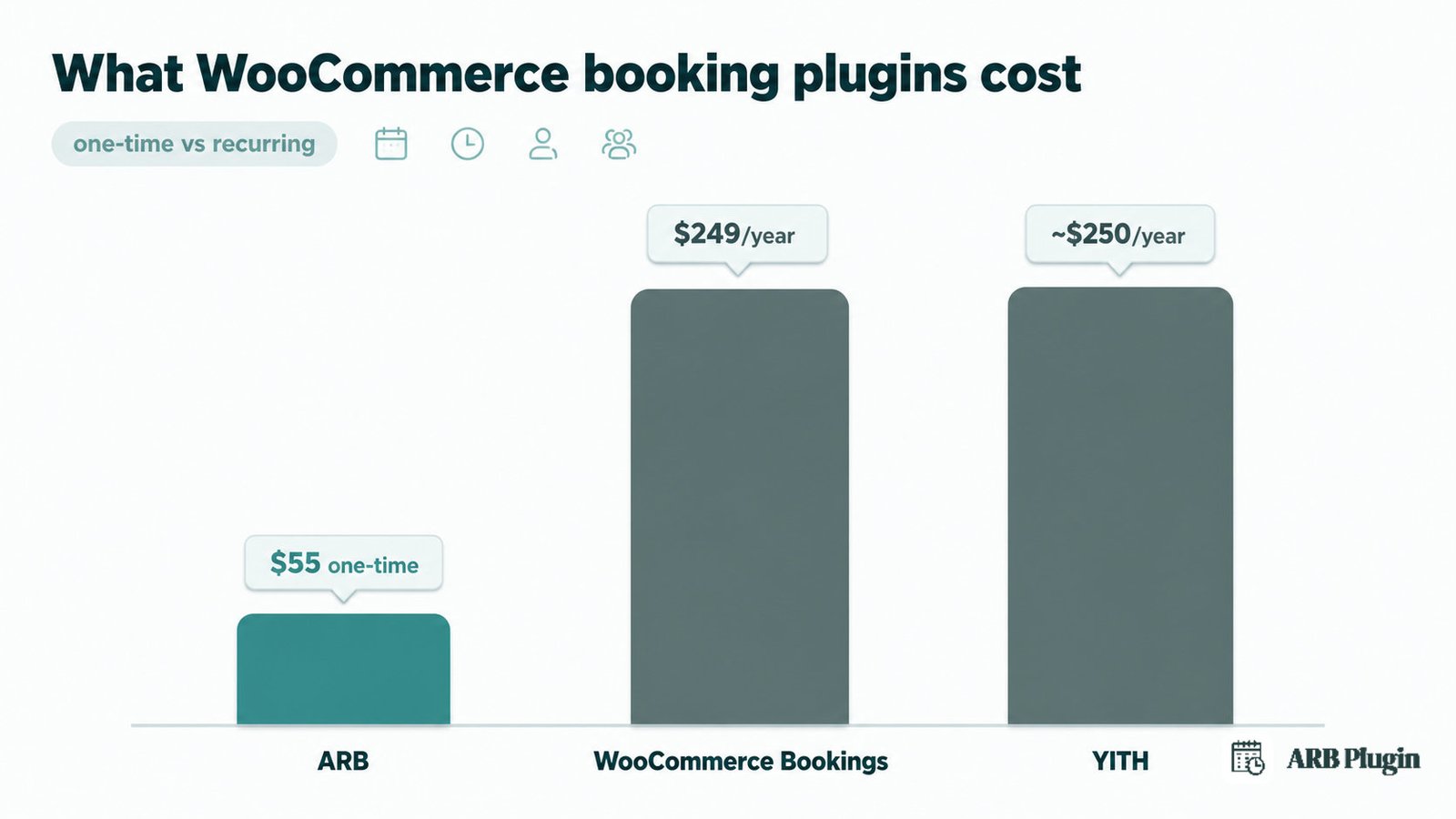
WordPress booking plugin prices range from free to $249 a year. Recurring options like WooCommerce Bookings ($249/yr) and YITH (about $250/yr) contrast with one-time licenses like ARB, priced around $55. See the full booking plugin cost breakdown.
What is the best WooCommerce booking plugin?
The best WooCommerce booking plugin depends on your booking rules, pricing flexibility, and budget. Weigh native WooCommerce flow against a standalone system, and one-time cost against recurring cost. See the best WooCommerce booking plugins ranked comparison for the full breakdown.
How much does WooCommerce Bookings cost?
WooCommerce Bookings, the official extension, costs $249 per year, a recurring fee with no one-time option. ARB, by contrast, is a one-time license around $55. Read our WooCommerce Bookings review for the full feature and reliability breakdown.
How much does ARB cost?
ARB costs $55 for a one-time Regular License on CodeCanyon, with no yearly renewal fee. All core booking features are included; Google Calendar sync and SMS are optional paid add-ons. See ARB pricing and the license options.
How do I choose the right booking plugin?
Match the plugin to your booking rules, like pricing model, resources, and capacity, your platform, WooCommerce-native versus standalone, and your budget, one-time versus recurring. Work through the booking-plugin buyer's guide for a full decision framework.
What are the best alternatives to WooCommerce Bookings?
Alternatives to WooCommerce Bookings include ARB, WooCommerce-native and one-time priced, plus YITH, PluginHive, Amelia, and Booknetic. Each differs on native flow, pricing model, and feature depth. See the WooCommerce Bookings alternatives roundup for a full comparison.
Payments, Deposits, and Pricing
Bookings still have to get paid, taxed, and sometimes deposited before the slot is confirmed.
Can I take payments for bookings in WooCommerce?
Yes. A WooCommerce-native booking runs payment through your existing checkout and gateways, so a reservation is paid exactly like any other order. ARB inherits every gateway your store already has connected. Follow the accept payments for appointments guide.
Does ARB work with Stripe and PayPal?
Yes. ARB uses WooCommerce's own gateways, so Stripe, PayPal, Square, Amazon Pay, PayFast, and eWay all work out of the box. Offline options like bank transfer and cash on delivery work too. See how to set up Stripe payments.
Can I charge different prices by date, person, or duration?
Yes. ARB's range-based pricing adjusts cost by slot count, person type, date, time, and day of week. A Saturday booking, for example, can carry a $20 surcharge automatically. Configure your own dynamic booking pricing rules in the Costs tab.
Can I take a deposit or partial payment for a booking?
No, ARB does not support native deposits or partial payments; its closest option is a Request for Quote workflow with custom, admin-set pricing before payment. Even WooCommerce Bookings needs a separate $219/yr add-on for deposits. See booking deposit options.
Do bookings work with my existing taxes and coupons?
Yes. ARB reuses WooCommerce's own tax rules and coupon system. A reservation is taxed and discounted exactly like your other products, with no parallel system to manage. See WooCommerce taxes, coupons, and gateways under ARB's integrations.
Calendar, Reminders, and Notifications
Calendars, reminders, and confirmation emails keep both the store and the customer on the same page.
Can I sync WooCommerce bookings to Google Calendar?
Yes, but only with ARB's paid Google Calendar add-on, and only one way: bookings push to Google Calendar, not back. Core ARB ships iCalendar (.ics) export instead. Note that WooCommerce Bookings' native sync runs two-way. See the Google Calendar add-on.
How do I send appointment reminders to customers?
Send automated or manual bulk email reminders with dynamic tags, like the customer's name, to everyone with an upcoming reservation. SMS reminders need ARB's separate paid SMS add-on. Route to send appointment reminders for the full setup.
Does ARB send booking confirmation emails?
Yes. ARB sends automatic confirmation and notification emails on every booking, customizable through WooCommerce's own email templates, with invoice and order details attached for the customer. See booking confirmation emails to customize yours.
What is an .ics calendar file?
An .ics, or iCalendar, file is a standard calendar attachment a customer can import into Google, Apple, or Outlook calendars. ARB attaches one to every booking email so customers save the reservation automatically. See what an .ics file is.
How do I reduce no-shows?
Cut no-shows with automated reminders, a clear confirmation email, a minimum lead-time rule, and a stated cancellation policy customers see before booking. These four levers work together, not in isolation. Follow the no-show playbook for the full setup.
Rentals, Resources, and Industries
WooCommerce bookings extend past appointments into rentals, hotel rooms, salons, and seat-limited classes.
Can I use WooCommerce for equipment or car rentals?
Yes. Model rentals with duration-based pricing, by day, week, or month, plus per-unit availability and capacity so items are never double-booked. This runs through the same reservable-product engine as appointments. See rental bookings in WooCommerce for setup.
Can I assign bookings to specific staff or resources?
Yes. ARB models rooms, staff, courses, or vehicles as resources, each with its own price and availability, so a booking ties to one specific resource. Staff are modeled as generic resources, not a dedicated staff module. See assign staff and resources.
Can I build a hotel reservation site with WooCommerce?
Yes. Set nightly or monthly durations, per-room availability and pricing, and capacity limits so no room is ever double-booked, all inside WooCommerce's own checkout. See how to build a hotel booking site with reservable products.
Can I take salon or spa appointments?
Yes. Set services and staff as resources, each with its own price, availability, and buffer period. Keep slots at one-at-a-time so a stylist is never double-booked. See salon appointment booking for the full walkthrough.
Can I book courses or classes with limited seats?
Yes. Set a Max Reservations per Slot capacity limit, use person types for each attendee, and set duration rules for the session length. A class fills to its seat limit, then closes. See book classes with limited seats for setup.
Managing and Troubleshooting Bookings
Once bookings start coming in, you need a way to approve, cancel, and manage them.
How do I decline or turn down a booking?
Turn on confirmation-required mode so every booking arrives pending, not paid, until you approve or reject it. From the Reservations admin, change its status, edit it, or cancel outright. See manage bookings in WooCommerce for the full workflow.
How do I let customers cancel or reschedule?
Enable Can Be Cancelled on the product and set a cancellation timeframe; customers then cancel from their WooCommerce My Account page. Admins can reschedule or edit any reservation directly. See handle cancellations and reschedules for the setup.
What should a booking cancellation policy include?
A clear cancellation policy states the cancellation window, any fees that apply, the refund rule, and exactly how a customer cancels. Publish it on the product page before checkout, not after. See what a cancellation policy needs in full.
Can customers manage their own bookings?
Yes. After checkout, customers view, edit, and cancel their own reservations from the WooCommerce My Account area, without emailing support for routine changes. See self-service booking for what customers can and can't do themselves.
Ready to Put ARB to the Test?
WooCommerce booking questions all come back to the same choice: bolt on a separate system, or keep bookings inside the store you already run. ARB does the second, with dynamic pricing, resources, and double-booking protection built in for a one-time $55 license, rated 4.81 out of 5 on CodeCanyon.
Try the booking flow before you buy: open the live demo and test a real reservation end to end.