Choosing a WooCommerce booking plugin means evaluating seven factors. They are WooCommerce-native integration, booking-rule and pricing flexibility, total cost of ownership, setup complexity, calendar sync, maintenance, and support. The costliest mistakes: assuming any WordPress booking plugin is WooCommerce-native, and buying on sticker price instead of total cost.
This guide covers each criterion with the signals and questions to use in a trial. It also covers a step-by-step evaluation process, a checklist, and where ARB fits for flexible pricing on a one-time budget.
What Should You Look for in a WooCommerce Booking Plugin?
Choosing a WooCommerce booking plugin comes down to seven criteria. They are WooCommerce-native integration, booking-rule and pricing flexibility, total cost of ownership, setup and admin experience, calendar sync, maintenance and compatibility, and support. Buyers who check all seven before shortlisting avoid the most common post-purchase regrets.
Here is what each criterion actually decides, and what a good answer looks like.
| Criterion | What it decides | What "good" looks like |
|---|---|---|
| WooCommerce-native integration | Whether bookings reuse your existing cart, checkout, tax, and gateways | A real WooCommerce product type, not a bridge or redirect |
| Booking-rule and pricing flexibility | Whether the plugin can actually price your bookings | Multi-axis pricing by person, resource, date, time, and day of week |
| Cost and licensing (TCO) | What you pay over several years, not just at checkout | Low total cost after add-ons, with few essentials gated behind extras |
| Setup and admin experience | How much time setup and daily management cost you | A familiar setup path, demo data, and a daily agenda view |
| Notifications and calendar sync | Whether reminders and sync prevent no-shows and double-booking | Native two-way sync with the calendars you actually use |
| Maintenance and compatibility | Whether the plugin still works after your next WordPress update | Updated within the last few months, current WordPress and WooCommerce support |
| Support and documentation | How fast you recover when something breaks | Deep docs plus a clearly stated, responsive support window |
If you would rather skip straight to a shortlist, see our best WooCommerce booking plugins compared. The rest of this guide walks through each criterion in order, starting with the one that decides whether the plugin fits your store at all.
1. Is It WooCommerce-Native or a Standalone Plugin Bolted On?
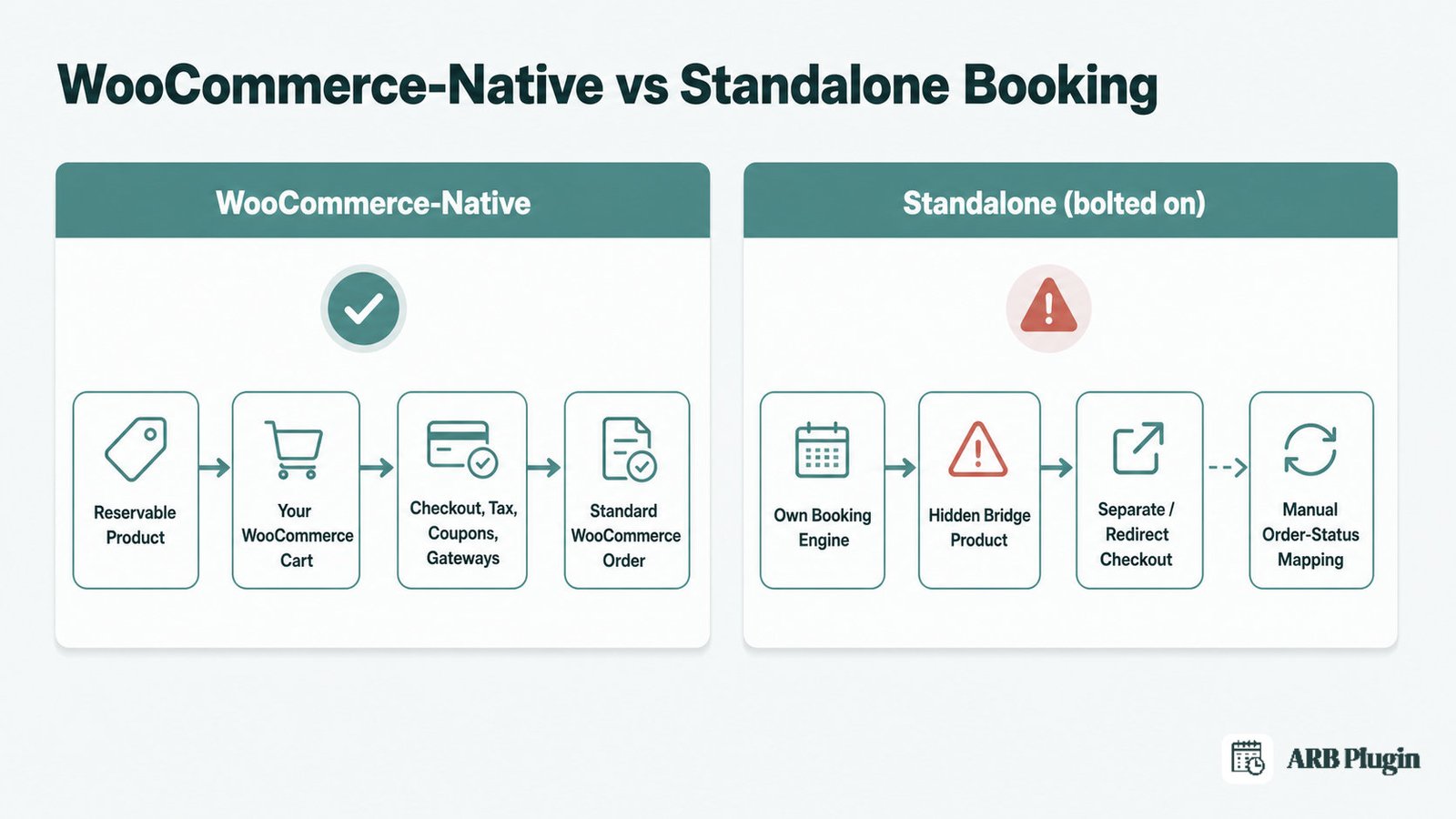
A WooCommerce-native booking plugin adds a real WooCommerce product type that shares your store's cart, checkout, tax rules, coupons, and payment gateways. A standalone plugin runs its own booking engine and routes orders to WooCommerce through a bridge or redirect. Native matters most for a store that already runs WooCommerce.
What to look for
Genuine native integration shows up in three concrete places, not in the marketing copy.
- A native "Reservable Product" or "Bookable Product" type, not a shortcode dropped onto a page.
- Bookings that appear as normal WooCommerce orders in your existing order list.
- Your existing payment gateways, tax rules, and coupons applying automatically, with no extra setup.
Several established WooCommerce booking plugins add exactly this kind of native product type. Treat it as table stakes for a WooCommerce store, not a bonus feature.
Red flags to avoid
A standalone engine wearing a WooCommerce badge tends to leave these tells.
- A hidden "bridge" product created behind the scenes to route the sale to a separate checkout.
- A redirect to a checkout page that is not your store's normal WooCommerce cart.
- Manual mapping between the plugin's own order statuses and WooCommerce's order statuses.
Amelia's own WooCommerce integration documentation describes exactly this pattern. A booking redirects to WooCommerce checkout through a hidden bridge product. The store owner then has to manually align the plugin's order statuses with WooCommerce's own statuses. That is a standalone integration wearing a WooCommerce costume, not a native one.
Questions to ask before you buy
Put these three questions to the vendor before you trust the integration.
- Is this a native WooCommerce product type, or does it run its own checkout? A native product type reuses your cart automatically. A bridge does not.
- Do bookings become standard WooCommerce orders? Standard orders keep your existing reporting, fulfillment, and refund workflows intact.
- Do my existing gateways, taxes, and coupons apply without extra mapping? If the answer is that some configuration is needed, budget setup time you did not plan for.
2. Can It Model Your Actual Booking Rules and Pricing?
A booking plugin must match your booking type. That might be a time-slot appointment, a full day, or a multi-night stay. It must also match your pricing logic: per person, per resource, per date, or by length of stay. Get this wrong and you hit a wall mid-setup.
What to look for
Your pricing model, not the feature checklist, decides whether a plugin fits.
- Flexible durations, from minutes for a consultation to months for a rental unit.
- Independently priced resources and person types, so a suite costs more than a standard room, and an adult costs more than a child.
- Multi-axis range pricing by slot count, person count, date, time, and day of week.
- Buffer time between bookings and a capacity cap per slot to block double-booking.
- A quote or approval-first mode for businesses that negotiate before charging.
Developers who cross-shop these plugins say it plainly on WordPress forums. Match the plugin to your booking type first: an appointment tool for time slots, a rental tool for by-the-day or multi-day stays. Sorting by booking type before features narrows the field fast.
Red flags to avoid
These gaps only surface once your real pricing logic hits them.
- A rigid single date-picker with no way to price by person type, resource, or date range.
- No overbooking guard, so two customers can claim the same slot.
- A pricing engine built for staff scheduling first, like Booknetic, models pricing by service and duration. It is not built around slot count or date range, a gap for rental or multi-axis pricing needs.
Buyers have also flagged that some official WooCommerce plugins do not handle multicurrency out of the box. That gap only surfaces once you test your specific pricing needs in a trial.
Questions to ask before you buy
Pin down the pricing engine's real ceiling with three direct questions.
- Can I price differently by person type, by resource, and by date or day of week? This is the pricing engine's actual ceiling, not its marketing description.
- Can I set buffer time and a capacity cap per slot? Without this, two bookings can collide.
- Does this support a quote or approval flow, or only instant payment? Instant-payment-only tools do not fit a negotiate-first service business.
3. How Much Does a WooCommerce Booking Plugin Cost?
WooCommerce booking plugins are sold three ways: a one-time license, an annual subscription, or a free base plus paid add-ons. The most overlooked cost is add-on stacking, where essentials like calendar sync or SMS reminders are sold separately and quietly double the real price.
Pricing models in this category
Four licensing models dominate this category, each with a different long-term cost.
| Model | Example | What to know |
|---|---|---|
| One-time license | ARB's one-time pricing, approximately $55 on CodeCanyon | Pay once; no renewal, but fewer bundled extras |
| Annual subscription | WooCommerce Bookings at $249/year; YITH Booking at $249.99/year, auto-renewing; PluginHive Bookings at $149/year | Renews every year; often includes more built-in features |
| Freemium plus paid add-ons | Bookly, free core plus 40 or more paid add-ons | Free to start; essentials often cost extra as you scale |
| Tiered annual or lifetime | Amelia, $49 to $679 per year or roughly $269 to $1,799 lifetime; Booknetic, $45 to $299 per year or $99 to $699 lifetime | Higher tiers add integrations; lifetime avoids renewals at a higher upfront cost |
Hidden costs to watch for
The sticker price rarely reflects the real total, so watch these costs.
- Calendar sync, video meetings, payments, and SMS gated behind separate paid add-ons. Booknetic's own Basic plan ships with none of them included, pushing most buyers to Standard or higher.
- Deposits, SMS, request-a-quote, and multicurrency sold as separate plugins on top of an already-recurring license, as with YITH's $249.99-per-year base.
- Add-on gating happens on the low-cost side too. Even one-time-license plugins commonly hold back calendar sync or SMS as paid add-ons, so no plugin in this category is fully add-on-free. Confirm exactly what is core before you buy.
- Annual renewals that auto-charge without a clear reminder, and are non-refundable once processed.
- Per-site or per-domain limits that force an upgrade the moment you add a second store.
- Discount marketplaces that resell cracked copies of premium booking plugins at a fraction of the price. You lose updates, security patches, and support, which usually costs more than the license did.
If free options are more your budget, read best free WordPress booking plugins (and what free really costs) before assuming free covers what you need.
What drives total cost of ownership
Total cost of ownership comes down to a few multi-year factors.
- Project the cost over three years, not the first month.
- Count only the add-ons you will actually use, not the vendor's full catalog.
- Compare a one-time license against three years of subscription renewals side by side.
- A one-time, all-core-included license usually wins on raw multi-year cost. A recurring plan can still be worth it if its support and polish save you real setup time.
4. How Complex Is Setup and Day-to-Day Admin?
Weigh both time to launch and daily management, not just the feature list. A config-heavy plugin with no demo data or a dated admin screen costs you hours every week, long after setup is done.
What to look for
A plugin that respects your time shows it in the setup flow.
- Setup inside an interface you already know, like the WooCommerce product editor, instead of a separate settings maze.
- Bundled demo data, so you see a working booking before you configure anything.
- A daily agenda or dashboard view for managing the day's bookings at a glance.
- One-click status changes for confirming, rescheduling, or cancelling a booking.
Red flags to avoid
Configuration friction is easiest to spot in these warning signs.
- An empty default state with no sample booking to test against.
- Settings fragmented across many separate tabs and modules.
- Several external add-ons that each need their own credentials wired up before the plugin works end to end. Reviewers describe exactly this friction with Booknetic: a learning curve that catches non-technical owners on day one, because several add-ons need configuring at once.
- Marketplace reviews of WooCommerce Bookings call it "far too complicated for normal users," a warning worth testing yourself in a trial before buying.
Questions to ask before you buy
Test the daily workflow, not just the install, with these questions.
- Is there demo or sample data so I can see a working booking immediately? An empty state hides how much configuration is actually required.
- How do I view and manage a single day's bookings from the admin? This is your daily workflow, not a one-time setup task.
- What can I configure myself, without hiring a developer? It sets your real ongoing cost, beyond the license price.
5. How Does It Handle Notifications and Calendar Sync?
Reminders cut no-shows, and calendar sync stops double-booking across the tools you already use. Check whether sync is native or an add-on, one-way or two-way, and which calendars it actually covers before you assume it fits.
What to look for
Sync quality depends on direction and coverage, not on the word alone.
- Automated reminders, plus the option to send manual or bulk reminders yourself.
- Native two-way sync with Google and Outlook, and ideally Apple Calendar too.
- For rental businesses, OTA sync with Airbnb, Booking.com, or Vrbo, so a booking on one channel blocks the others.
- A customer account area where bookers can view or manage their own reservation.
PluginHive is a strong positive example here. It ships native two-way Google and Outlook sync plus Zoom meetings. Its own customers repeatedly single out calendar reliability and support as its best features.
Red flags to avoid
Weak sync betrays itself through these patterns.
- Sync that only pushes one direction, from the plugin to your calendar and never back.
- Calendar sync locked behind a paid add-on or a higher pricing tier.
- Reminder emails with no manual resend option if a customer misses the first one.
- No customer account area, so every reschedule request comes to you by phone or email.
Questions to ask before you buy
Confirm the sync details with three specific questions.
- Is calendar sync native and two-way, or is it one-way or an add-on? One-way sync still leaves room for a double-booking.
- Which calendars does it actually sync with: Google, Outlook, Apple, or OTA channels? A rental business needs OTA sync specifically, not just Google.
- Can customers reschedule or cancel their own booking without contacting me? This decides how much admin time notifications actually save you.
6. Is It Actively Maintained and Compatible With Your Stack?
A booking plugin is revenue infrastructure, not a decoration. An abandoned or lagging plugin is a liability the next WordPress or WooCommerce update can break overnight. Check the update cadence and current compatibility before you buy, not after.
What to look for
A well-maintained plugin leaves a visible, current track record.
- An update released within the last few months, not a year or more ago.
- Current WordPress, WooCommerce, and PHP compatibility, plus support for WooCommerce's High-Performance Order Storage (HPOS).
- A long, unbroken changelog that shows steady, ongoing development.
- A plugin that is still actively sold and supported, not quietly abandoned.
Red flags to avoid
An abandoned or lagging plugin shows these warning signs.
- No update in the past 12 months or more.
- A version that lags a major WordPress or WooCommerce release.
- A wave of recent reviews reporting the plugin broke after an update. Users reported exactly this after one competitor's major release in December 2025, describing the plugin as "completely buggy since the update."
- A plugin that has been delisted or is no longer purchasable.
This risk is not hypothetical. WooCommerce store owners on Reddit have documented a booking plugin losing HPOS compatibility after an update. WooCommerce then fell back to legacy order storage to protect data integrity. That is exactly why current HPOS support belongs on your checklist, not treated as an afterthought.
Questions to ask before you buy
Gauge the vendor's maintenance discipline with these questions.
- When was the last update, and how often do you typically ship releases? A stale changelog predicts future compatibility breaks.
- Is this compatible with my current WordPress, WooCommerce, and PHP versions, and does it support HPOS? An incompatible plugin can silently corrupt order data.
- What happens to my existing bookings if an update introduces a bug? It tells you whether the vendor has a rollback or hotfix process at all.
7. What Support and Documentation Does It Include?
When a booking breaks at checkout, support and documentation decide how fast you recover. Check the depth of the docs and the real support window before you buy, not a vague responsive-support promise.
What to look for
Real support has depth and a stated response window, not just a promise.
- Deep documentation covering setup steps, not just a feature list.
- Video tutorials for the setup steps that are hardest to explain in text.
- A clearly stated support window and a defined typical response time. PluginHive states a typical support turnaround under 90 minutes, and its own customers repeatedly single out support as the plugin's most-praised attribute. One reviewer described it as the fastest support they experienced in ten years of web work.
Red flags to avoid
Thin support reveals itself before you ever file a ticket.
- Thin documentation that skips the configuration steps you actually need.
- Support tied only to an active subscription, with no clear response-time commitment.
- A support pattern that blames the user's own setup instead of investigating the actual issue.
Questions to ask before you buy
Test the support commitment with three pre-sales questions.
- How long is support included with my purchase, and does renewal reset or extend it? Some licenses include only a few months of support, not the full license term.
- Is there documentation or video specifically for my use case, not just the general feature set? Generic docs rarely cover a rental or quote-first workflow.
- What is the typical response time for a support ticket? A vague answer here usually means there is no real commitment behind it.
Which Criteria Matter Most for Your Business Type?
The same seven criteria apply to every business, but which ones decide your shortlist changes with what you sell. Here is how to re-weight them for common WooCommerce booking business types.
| Business type | Criteria that matter most | What to prioritize |
|---|---|---|
| Salon, spa, or clinic (staff-based) | Booking rules, notifications | Per-staff or per-resource availability plus reliable reminders. A dedicated per-staff module, like Amelia's or Booknetic's, goes further than a generic "resources" model. |
| Hotel, vacation rental, or multi-day stay | Booking rules, calendar sync | Date-range or nightly pricing plus OTA sync with Airbnb or Booking.com, the way YITH handles it. A plugin without date-range booking cannot serve this business at all. |
| Courses, classes, or workshops | Booking rules, setup | Capacity control and per-participant pricing, so a class never overbooks. |
| Events or fixed-date reservations | Booking rules, notifications | Overbooking prevention and reliable confirmation emails. |
| Budget buyer or agency deploying per client | Cost and licensing, WooCommerce-native | One-time ownership with no add-on stacking on the essentials you actually need. |
For appointment-only businesses not built on WooCommerce, our best WordPress booking plugins compared is the better starting point.
Common Mistakes When Choosing a WooCommerce Booking Plugin
The three costliest mistakes share a theme: skipping real verification before you buy. Buyers assume any WordPress booking plugin is WooCommerce-native, judge cost by the sticker price alone, and skip testing their booking rules in a trial. Here are five mistakes worth avoiding.
- Assuming any "WordPress booking" plugin is WooCommerce-native. Many plugins market themselves as being "for WordPress" without clarifying that WooCommerce is only one payment routing option, not the native cart. Check for a native product type, not a bridge. Amelia's own documentation confirms its WooCommerce path runs through a hidden bridge product with manual order-status mapping, the exact pattern Criterion 1 warns against.
- Buying on sticker price instead of total cost after add-ons and renewals. A $45 or $55 headline price looks cheap until calendar sync, SMS, or deposits turn out to be separate purchases. Price three years of ownership with every add-on you will actually need, not just the base license.
- Not testing your own booking rules in a trial. A demo booking form looks fine until you try your specific pricing logic. A gap like missing multicurrency support only shows up once you test it yourself. Book your real scenario, your actual pricing rules and person types, in the live demo before you buy.
- Ignoring maintenance and compatibility. A popular or official plugin feels safe by reputation, but reputation does not stop a bad release. One major competitor's users reported it went "completely buggy since the update" after its most recent major release. Check the changelog and recent reviews for update cadence, not just the plugin's age or popularity.
- Overlooking calendar sync direction and coverage. "Calendar sync" sounds complete on a features page, but it may be one-way, add-on-gated, or limited to a single calendar. Confirm two-way sync and your specific calendars before you commit, using Criterion 5's questions in a live demo.
How to Evaluate a WooCommerce Booking Plugin: A Step-by-Step Process
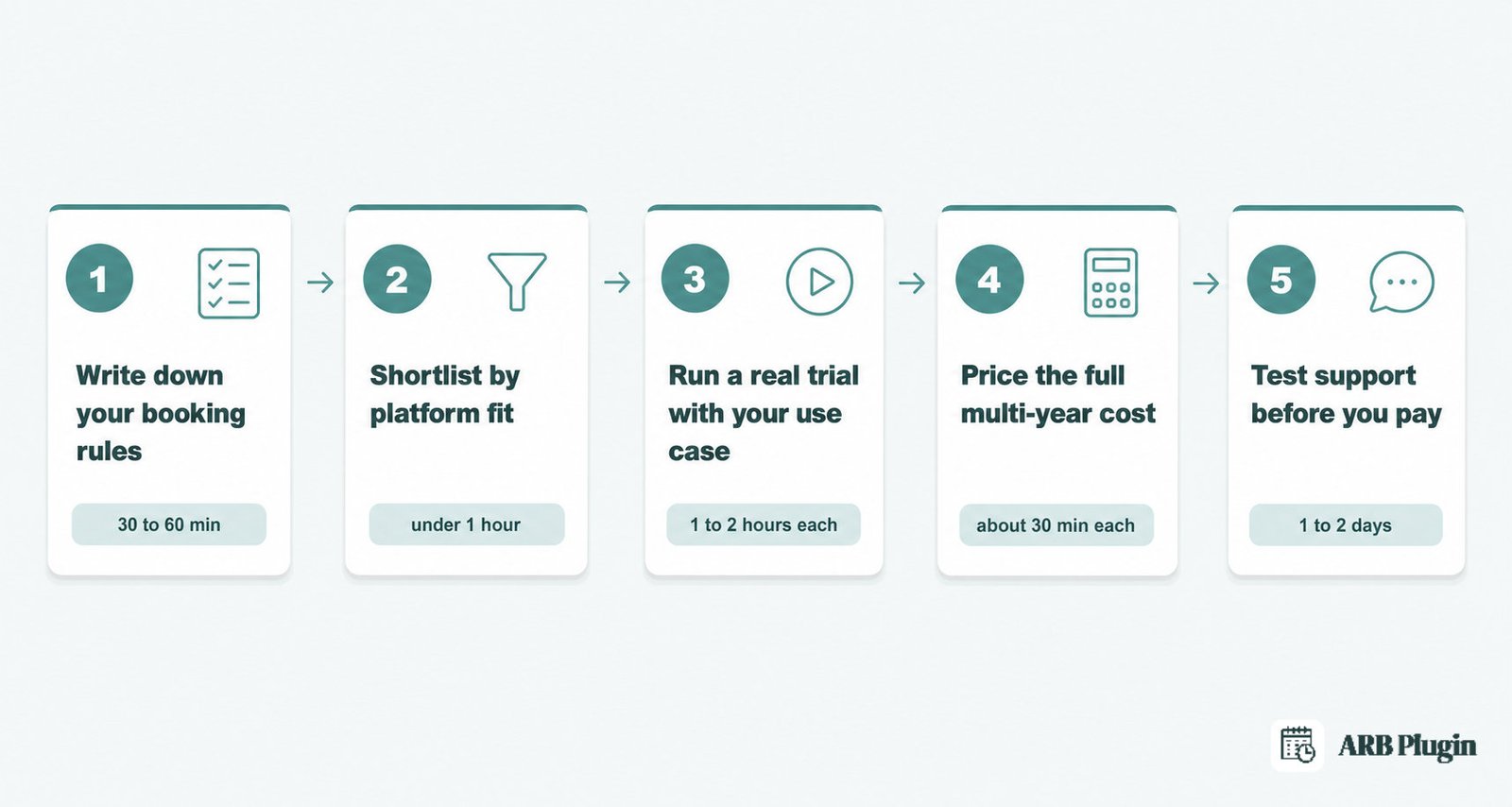
Evaluating a WooCommerce booking plugin takes five stages: define your rules, shortlist by platform fit, run a trial, price the full cost, and test support. Budget a few days to two weeks, depending on how complex your booking rules are.
Step 1: Write down your booking rules before you look at tools
List what you need: booking type (appointment, day, or multi-day rental), durations, resources, and person types. Add your pricing axes, capacity limits, and whether you need a quote-first flow or instant payment. This step takes 30 to 60 minutes and produces the checklist you will compare every plugin against.
Step 2: Shortlist by platform fit (native vs standalone)
Start from Criterion 1: eliminate any plugin that is not genuinely WooCommerce-native for a WooCommerce store, or that has no WooCommerce path at all. This step takes under an hour once your rules are written down.
Step 3: Run a real trial with your own use case
Book your actual scenario in the demo, not the vendor's suggested demo script. Test the pricing rule that broke a past tool for you, like multicurrency support or a specific person-type discount. This step takes one to two hours per shortlisted plugin.
Step 4: Price the full multi-year cost, add-ons included
Apply Criterion 3's method: list every add-on you actually need, then project one-time versus subscription cost over three years. This step takes about 30 minutes per plugin once you know which add-ons apply.
Step 5: Test support before you pay
Ask a real pre-sales question and measure the response, using Criterion 7's questions. This step takes a day or two, since you are waiting on their actual response time, not a sales promise.
Your WooCommerce Booking Plugin Checklist
Run every shortlisted plugin through this checklist before you commit.
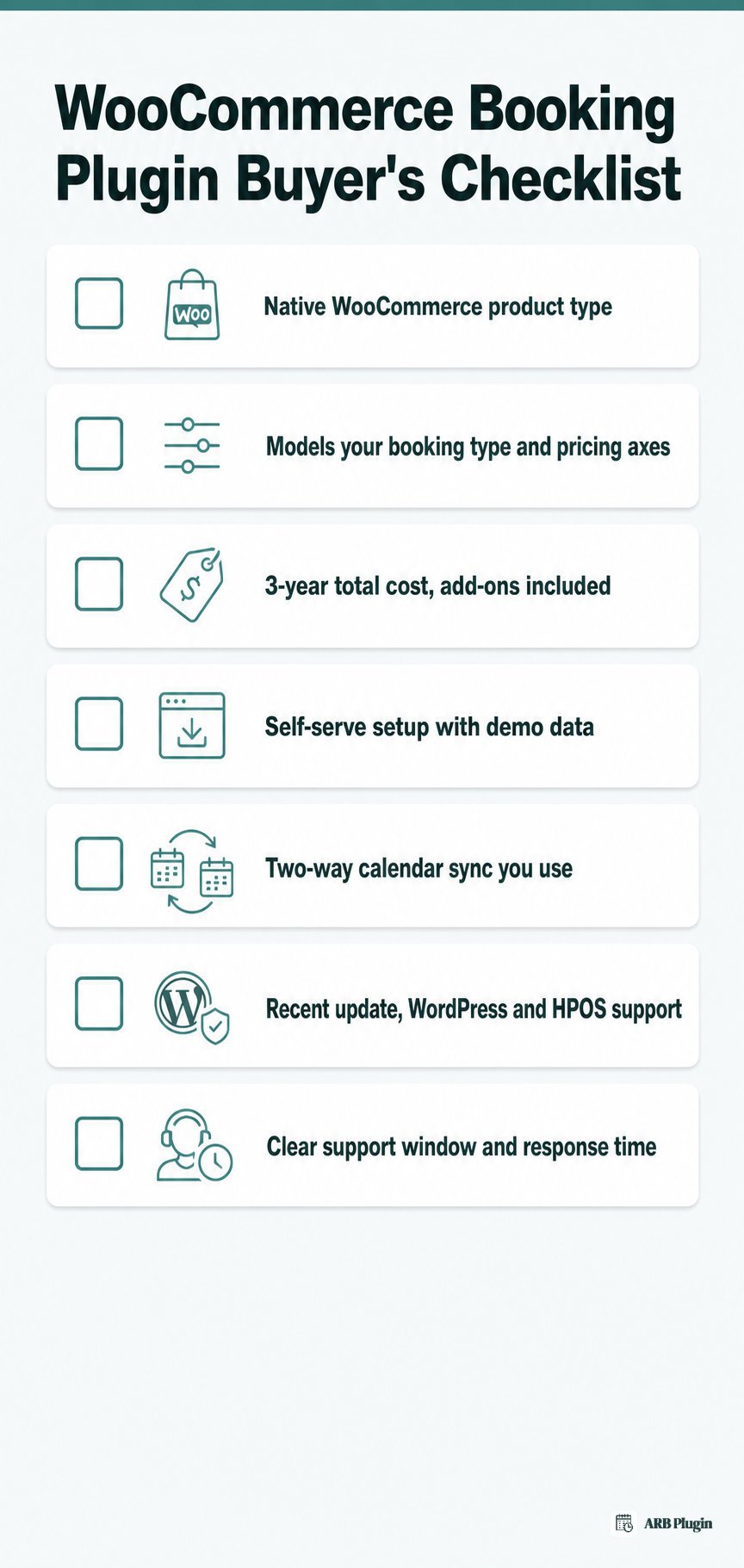
- Native WooCommerce product type, not a bridge or redirect
- Models your actual booking type and pricing axes (person, resource, date, time)
- Total cost over three years, add-ons included, not just the sticker price
- Setup you can manage yourself, with demo data and a daily agenda view
- Two-way calendar sync for the specific calendars you use
- Updated within the last few months, with current WordPress, WooCommerce, PHP, and HPOS support
- A clear support window with a real response time
If a plugin clears every box for your business, it is a real contender.
Why ARB Fits WooCommerce Stores That Need Flexible Pricing on a One-Time Budget
ARB satisfies the criteria above for a WooCommerce store on a one-time budget. It delivers native WooCommerce integration, booking-rule and pricing flexibility, and a low one-time cost. It scores 4.2 out of 5 on our how we review booking plugins methodology, with real gaps worth knowing about first.
How ARB handles WooCommerce-native booking
ARB adds a native Reservable Product type to WooCommerce. Bookings become real WooCommerce orders. ARB reuses your store's existing cart, checkout, tax rules, coupons, and every WooCommerce payment gateway.
There is no bridge product and no manual status mapping. On our rubric, this scores 5.0 out of 5, the same criterion where several rivals lose points.
How ARB handles booking rules and pricing
ARB supports durations from minutes to months or nights. It adds independently priced resources and person types, plus multi-axis range pricing by slot count, person count, date, time, and day of week. It also adds buffer periods, a capacity cap per slot, and a Request-for-Quote mode for approval-first bookings. This scores 4.5 out of 5 on our rubric.
How ARB handles cost and licensing
ARB is a one-time license around $55 on CodeCanyon, with every core booking feature included in that single price. Only Google Calendar sync ($19 one-time) and SMS notifications ($15 one-time) are paid add-ons. This scores 4.5 out of 5 on value and licensing.
ARB has real gaps worth conceding. It has no native two-way calendar sync. Its Google Calendar add-on syncs one way only, with no Outlook or Apple support.
It also has no deposits or partial payments, and no dedicated staff module, since staff are modeled as generic resources. It also has no free tier.
Rivals lead on these points. Amelia and Booknetic offer dedicated staff modules, while PluginHive offers native two-way sync across Google and Outlook. YITH syncs directly with Airbnb, Booking.com, and Vrbo. If you need Amelia's fuller feature set and are open to a subscription, is Amelia worth it covers it in depth.
ARB pricing and where to try it
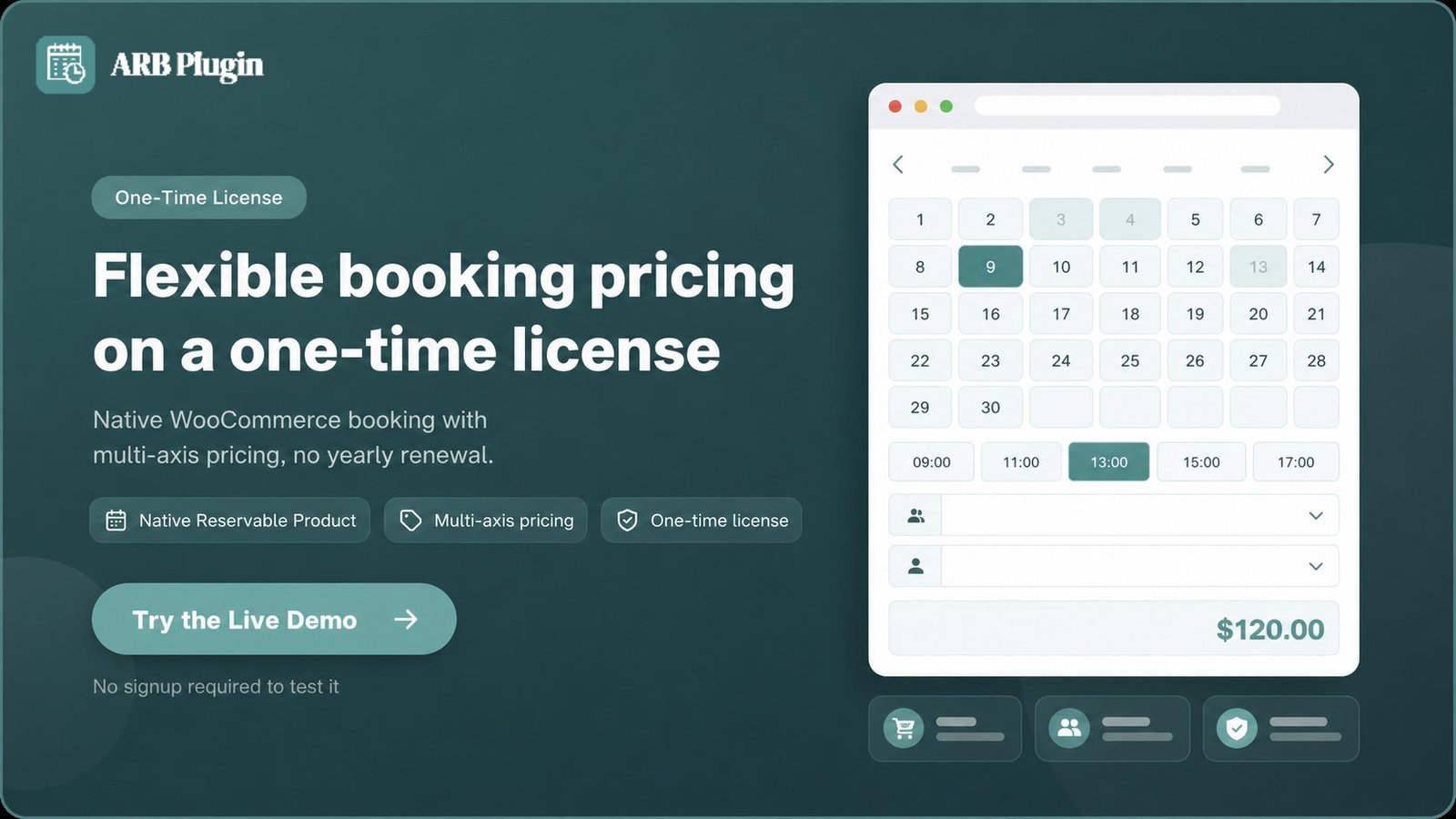
ARB's one-time license costs about $55, with no annual renewal. Try the ARB booking flow in the live demo to test your own booking rules before you buy.
FAQs
What is the most important factor when choosing a WooCommerce booking plugin?
For a WooCommerce store, native integration and booking-rule flexibility matter most, since a plugin that fails either forces you into workarounds. After those two, total multi-year cost decides which option is actually worth it.
Is a WooCommerce-native or a standalone booking plugin better?
Native is better once you already run WooCommerce, since it reuses your cart, checkout, tax, and gateways automatically. Standalone plugins can still suit an appointment-only business that is not built around WooCommerce commerce.
How much should a WooCommerce booking plugin cost?
Pricing ranges from a one-time license around $55 to annual subscriptions between $149 and $249, or a free base plus paid add-ons. Judge plugins on multi-year total cost of ownership, not the sticker price alone.
How long does it take to evaluate a booking plugin?
A focused evaluation, writing down your rules, shortlisting, running a trial, pricing the true cost, and testing support, takes a few days to two weeks. Complex pricing or multi-staff needs push that timeline longer.
Do I need a separate add-on for Google Calendar sync?
Often yes. Many WooCommerce booking plugins, ARB included, gate two-way Google or Outlook sync behind a paid add-on or a higher tier. ARB includes iCalendar export in its core license, with Google Calendar sync available as a paid add-on ($19 one-time). Confirm exactly what is included before you buy.
Is ARB a good WooCommerce booking plugin?
Yes, for WooCommerce stores that need flexible per-person, per-resource, or range-based pricing on a one-time budget. It scores 4.2 out of 5 on our rubric, though it lacks native two-way calendar sync, deposits, and a free tier.