Feature Page
Price Bookings by Date, Time, Person, and Slot
Set WooCommerce booking prices by date, time, duration, person, and resource with ARB's stackable Add Range rules, calculated live before checkout.
Six Pricing Rules, One Booking, Zero Add-Ons
Stack weekend surcharges, evening discounts, and group deals on one booking, calculated live before checkout, for a one-time $55.
See it live in the ARB demo before you commit.
ARB stacks every pricing condition on one Costs tab, so a single reservation charges by when, how long, who, and what.
- Charge more on weekends with a Date Range rule that adds a surcharge to peak days automatically.
- Discount slow evenings using a Time Range rule that fills quiet hours without a manual override.
- Reward longer stays through a Slot Count rule that drops the price past a duration threshold.
- Cut group rates with a Person Count rule that lowers the price for larger group bookings.
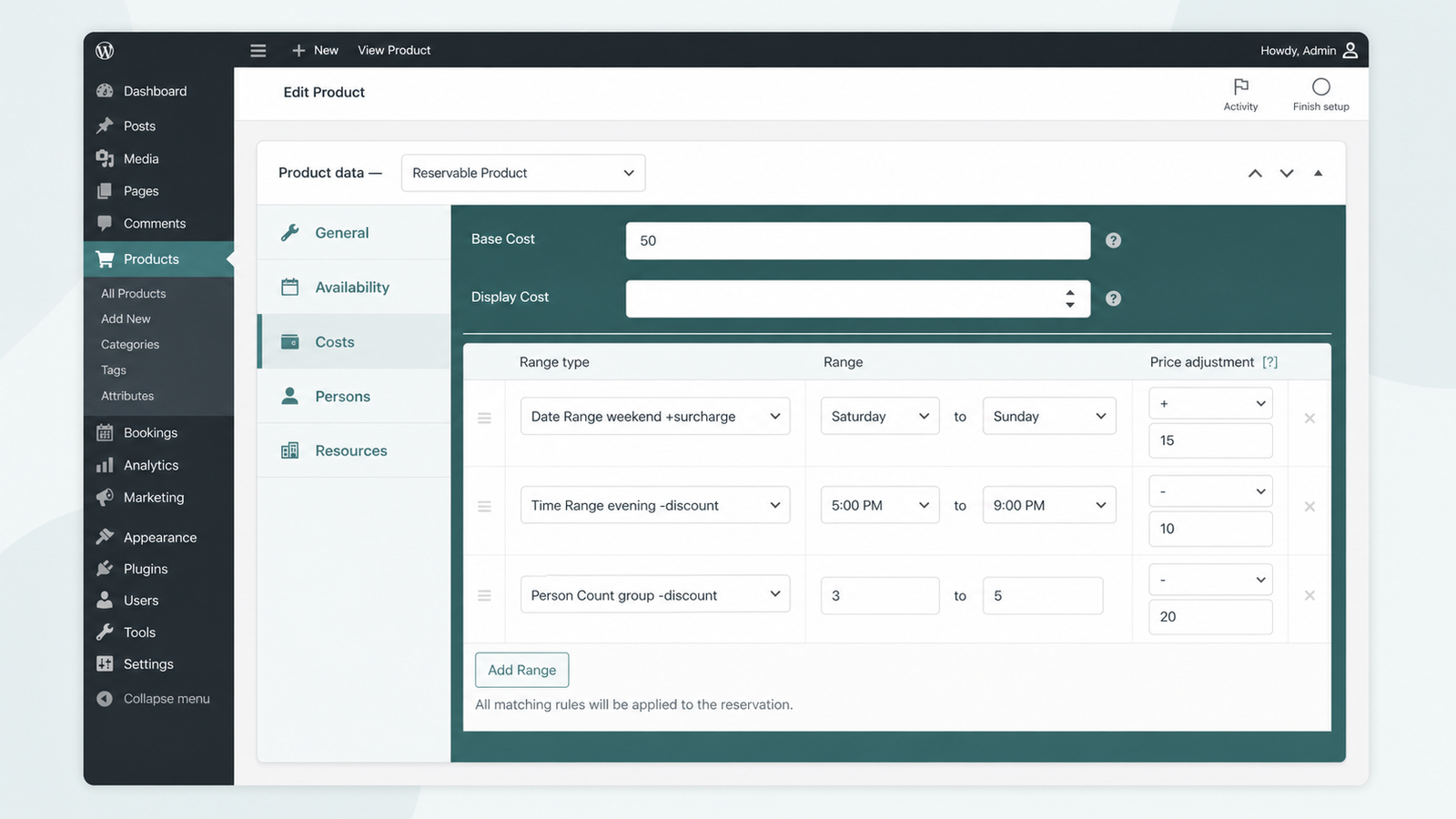
Every Rule Stacks Without a Paywall
Stack Six Range Bases on One Product
Add unlimited rules across Slot Count, Person Count, Date Range, Time Range, Range of Days, and Date Range with Time.
- Combine a weekend surcharge and an evening discount at once.
- Stack rules with no cap per Reservable Product.
- Reuse the same windows in your availability rules.
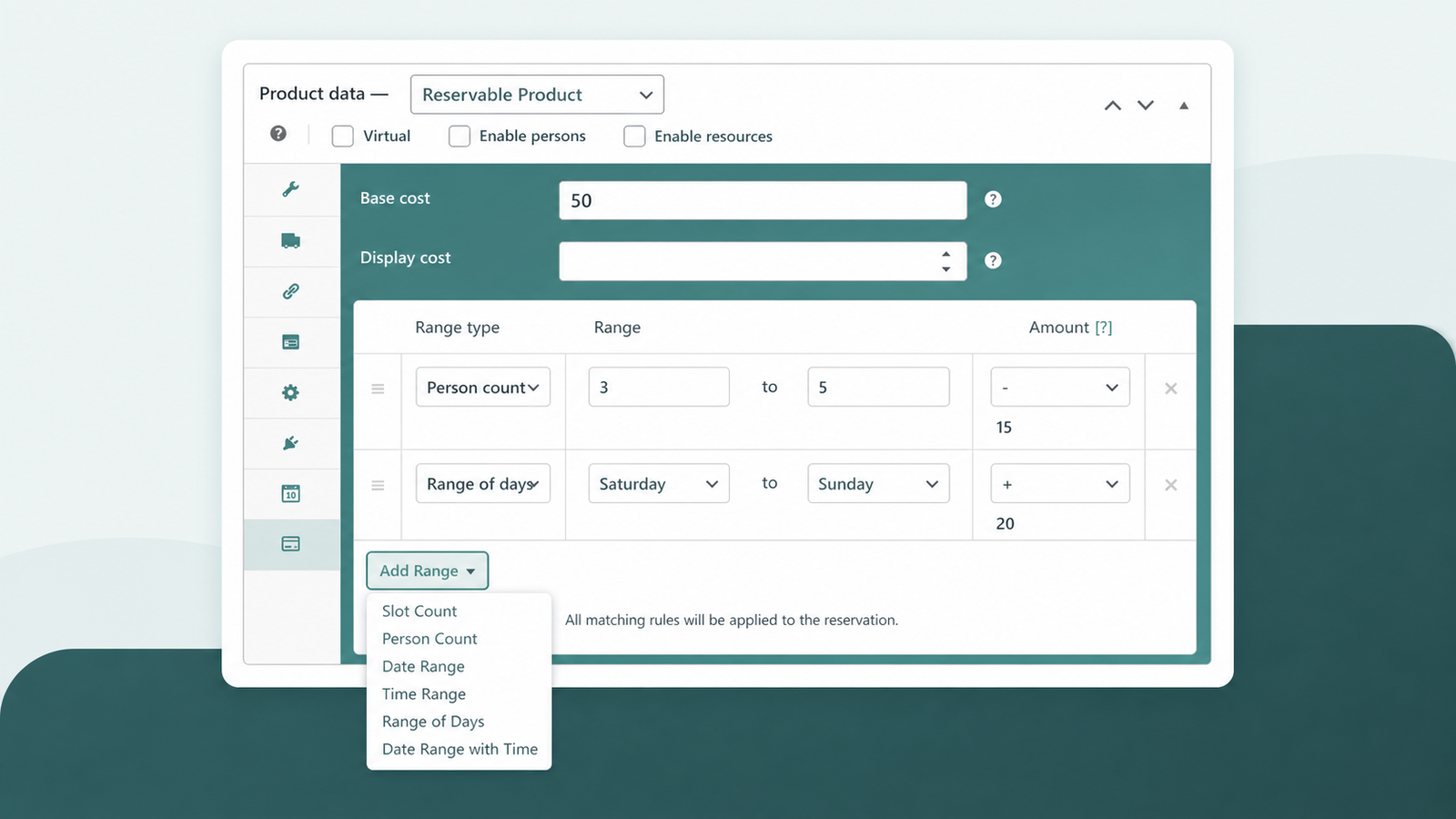
Price Every Resource and Person Type
Every room, staff member, or car type and every booker category carries its own independent price.
- Assign each resource its own price and availability.
- Price Adult, Child, or Ticket types separately.
- Layer these prices on top of every range rule.
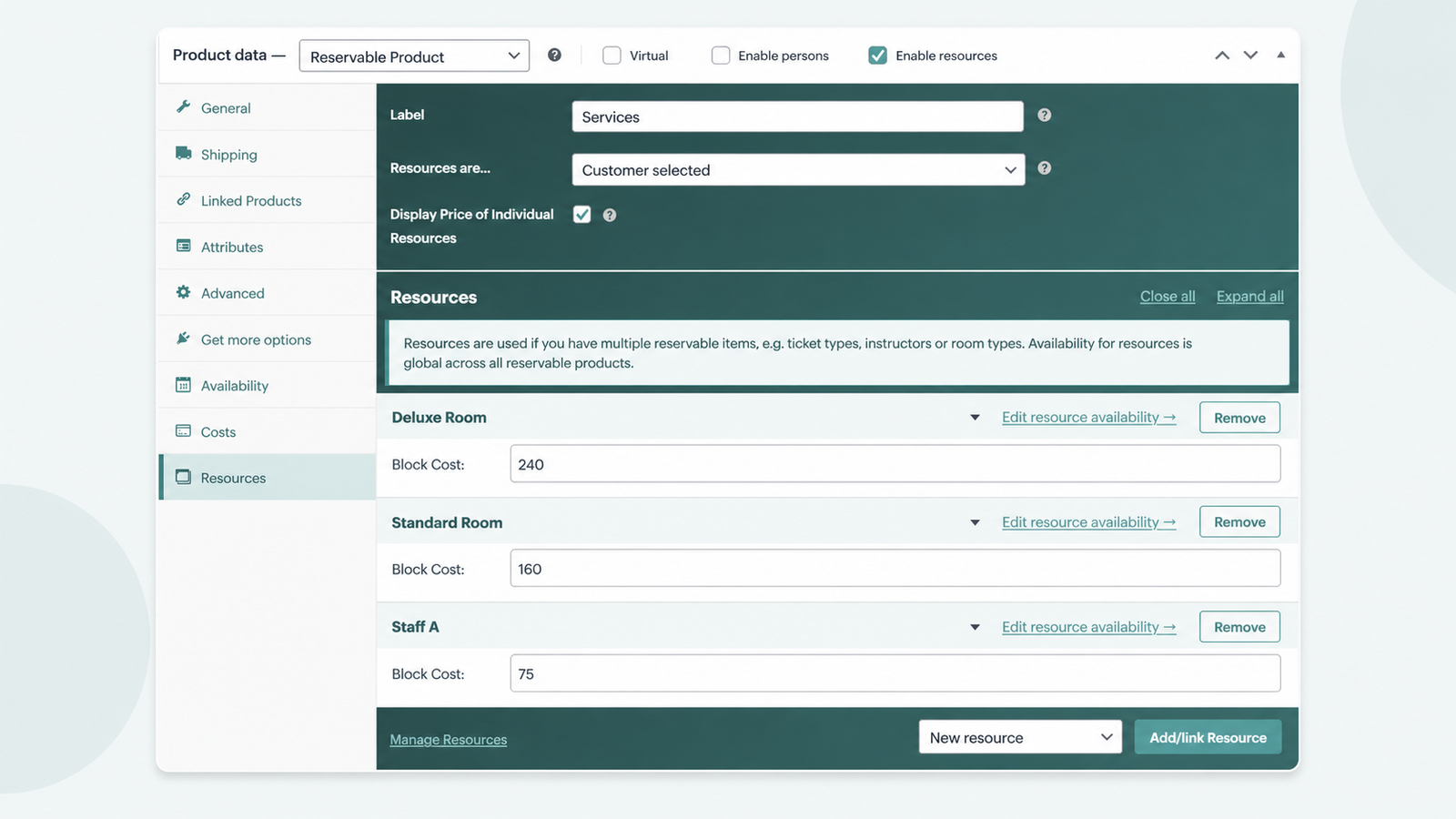
Recalculate the Total Live Before Checkout
ARB updates the total over AJAX the moment a customer changes the date, resource, or person count.
- Show an itemized breakdown of every line item.
- Recalculate as customers pick a date on the booking calendar.
- Push the final total into every WooCommerce payment gateway.
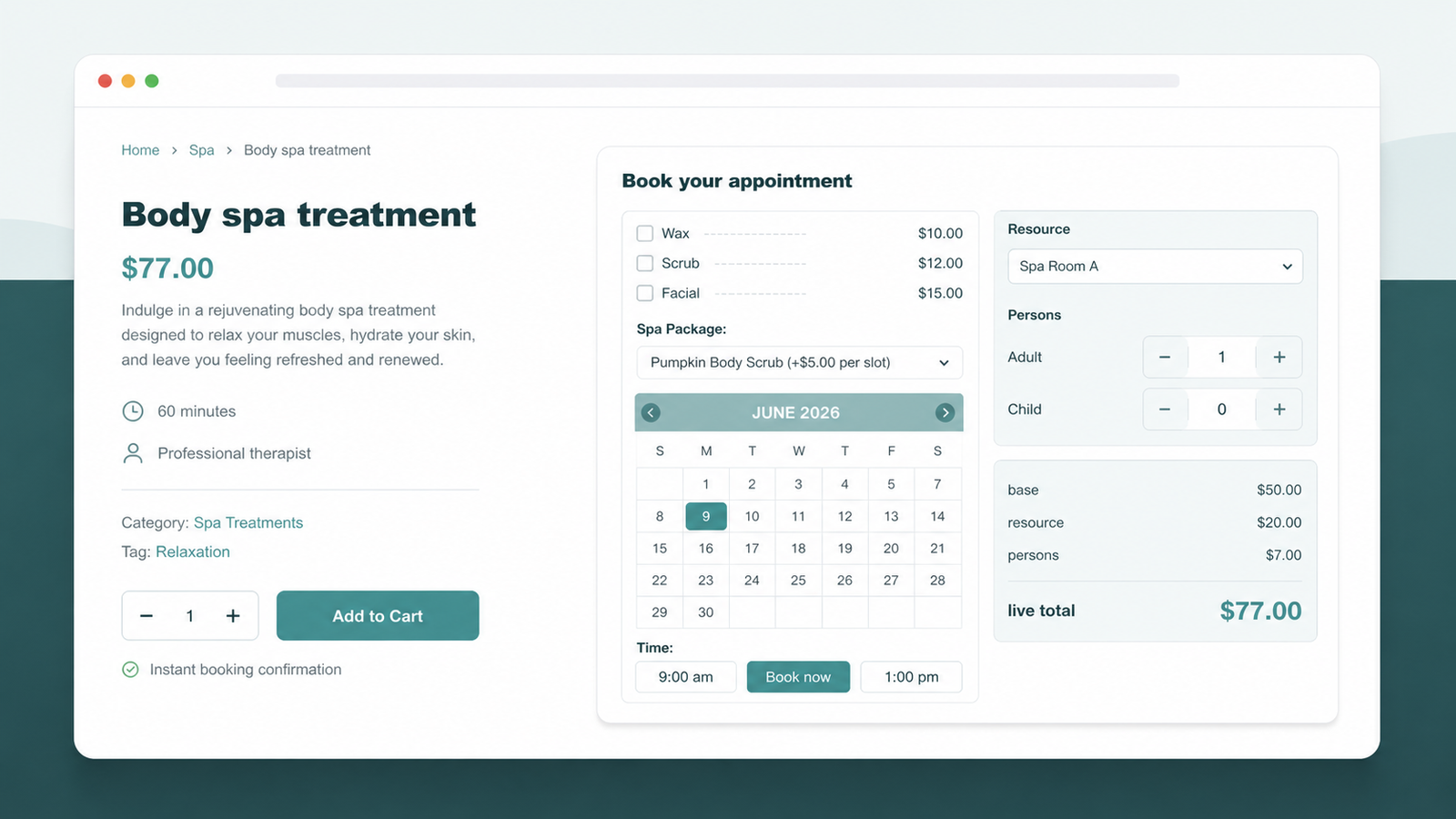
Add Discounts or Switch to Quotes
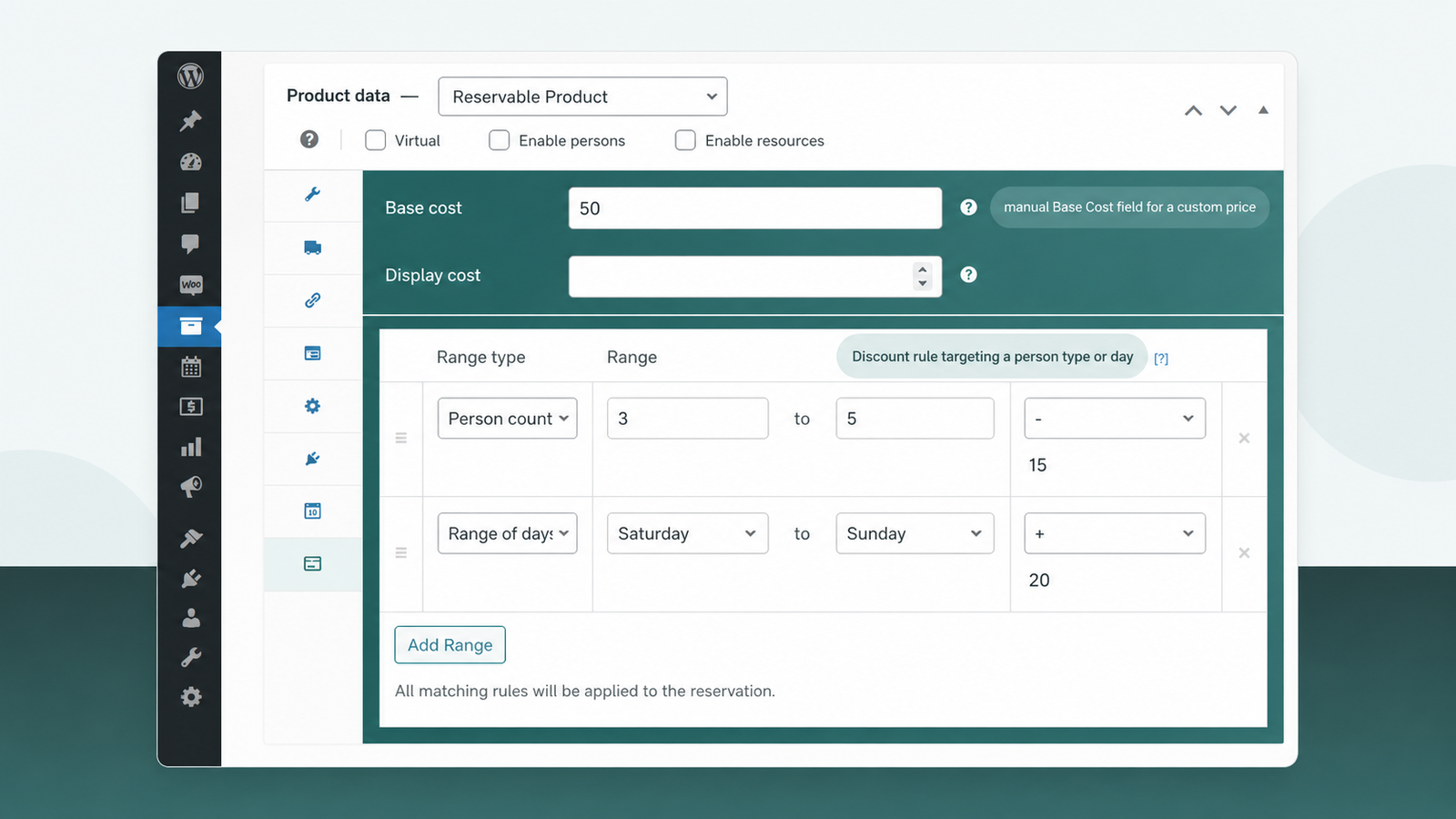
Layer a Discount on a person type or day, or flip the form into a quote request.
- Discount a specific person type or day.
- Enable Request for Quote for custom pricing.
- Set a manual price when rules do not fit.
Set a Dynamic Price in Four Clicks
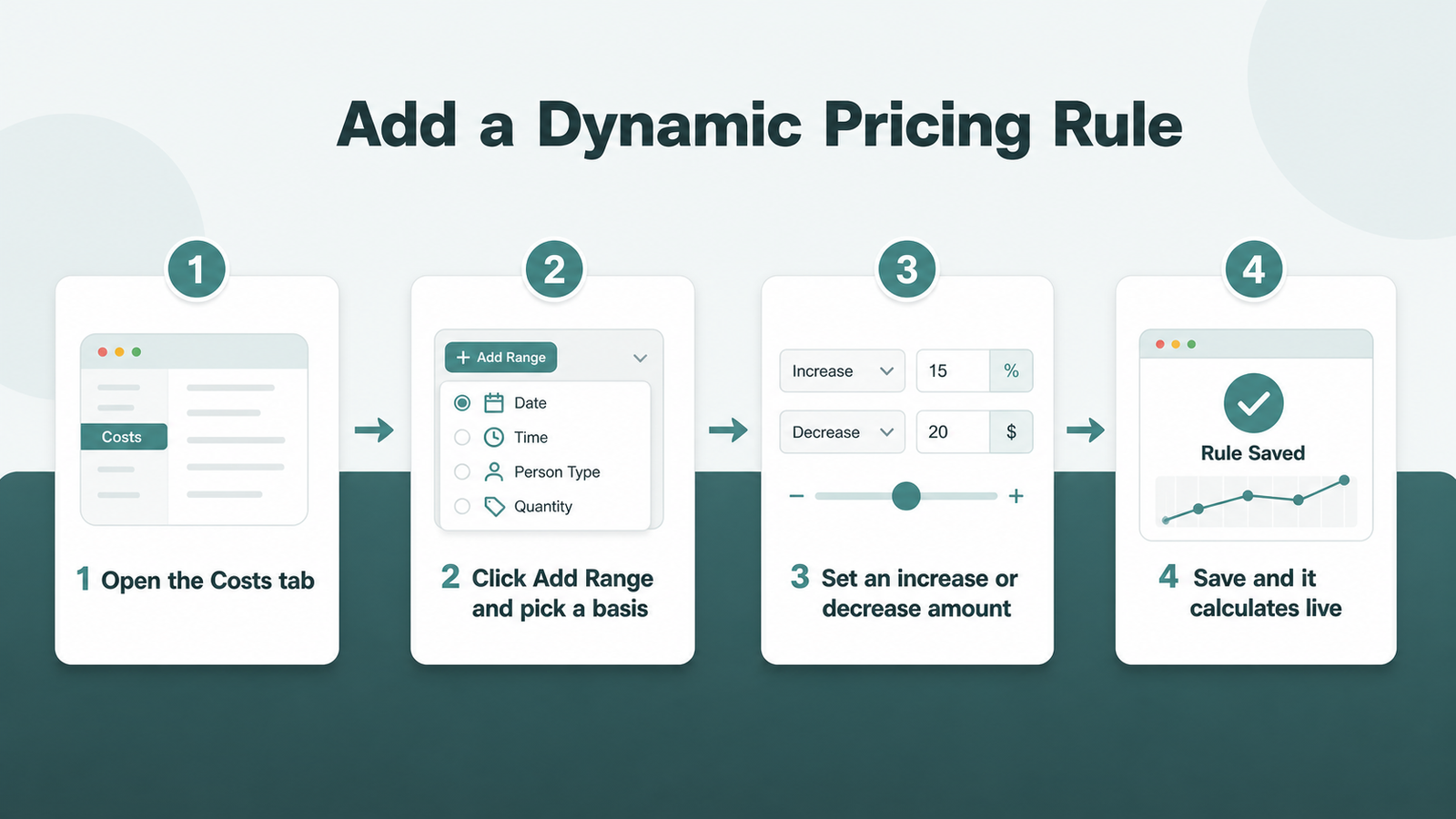
You build every rule on the Costs tab of a Reservable Product, with no code required.
- Edit a Reservable Product and open the Costs tab.
- Click Add Range and pick a range basis.
- Set an increase or decrease amount for that range.
- Save, and ARB calculates the rule live instantly.
ARB vs Booking Plugins That Gate Pricing
Most booking plugins charge extra for dynamic pricing, or apply only one rule at a time.
| Plugin | Dynamic pricing access |
|---|---|
| ARB | Six stackable range bases on one Costs tab, one-time $55 |
| WooNinjas | Dynamic pricing only in paid tiers ($79 to $269 per year), duration or demand |
| Plugin Republic | Dynamic pricing gated behind a separate $149 per year tier |
| PluginHive | Only the highest-priority cost rule applies, so surcharges cannot combine |
| WooCommerce Bookings | Date and time ranges cannot combine with per-group or per-resource rules |
The generic WooCommerce Dynamic Pricing extension does not help here either. It discounts cart quantity, order totals, and customer roles for $129.00, never a booking's date, time, or resource.
Stop Charging One Flat Price for Every Booking
The whole ARB pricing engine ships in the one-time license, so you charge by date, time, duration, person, and resource without a subscription. Open the live ARB demo and stack a test rule before you buy.
Frequently asked questions
Straight answers to the questions that matter most
Can I charge more for weekend bookings in WooCommerce?
Yes. Add a Date Range rule from Saturday to Sunday with a positive amount. ARB adds that amount to every weekend booking automatically, the same setup as the spa example above.
Can booking prices change by time of day?
Yes. A Time Range rule adjusts price for specific hours. A $10 discount for the 7 PM to 10 PM slot fills quiet evening hours without a manual override.
Does ARB support price by number of days or length of stay?
Yes. The Slot Count range basis discounts or surcharges price once a booking crosses a duration or quantity threshold, covering length-of-stay pricing natively.
Can I set different prices per person or per group?
Yes. Person Count rules discount group bookings. Person Types also set an independent price for each booker category, such as Adult versus Child.
Can each resource, like a room, staff member, or car, have its own price?
Yes. Every Resource in ARB carries its own individual price and availability. That price stays independent from every Add Range rule applied on top of it.
Is this the same as the WooCommerce Dynamic Pricing extension?
No. The generic extension discounts cart quantity, order totals, and customer roles. ARB's booking dynamic pricing prices a single reservation by date, time, duration, person, and resource.
Does the price update live before checkout?
Yes. ARB recalculates the total over AJAX as the customer picks a date, time, resource, or person count. It can also show an itemized breakdown before checkout.
Can I set a custom price when the rules do not fit?
Yes. Turning on Request for Quote mode replaces the booking form with a quote request. The admin then sets a custom price for that specific requester.
More setup answers live in the WooCommerce booking FAQ.