Choosing a web host means testing a provider across eight dimensions: hosting-type fit, uptime, speed, support, pricing and renewal terms, scalability, security, and independent reviews. Get any one wrong and you risk downtime, a slow site, or a renewal bill that doubles.
This guide walks through each dimension as a concrete step, in the order that actually protects you before you sign up. It ends with the most common mistakes buyers make. Then it answers the questions people ask most before buying or switching hosts.
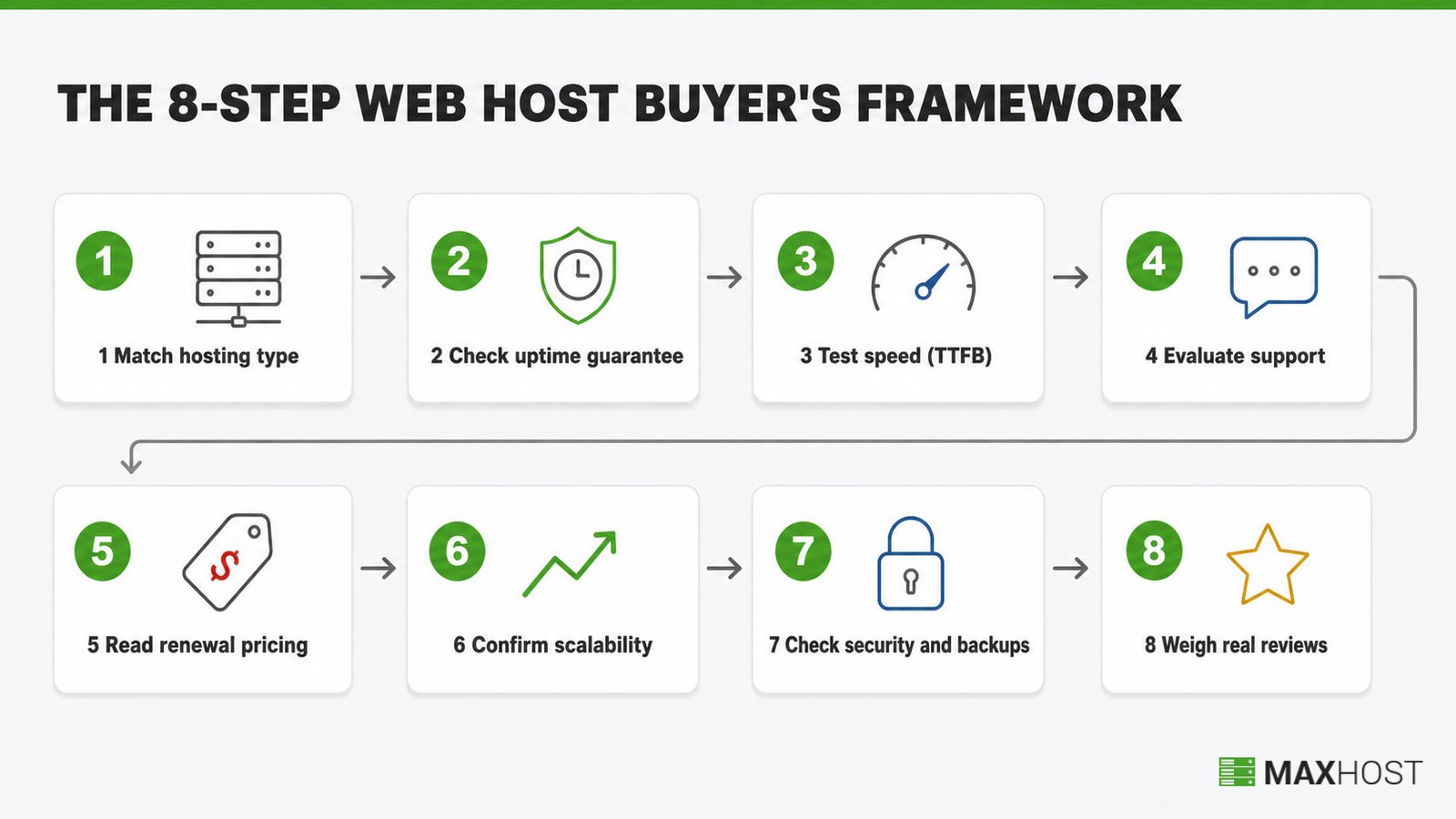
Choosing a Web Host at a Glance
A web host is worth choosing when it fits your site's traffic pattern and guarantees 99.9% uptime or better. It also loads fast, answers pre-sales questions specifically, and discloses its renewal price up front.
The table below is the fast version of this guide. It shows what good looks like on each dimension, and the red flag that tells you to walk away.
| Dimension | What good looks like | Red flag |
|---|---|---|
| Hosting type fit | Matches your site's actual traffic and workload | A one-size-fits-all plan pushed regardless of your traffic |
| Uptime guarantee | 99.9% or higher, backed by a written SLA with a credit remedy | No stated guarantee, or an SLA with no compensation clause |
| Speed and performance | Time to first byte under 800ms, plus a data center near your audience | No published performance data, and no choice of data-center region |
| Support quality | A specific, accurate answer to a pre-sales question within hours | A canned reply or a link to a generic help article |
| Pricing and renewal | The renewal price is disclosed next to the intro price | The renewal price is buried in a separate terms page |
| Scalability | You can upgrade tiers in place, without a full migration | Upgrading forces a fresh signup and a manual migration |
| Security and backups | Free auto-renewing SSL, daily backups, malware scanning, DDoS protection | Backups sold as a paid add-on with no default coverage |
| Reviews and reputation | Consistent ratings across two or more independent platforms | Only vendor-published testimonials, no third-party presence |
What You Need Before You Start
Gather three things before you compare a single host. Skipping this step is why most buyers pick the wrong plan on the first try.
- Your site's type and expected traffic. A blog, a portfolio, a small business site, and a growing store each need a different hosting type.
- A realistic budget. Use the renewal price you will actually pay, not the discounted first-term price.
- Your technical comfort level. Decide whether you want a fully managed plan or are comfortable managing your own server.
This guide assumes you are choosing hosting for your own site. If you are instead vetting an upstream provider to resell hosting under your own brand, the same eight criteria still apply. You will also weigh reseller hosting terms with that upstream partner. Ask whether you need white label hosting too, since your customers should never see their name.
Step 1: Match the Hosting Type to Your Site's Needs
Hosting type is the first filter, because it determines every resource limit that follows. Pick it before you compare any specific provider.
Web hosting splits into four practical types for most buyers. The table below maps each type to a site profile.
| Site type | Best hosting type | Why |
|---|---|---|
| Blog or small brochure site | Shared hosting | Lowest cost, low traffic, no dedicated resources needed |
| Growing traffic or an online store | VPS hosting | Dedicated resources without managing a full physical server |
| Enterprise or high-traffic site | Dedicated or cloud hosting | Full server control, or elastic capacity for traffic spikes |
| WordPress-specific build | Managed WordPress hosting | Server tuned for WordPress, with automatic updates and caching |
Shared hosting works for most new sites under a few thousand monthly visitors. Once a store or a content site outgrows shared resources, VPS hosting removes the noisy-neighbor risk without the cost of a dedicated server. For the full breakdown of how these tiers differ on resources, control, and price, see shared vs VPS vs dedicated vs cloud hosting.
Done: You can name your hosting type in one sentence. You can explain why it fits your current traffic, not your hoped-for traffic.
Step 2: Check the Uptime Guarantee and What It Actually Covers
A written uptime guarantee of at least 99.9% is non-negotiable. Below that floor, treat the plan as unreliable regardless of its other features.
The percentage matters less than what it means in real downtime. At 99.9% uptime, a site can go down for up to 8 hours and 46 minutes a year and still meet the guarantee. At 99.95%, that falls to about 4 hours and 23 minutes. At 99.99%, it drops to under 53 minutes a year, roughly ten times less downtime than the 99.9% floor.
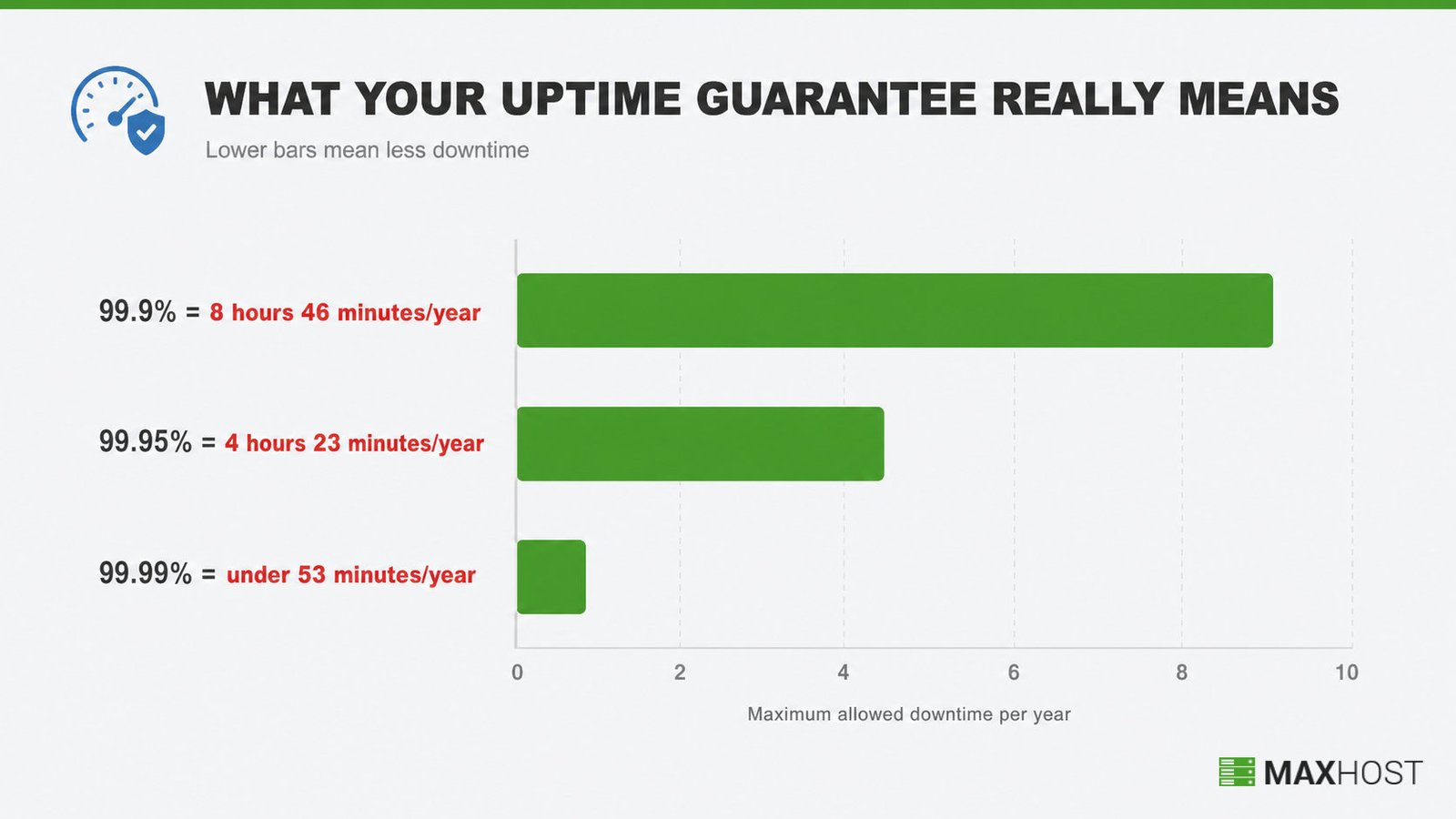
A guarantee without a remedy is not a guarantee. Confirm the SLA states a specific service credit, commonly a percentage of your monthly fee per hour of downtime past the threshold.
Then read the fine print, because that is where the guarantee narrows. Two clauses decide whether the number means anything.
- Exclusions. Many hosts exclude scheduled maintenance, software updates, and DDoS attacks from the downtime that counts against the guarantee.
- Claim process. The credit is rarely automatic. Most SLAs make you request it with a ticket, often within 10 to 30 days of the outage.
Done: You know the host's stated uptime percentage and its downtime-minutes equivalent. You also know exactly what credit you get if it misses the number.
Step 3: Test Real-World Speed and Performance
Time to first byte (TTFB) is the cleanest speed signal a host controls directly. It measures how fast the server responds before your page even starts rendering. Google's own threshold marks 800 milliseconds or less as good, 800 to 1,800 milliseconds as needing improvement, and anything above 1,800 milliseconds as poor.
A well-configured host on shared or managed plans should land well inside the good range, typically a few hundred milliseconds. Anything consistently near or above the 800ms line signals an overloaded server or thin infrastructure.
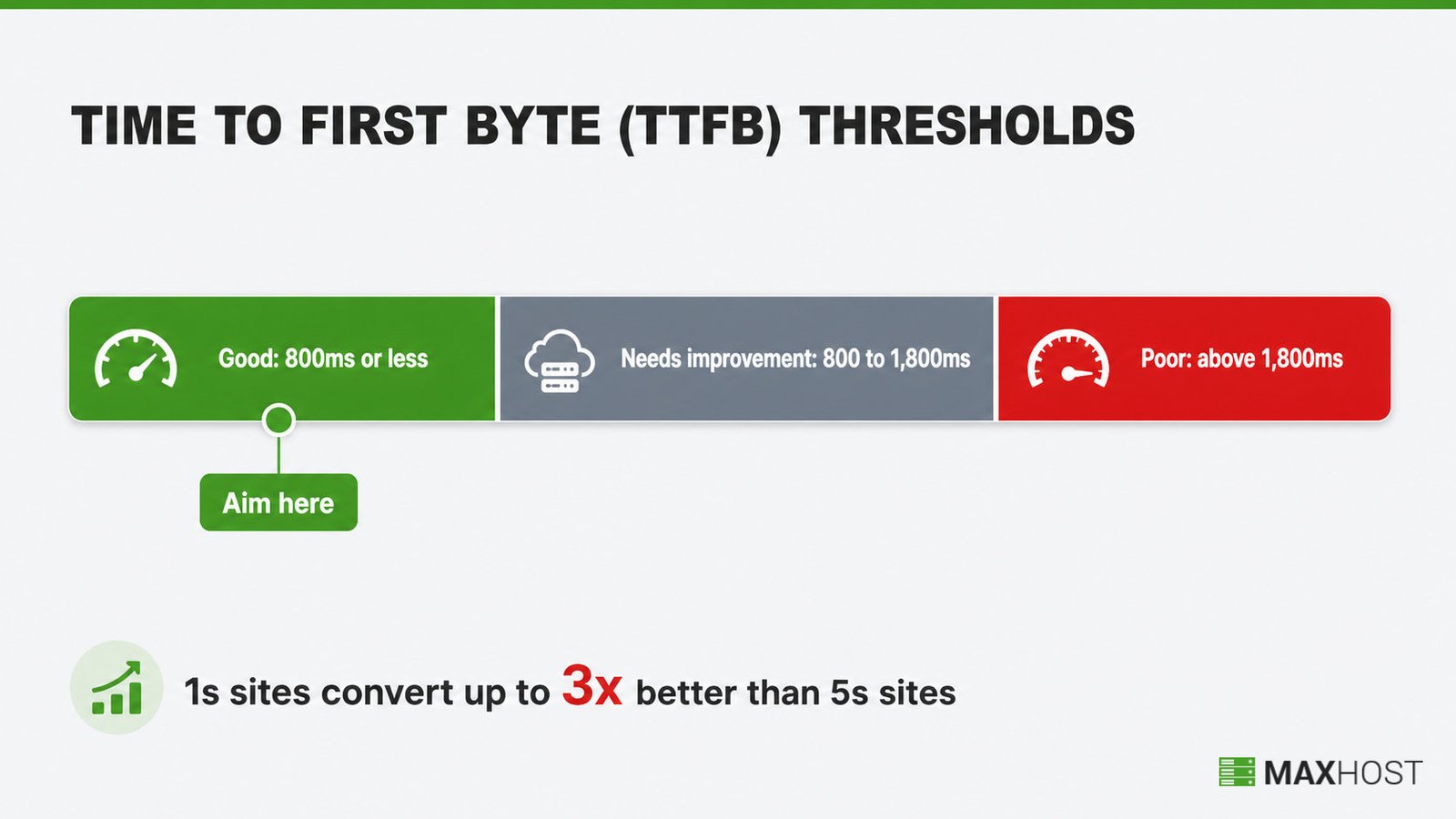
Server location shapes speed as much as hardware does. Pick a host with a data center near most of your visitors, since physical distance adds latency to every request.
Speed is not a cosmetic metric. Portent's independent research found that B2B sites loading in one second convert at roughly three times the rate of five-second sites. Ecommerce sites loading in one second convert at roughly 2.5 times the rate of five-second sites. Test any host's published demo or existing customer sites with a free tool like Pingdom or GTmetrix before you commit.
Done: You have a TTFB measurement from a live site on that host, and you know which data-center region will serve your visitors.
Step 4: Evaluate Support Quality Before You Buy, Not After
Test support before you pay, because a slow or vague pre-sales reply predicts exactly what happens when your site goes down. This is the single most skipped step in choosing a host.
Send a real, specific technical or policy question through the host's pre-sales chat or email, not a generic "do you offer hosting" message. Then judge the response on three points.
- Response time. A specific answer inside a few hours is a good sign; a day or more is a warning for anything time-sensitive.
- Specificity. A real answer names the actual limit, process, or setting; a canned reply links a generic help article instead.
- Channel coverage. Confirm whether live chat, phone, and ticket support are all available, and at what hours.
If the pre-sales team stalls or dodges a direct question, the paying-customer support queue is unlikely to be faster.
Done: You have a timestamped, specific answer to your own test question from that host's actual support team.
Step 5: Read the Pricing Fine Print (Intro Price vs Renewal Price)
Check the renewal price before you buy, not just the advertised intro price. This single check prevents the most common and costly hosting mistake.
Introductory pricing subsidizes new signups; the renewal price is where the host recovers that discount. Renewal increases of 200% to 500% over the intro rate are common industry-wide. A $2.99-per-month plan can renew at $18 a month or more once the first term ends.
Before you sign up, ask the host these questions directly.
- What is the exact renewal price for this plan, in writing?
- Does the plan auto-renew, and can I disable auto-renewal?
- Is there a cancellation or downgrade fee if I leave after the first term?
- Is the free domain free only for the first year, and what does it renew at?
- What is the money-back guarantee window, so I can test the host risk-free?
Done: You have the exact renewal price in writing, not an estimate from a sales page.
Step 6: Confirm There's Room to Scale as You Grow
Confirm you can upgrade tiers in place before you need to, because a forced migration under traffic pressure is far riskier than a planned one. Ask specifically whether moving from shared to VPS, or VPS to a higher tier, happens without a full site rebuild.
The strongest hosts let you click an upgrade button and keep your existing files, database, and DNS settings untouched. The weakest force a fresh signup and a manual migration, often during the exact traffic spike that triggered the upgrade.
This same evaluation framework applies if you are scaling into hosting or reselling yourself, not just buying hosting for one site. If that is your goal, how to start a web hosting business walks through picking an upstream wholesale provider with the identical criteria.
Done: You have a documented answer for how an in-place upgrade works on that host. You have this before you need it.
Step 7: Check Backups, Security, and the Control Panel
Confirm these four defaults exist before you buy. Retrofitting security after a breach costs far more than checking for it up front.
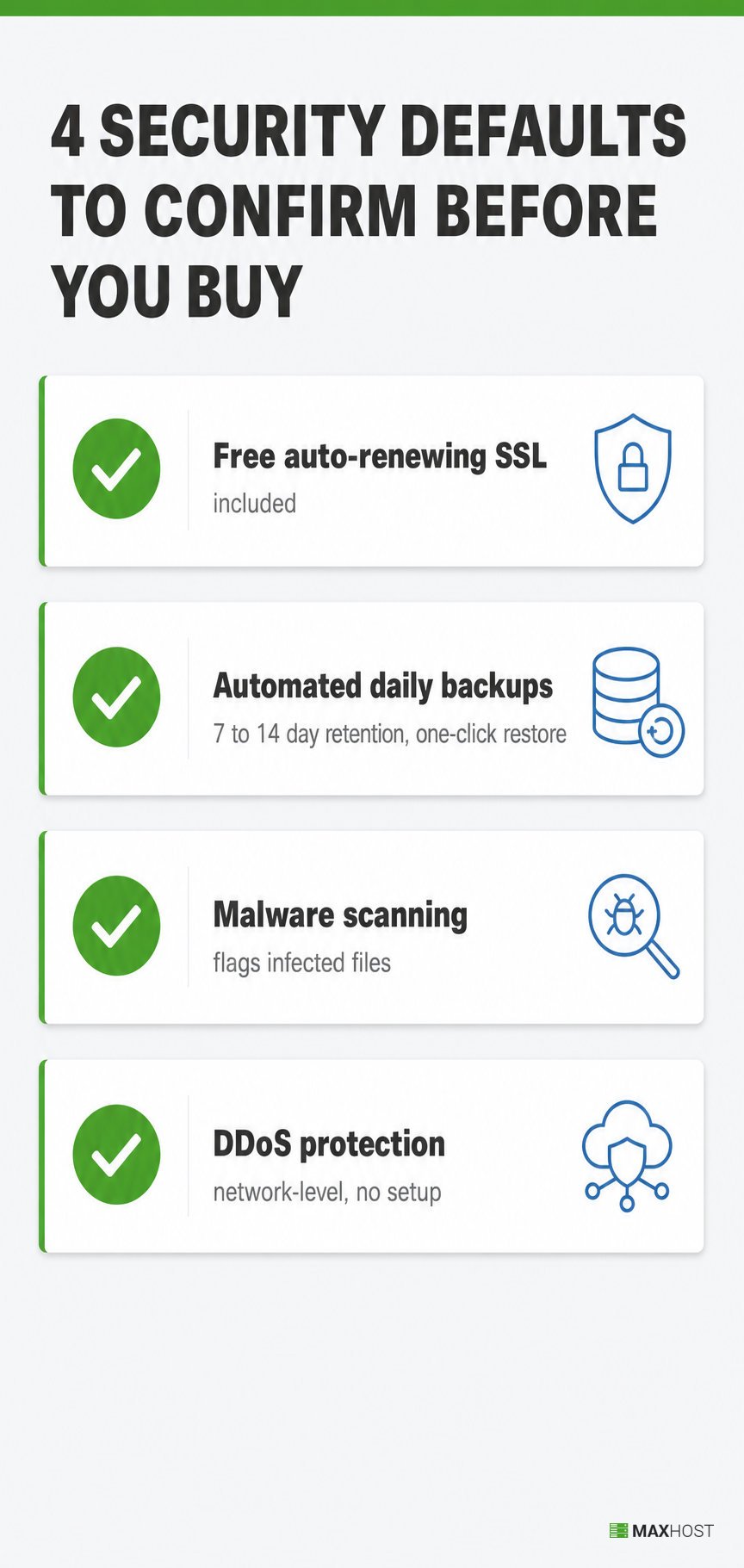
- Free, auto-renewing SSL. An SSL certificate should be included and renew automatically, not sold as a separate line item. Let's Encrypt now secures more than 700 million sites for free, so a host still charging for basic SSL is behind the baseline.
- Automated daily backups. Look for at least 7 to 14 days of retained, one-click-restorable backups included in the plan, not an optional paid add-on.
- Malware scanning. Active scanning that flags infected files, not just a firewall.
- DDoS protection. Network-level filtering that does not require you to configure anything.
A control panel you can actually use matters as much as the security features underneath it. cPanel remains the most familiar option for account-level management on shared and reseller plans. It has the shortest learning curve of any major panel. If you are evaluating a reseller or upstream package, also confirm WHM access. WHM is what lets you provision and manage customer accounts at the server level.
Done: You have confirmed SSL, backup retention, malware scanning, and DDoS protection. You have also confirmed control panel access, in writing or in the plan's published specs.
Step 8: Weigh Real Reviews Over Marketing Claims
Weigh independent review-platform patterns over the host's own testimonials, because a vendor only publishes the reviews that make it look good. Every hosting company's homepage shows five-star quotes; that tells you nothing on its own.
Read reviews on at least two independent platforms, such as G2, Capterra, Trustpilot, or Reddit. Look for a consistent pattern, not a single complaint or a single rave. A host with hundreds of reviews and a recurring complaint about billing surprises or slow support is telling you something specific. A host with only a handful of reviews, all suspiciously polished, is telling you something too.
Done: You have checked at least two independent review sources. You can name one recurring pattern, positive or negative, that the host's own marketing does not mention.
Common Mistakes to Avoid When Choosing a Web Host
The single most damaging mistake is chasing the lowest intro price while ignoring the renewal price. That gap is what causes bill shock at year two. The other four mistakes below compound it.
- Chasing the lowest intro price. What it looks like: picking the cheapest first-year offer without checking renewal terms. Why it happens: intro prices are the number every host advertises loudest. The fix: check the renewal price before you sign up, and budget for it from day one.
- Picking a hosting type before assessing your own traffic. What it looks like: buying dedicated hosting for a brand-new blog, or shared hosting for a growing store. Why it happens: buyers guess instead of measuring. The fix: complete Step 1's traffic assessment before comparing any specific plan.
- Skipping the pre-sales support test. What it looks like: discovering that support is slow or unhelpful only after your site goes down. Why it happens: pre-sales chat feels like a sales pitch, not a test. The fix: send a real technical question before you buy and time the response.
- Trusting "unlimited" claims at face value. What it looks like: hitting an undisclosed fair-use cap on storage, bandwidth, or file count. Why it happens: "unlimited" is a marketing term, not a technical one, and the real limit lives in the fine print. The fix: read the acceptable-use policy before you buy, not after you hit the cap.
- Not checking the upgrade path. What it looks like: needing a full migration to move up a tier during a traffic spike. Why it happens: buyers assume every host lets you upgrade smoothly. The fix: confirm in-place tier upgrades in Step 6, before you commit to a plan.
FAQs
What's the difference between a web host and a domain registrar?
A web host stores your website's files on a server and serves them to visitors; a domain registrar reserves and manages your domain name. You need both, but they do not have to be the same company, and switching one does not require switching the other.
How much should web hosting actually cost?
Basic shared hosting for a small site typically runs $3 to $15 a month at renewal. VPS hosting runs $20 to $80 a month, and managed WordPress or dedicated plans run higher depending on resources. Always compare the renewal price, not the intro offer, since that is what you actually pay long-term.
Is a 99.9% uptime guarantee actually good?
Yes, 99.9% is the industry-standard floor and allows up to about 8 hours and 46 minutes of downtime a year. Higher guarantees like 99.95% or 99.99% cut that further, down to under an hour a year at 99.99%. Still, 99.9% with a real credit remedy is an acceptable baseline for most sites.
Can I switch web hosts after I've already launched?
Yes, and it does not require downtime if you do it correctly. Keep your old host active while you clone your site to the new host and test the new copy fully. Then point your domain's DNS to the new host last. DNS changes can take up to 24 hours to fully propagate.
Is cheap web hosting always bad?
No, a low price alone is not the problem. The trap is an undisclosed renewal jump or a fair-use cap you discover after you commit. A cheap plan with a transparent renewal price and honest limits can be a genuinely good deal; a cheap plan hiding either is not.
How do I test a host's support before buying?
Send a specific technical or policy question through the host's pre-sales chat or email before you pay. Time how long the reply takes and judge whether it actually answers your question or just links a generic help article. A vague or slow pre-sales reply predicts how support behaves after you become a paying customer.
Do I need my own server, or can I resell hosting instead?
You do not need your own physical server to sell hosting. Reseller hosting lets you buy capacity wholesale from an upstream provider and resell branded plans to your own customers. Use the same evaluation criteria in this guide to vet that upstream partner.
Choosing your own host and choosing the software that runs a hosting company are two different decisions. If this guide was for your own site, you are set. Vetting an upstream host to start hosting or reselling instead is a different job. That job also needs a site built for the business itself. MaxHost is a WordPress theme purpose-built for hosting companies and resellers. It pairs marketing pages with a matching WHMCS client area. See the WordPress theme for hosting companies or view the demo.