Shared, VPS, dedicated, and cloud hosting differ in how much of a physical server you get and how much control you have over it. Shared hosting splits one server among many sites, and dedicated hosting gives you the whole machine. The right tier depends on your traffic and budget.
Below: a full comparison table across cost, performance, control, and scalability. Then a breakdown of what each tier means, a decision framework for choosing between them, and where cloud fits against VPS as your upgrade path.
Shared vs VPS vs Dedicated vs Cloud Hosting Compared
The four hosting tiers differ most in cost, control, and how server resources are shared, summarized in the table below.
| Hosting Type | How It Works | Performance | Control | Scalability | Typical Cost | Best For |
|---|---|---|---|---|---|---|
| Shared Hosting | Hundreds of sites share one server's CPU, RAM, and storage | Lowest of the four; a busy neighboring site can slow your pages down | Lowest; a control panel only, no root access | Fixed; growing past your plan means switching hosting types | $1 to $15 per month | Small sites, blogs, and new projects |
| VPS Hosting | Virtualization partitions one physical server into isolated, dedicated-resource slices | Higher and more predictable; other tenants cannot slow your slice down | Moderate to high; root access on most plans | Resizable by upgrading your plan, within the host's tiers | $20 to $100 per month | Growing sites that need predictable resources and more control |
| Dedicated Hosting | You get one entire physical server, with nothing shared | Highest and most consistent; every resource on the machine is yours | Highest; full root access and hardware-level control | Least flexible; scaling further means provisioning another server | $80 to $500 or more per month | High-traffic sites and compliance-driven workloads |
| Cloud Hosting | Resources are pooled across a network of servers, not one fixed machine | High and resilient; the network absorbs traffic spikes and keeps your site online if one machine fails | Ranges from a managed panel to full technical control, depending on the provider | Most scalable; capacity expands and contracts with demand | $20 to $100 per month, usage-based | Sites with variable or unpredictable traffic |
These four tiers share one underlying tradeoff: you trade cost for the amount of server you control. As your traffic and technical comfort grow, so does the tier you need.
What Each Hosting Type Actually Means
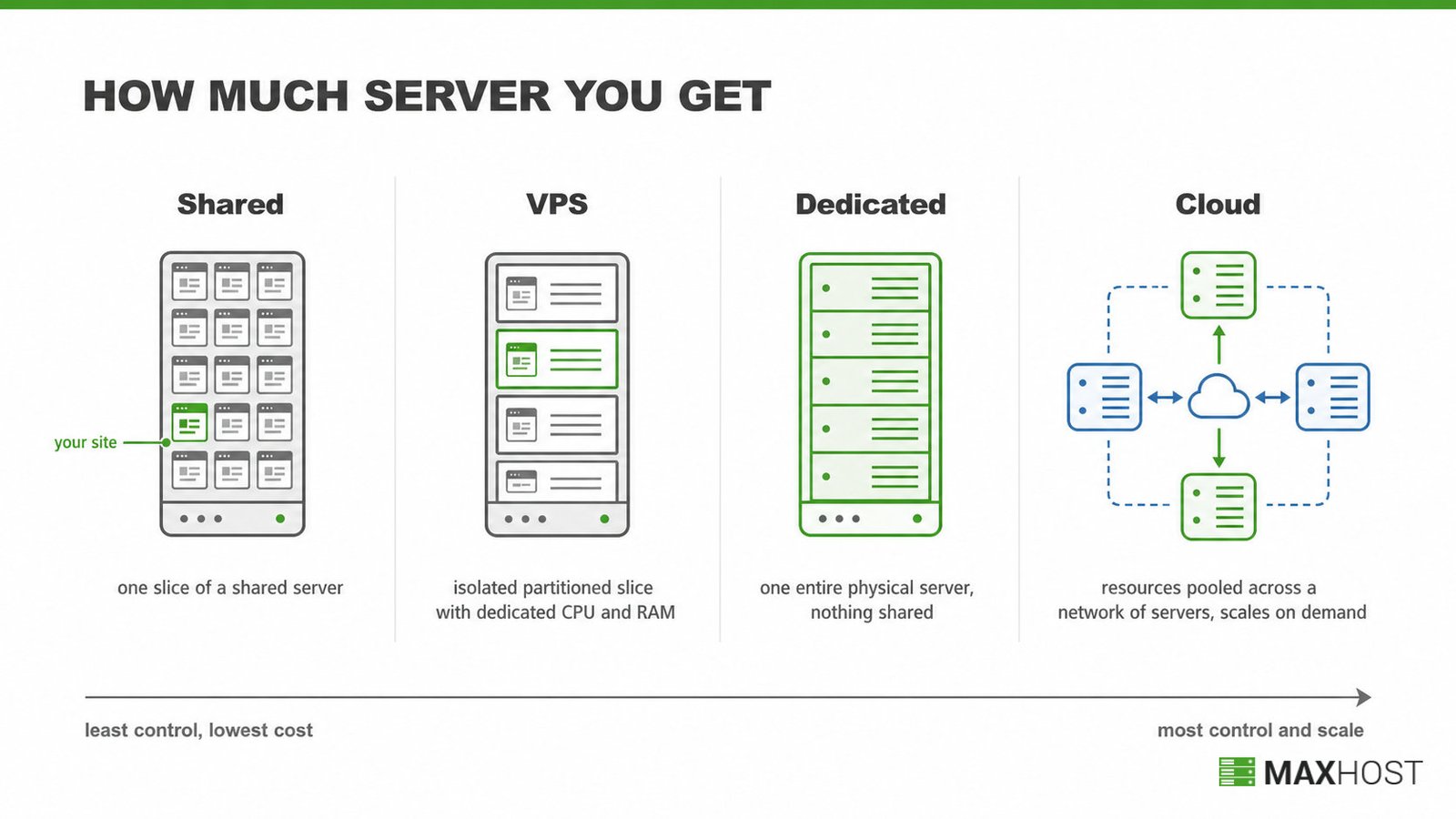
Each of these four tiers is a different take on what is web hosting. Every tier rents a share of a server and sets how much control you get over it.
Shared Hosting
Shared hosting puts your site on a server with hundreds of other websites, splitting CPU, RAM, and storage among every tenant. It is the cheapest tier because the provider spreads one machine's cost across many customers. Most shared plans ship a cPanel control panel instead of root access.
Sharing means a busy neighboring site can slow your pages down, a pattern HostPapa calls the noisy neighbor effect. Most shared plans handle roughly 10,000 to 100,000 monthly visits before performance suffers, according to Verpex. The full mechanism, benefits, and limitations live on what is shared hosting.
VPS Hosting
VPS hosting uses virtualization to partition one physical server into isolated slices, each with dedicated CPU and RAM. Your slice is not affected by other tenants on the same machine, unlike shared hosting's pooled resources. AWS frames VPS as the balance point between shared and dedicated hosting.
Most VPS plans include root access, so you can install anything and edit system files directly. An unmanaged VPS leaves setup and security patching to you. A managed VPS hands routine server work to the provider instead, a distinction GoDaddy draws for buyers choosing between the two. The full mechanism, benefits, and limitations live on what is VPS hosting.
Dedicated Hosting
Dedicated hosting gives you one entire physical server, with nothing shared with any other customer. Every CPU cycle, memory chip, and disk sector belongs to your site alone, so performance stays consistent even during traffic spikes. Cherry Servers notes it is the only tier with no built-in scaling mechanism: growing further means provisioning another server.
This tier costs the most and delivers the highest uptime and control of any tier, which is why compliance-driven and high-traffic workloads choose it. You get full root access and hardware-level control, with no other tenant able to affect your resources. The full mechanism, benefits, and limitations live on what is dedicated hosting.
Cloud Hosting
Cloud hosting pools resources from a network of servers instead of relying on one fixed machine. Traffic spikes pull additional capacity from that network automatically, instead of hitting a hard resource ceiling.
That same network makes cloud hosting resilient. If one server fails, another takes over, so your uptime never depends on a single machine. Billing follows a usage-based, pay-as-you-go model rather than a flat monthly rate, so cost tracks your actual load.
This elasticity makes cloud hosting the most scalable of the four tiers, though it runs somewhat higher than VPS at comparable load. Control varies by provider, ranging from a simple managed panel to full technical access for teams that want it. The full mechanism, benefits, and limitations live on what is cloud hosting.
Which Hosting Type Should You Choose?
Four triggers point to four different tiers, mapped in the table below.
| If Your Site... | Choose | Why |
|---|---|---|
| Is a small site, blog, or new project with light, predictable traffic | Shared Hosting | Lowest cost, and the traffic ceiling will not be an issue yet |
| Is growing past shared hosting's traffic ceiling and needs predictable resources | VPS Hosting | Isolated resources and optional root access, without dedicated hosting's price |
| Runs high-traffic workloads or has compliance requirements that demand full control | Dedicated Hosting | Maximum performance, uptime, and hardware-level control |
| Sees variable or unpredictable traffic, including seasonal spikes | Cloud Hosting | Elastic capacity that scales with demand instead of a fixed ceiling |
Managed versus unmanaged support is a second factor once you have picked a tier. An unmanaged VPS or dedicated plan saves money, but it assumes you can patch and secure the server yourself. For a broader buyer framework beyond hosting tiers, including support, uptime SLAs, and pricing structure, see how to choose a web host.
Is VPS or Cloud Hosting the Right Upgrade From Shared Hosting?
VPS and cloud hosting are the two most common upgrades from shared hosting, and they solve different problems. VPS gives you a fixed, isolated slice of one server, so cost stays flat and predictable. Cloud spreads your site across a network of servers and bills for actual use, so it absorbs spikes shared and VPS hosting cannot.
Reliability separates them too. A VPS ties your uptime to one physical machine, while cloud hosting reroutes to another server when hardware fails. The line between the two has blurred, and many providers now sell a "cloud VPS" that mixes both models.
Choose VPS when your traffic is steady and you want a known monthly bill. Choose cloud when traffic is unpredictable, seasonal, or growing fast, and paying for elastic headroom is worth the higher average cost. The full breakdown, including billing and scaling mechanics, lives on VPS vs cloud hosting compared.
How MaxHost Supports Every Hosting Tier
MaxHost supports every tier in this comparison by giving hosting businesses matching demos and billing templates for whichever tier they sell. Hosting-business builders get coordinated marketing demos for Web Hosting, Server Hosting, CyberPanel Hosting, and Cloud Hosting, the last tagged HOT on the live demo hub. Each demo pairs with bundled WHMCS client-area templates that install directly. Your marketing site and billing cart then share one design, with no bridge plugin connecting them.
That consistency matters most at checkout. A customer moving from your shared-hosting plan page into WHMCS should never feel like a different product took over. Resellers who sell more than one tier, shared alongside VPS or cloud, get that same visual consistency across every plan page and every client-area screen. The server hosting WordPress theme goes deeper on the VPS, dedicated, cloud, and datacenter layouts specifically.
See the MaxHost demo to explore every hosting-tier layout before you buy.
FAQs
What is the difference between shared, VPS, dedicated, and cloud hosting?
Shared hosting splits one server among many sites. VPS isolates a dedicated resource slice within a shared server. Dedicated gives you an entire server, and cloud spreads your site across a network of servers with usage-based billing.
Which type of hosting is cheapest?
Shared hosting is cheapest, typically $1 to $15 per month. VPS costs more at $20 to $100 per month, and cloud runs a similar range but bills usage-based. Dedicated hosting is the most expensive, at $80 to $500 or more per month.
Which hosting type is the most scalable?
Cloud hosting is the most scalable, since capacity expands and contracts automatically with demand. VPS is scalable within limits, but you resize by upgrading your plan rather than drawing on a shared pool.
Do I need dedicated hosting for a high-traffic site?
Not always: VPS or cloud hosting often handles high traffic first, since both scale further than shared hosting without dedicated's full cost. Dedicated hosting becomes worth it once you need guaranteed capacity or compliance-driven isolation.
Is cloud hosting the same as VPS hosting?
No. VPS gives you a fixed, isolated slice of one server at a flat monthly price. Cloud spreads your site across a network of servers and bills usage-based, so it handles unpredictable spikes VPS cannot.
What are the 4 main types of web hosting?
The four main types of web hosting are shared, VPS, dedicated, and cloud hosting. Each rents a different amount of server and control, from a shared slice on shared hosting to a whole machine on dedicated hosting.
Can I upgrade from shared hosting to VPS or cloud later?
Yes. Moving from shared hosting to VPS or cloud is the standard growth path as traffic increases. Most hosts migrate your site with minimal downtime once you outgrow your current plan.