Email hosting is a service that runs dedicated mail servers so a business can send and receive mail from its own domain. A hosting provider manages the servers, storage, and spam filtering, so a message lands at you@yourbrand.com instead of a free address like Gmail.
How Does Email Hosting Work?
Email hosting works through a chain of DNS records and mail protocols that route messages to and from a domain's mailbox. An MX (Mail Exchange) record in the domain's DNS tells other mail servers where to deliver incoming mail. The mail server stores each message until the mailbox owner retrieves it, then sends new mail back out.
An MX record is a type of DNS record, so setting up email hosting always starts with DNS access for the domain. Lower MX priority numbers get tried first, and a domain can list backup mail servers at higher priority numbers, per Wikipedia's MX record entry.
The mechanism relies on three protocol layers, covered below:
- MX record routes incoming mail to the correct mail server
- IMAP or POP3 retrieves stored mail; IMAP syncs the same mailbox across devices, while POP3 typically downloads and removes it from the server
- SMTP sends outgoing mail from the mailbox to its next hop
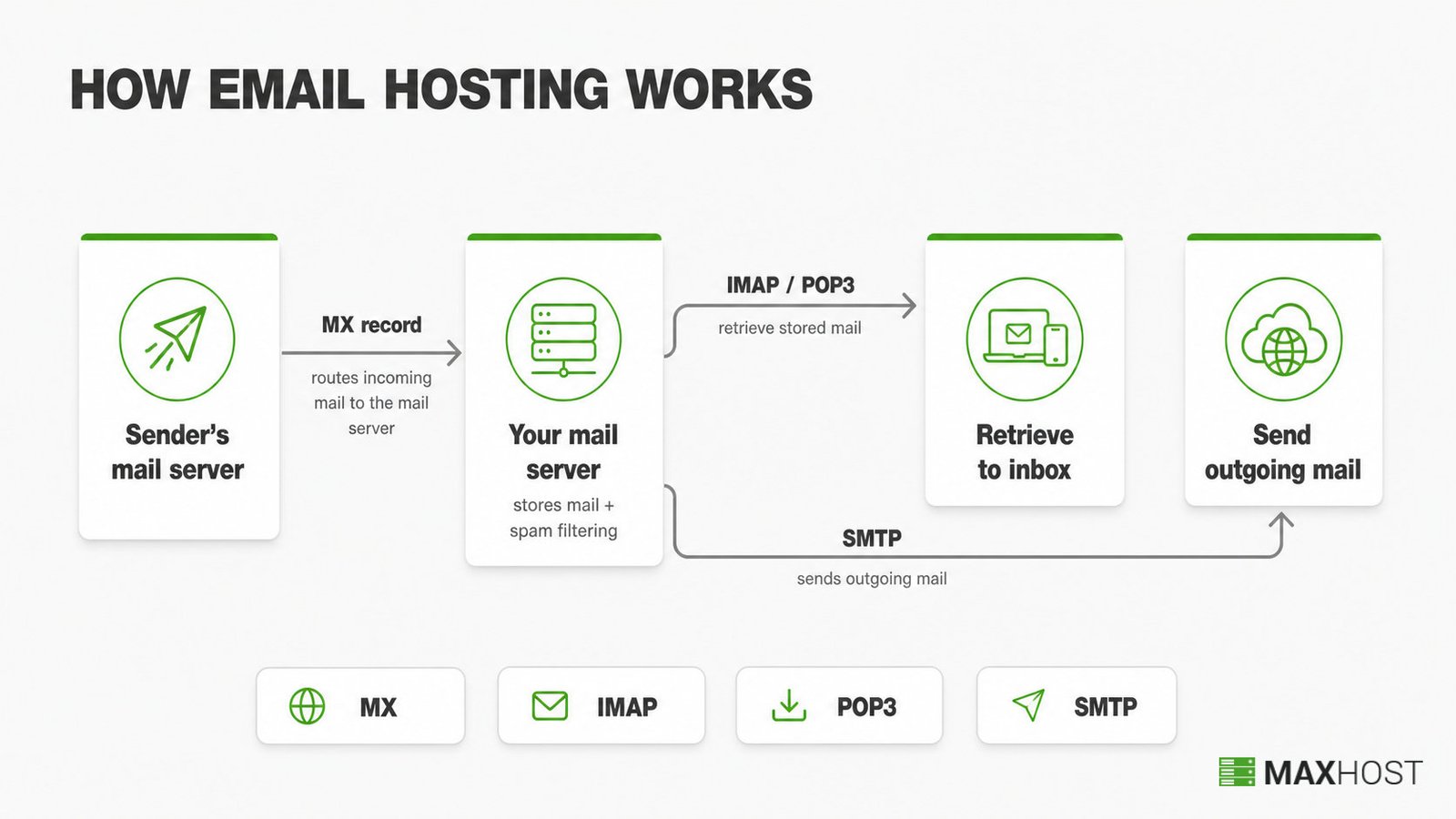
Alongside the MX record, a hosted domain publishes SPF, DKIM, and DMARC records. These authenticate the sender, and they are what keep legitimate mail out of the recipient's spam folder.
A webmail application reads and writes those messages. A desktop or mobile mail client connected over the same protocols works just as well, per Wikipedia's email hosting service entry.
Why Use Email Hosting Instead of a Free Email Address?
Email hosting beats a free address on five fronts. It gives a custom domain that reads as a business, mailbox storage that scales into tens of gigabytes, and stronger spam and malware filtering. It drops the third-party ads a free inbox carries, and it lets a whole team share matching addresses on one domain. Free webmail ties an address to the provider's own domain and caps storage at a few gigabytes.
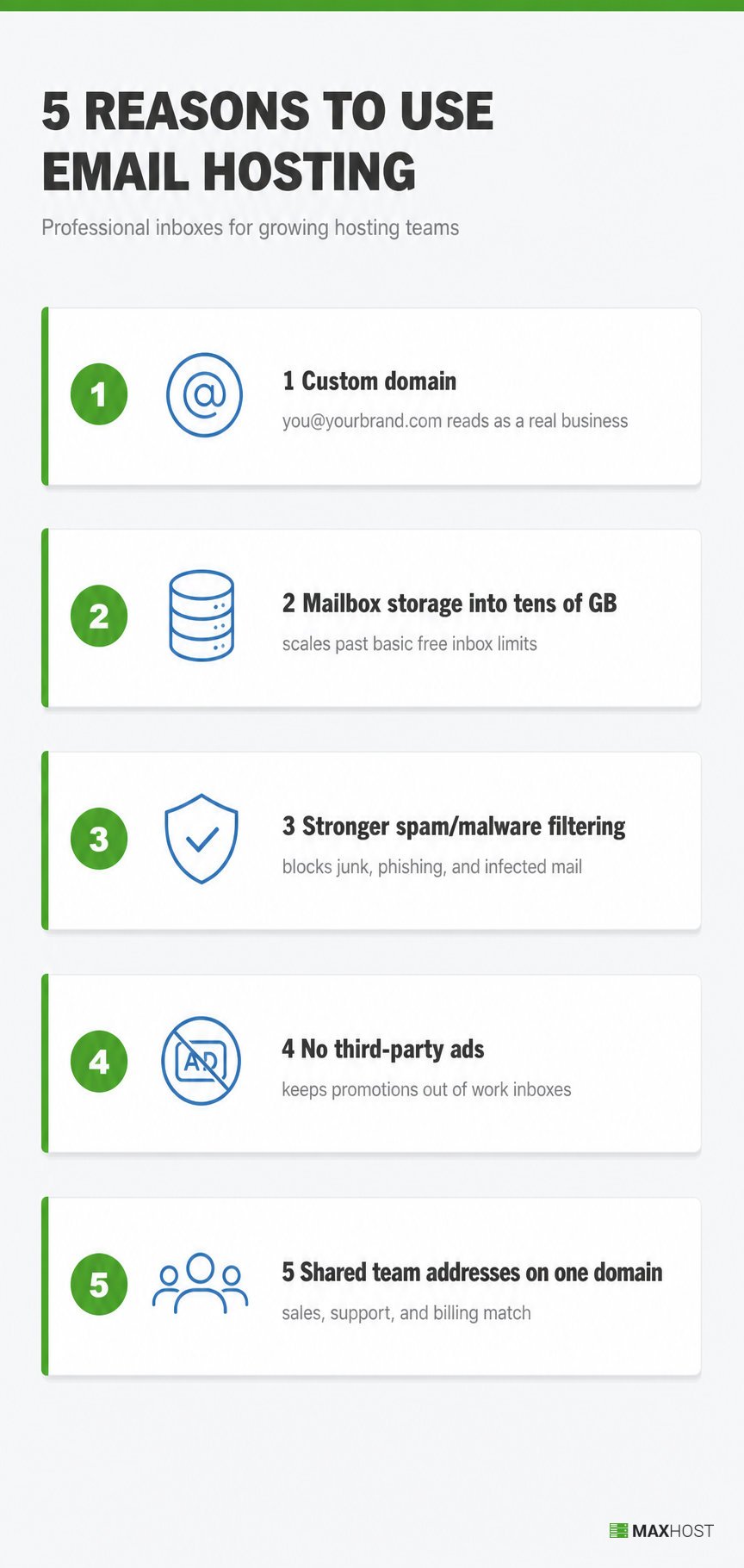
A custom domain name on every email address signals a real, established business rather than a personal account. That distinction matters most on a first message to a new customer or supplier.
Most of the time, a domain registrar or hosting company bundles email hosting into the domain or hosting purchase. It rarely sells as a stand-alone product. A domain reseller commonly upsells email hosting alongside every domain sale, and many shared hosting plans include a basic mailbox at no extra charge.
How Much Does Email Hosting Cost?
Email hosting starting prices run from about $1 to $32 per mailbox per month, from Zoho Mail's entry tier to Microsoft 365 Business Premium. Starting prices and mailbox storage for four widely used entry-level providers, verified in July 2026, appear below.
| Provider | Starting Price | Storage Per Mailbox |
|---|---|---|
| Zoho Mail | $1.00/month (Lite, billed annually) | 5 GB to 10 GB |
| Google Workspace | $7.00/month (Business Starter, annual plan) | 30 GB |
| Microsoft 365 | $7.00/month (Business Basic, annual plan) | 100 GB |
| Namecheap Private Email | $1.24/month ($14.88 billed yearly, Starter plan) | 5 GB |
Three factors drive the final bill.
- Mailbox count, because nearly all plans price per user, so five mailboxes cost five times one
- Storage tier, since entry plans cap at 5 GB to 10 GB while premium tiers reach 50 GB or more
- Bundled apps, as email-only plans stay cheap while suites adding calendars, file storage, and video calls cost more
Many web hosts skip per-mailbox pricing entirely and bundle a free mailbox with a shared hosting plan through cPanel email instead.
Is Hosting Your Own Email Server Worth It?
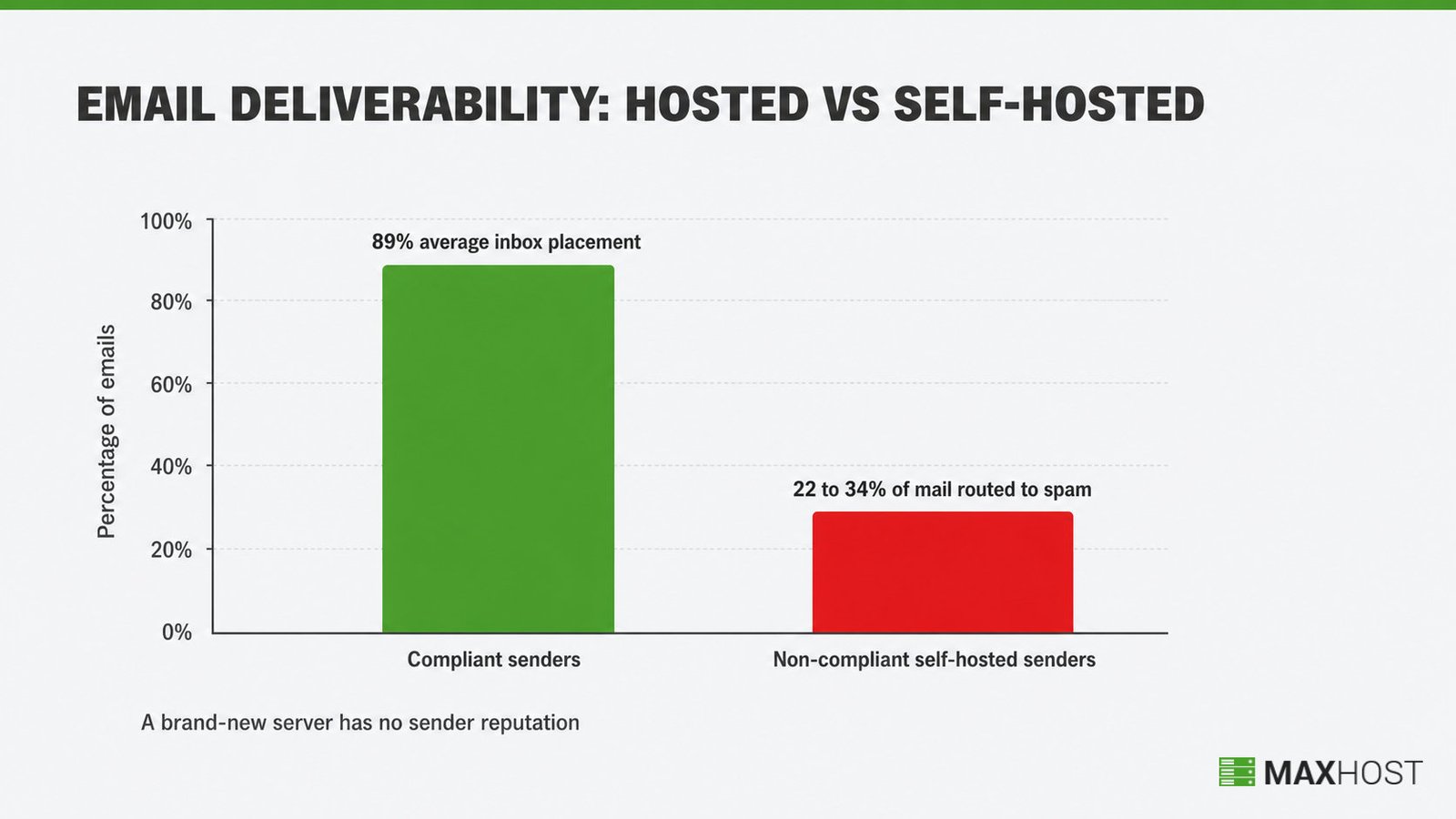
For most small hosting operations, no. Self-hosting an email server trades a low sticker price for deliverability risk. Hosted providers manage that risk at scale; a brand-new server has no sender reputation, and spam filters distrust it by default.
Compliant senders average 89 percent inbox placement. Non-compliant self-hosted senders can see 22 to 34 percent of mail routed straight to spam, according to a 2026 PowerDMARC analysis.
The maintenance never stops either. The operator warms the sending IP, keeps SPF, DKIM, and DMARC aligned, and often fights ISPs that block outbound port 25 by default.
Reliability compounds the risk. A self-hosted mail server needs the same uptime discipline as a website. A server that drops offline bounces messages, instead of just failing to load a page.
What Is the Difference Between Email Hosting and Web Hosting?
Web hosting stores a website's files and serves them to visitors. Email hosting stores and routes a domain's mailboxes. The two solve different jobs, even though the same company often sells both.
The split is clean across what each service stores and answers.
| Attribute | Web hosting | Email hosting |
|---|---|---|
| Stores | Website files, pages, and media | Mailboxes and their messages |
| Answers | A browser loading your domain | Mail addressed to your domain |
| Core DNS records | A and AAAA records | MX, SPF, DKIM, and DMARC records |
| Runs on its own | Yes, with no mailbox attached | Yes, with no website attached |
Web hosting answers the request when someone types a domain into a browser, loading pages from files on a server. Email hosting answers a separate request: where a message addressed to that domain's mailbox should land. A hosting plan can include both services, one, or neither, and buying one does not automatically include the other.
How MaxHost Helps Hosting Companies Sell Email Hosting
MaxHost gives a hosting company the WordPress site and WHMCS-matched checkout to sell email hosting as a plan add-on. It does not host the mail servers itself. Pricing tables and a live domain search present the offer to a visitor before checkout.
Email hosting is sold, not built, by most hosting companies. A reseller typically resells Google Workspace, Microsoft 365, or its own cPanel-based mailboxes. It then needs a site that presents those add-ons next to hosting and domain plans. MaxHost's guide to how to build a web hosting website covers that full setup.
MaxHost is a WordPress and WHMCS theme built for hosting companies, domain resellers, and corporate IT businesses selling plans like these. Its Pricing Tables display email add-ons alongside shared, VPS, and dedicated hosting tiers in one comparison layout. Its Domain Search module lets a visitor check availability before checkout starts. Both sit inside WHMCS-matched templates, so the storefront and the order flow read as one brand. MaxHost does not run mail servers itself; hosting resellers still pair it with their own infrastructure or a provider like the ones compared above.
See the plan layout in MaxHost's live hosting demo.
FAQs
What is email hosting?
Email hosting is a service that runs dedicated mail servers for a business domain, instead of a free address like Gmail. Most providers also handle spam filtering, storage, and backups.
Do you need email hosting for your website?
Not strictly, but most businesses benefit from it. A custom domain address builds more trust than a free one. A website does not require email hosting to function, since the two are separate services.
What is the best email hosting service?
There is no single best option; the right choice depends on budget and mailbox needs. Zoho Mail, Google Workspace, Microsoft 365, and Namecheap Private Email are four widely used providers, each with different pricing and storage tiers.
Is it worth hosting your own email server?
For most small hosting operations, no. A self-hosted server starts with no sender reputation, so spam filters distrust it by default. Building deliverability takes ongoing work that a hosted provider already handles at scale.
Is email hosting the same as web hosting?
No. Web hosting stores and serves a website's files, while email hosting stores and routes a domain's mailboxes. The two are often sold on the same plan but solve different jobs.
Can I use Gmail with my own domain name?
Yes, through Google Workspace, the paid version of Gmail that supports a custom domain address. A free personal Gmail account only supports a @gmail.com address and cannot use a custom domain.