DNS, the Domain Name System, is the internet's naming system. It translates human readable domain names into the numeric IP addresses computers use to find each other. DNS works like a phonebook: type a domain, and it looks up the server address behind it.
Every website, email inbox, and app depends on DNS resolving correctly before anything loads.
How Does DNS Resolution Work?
DNS resolution turns a domain name into an IP address through a cache check and a chain of servers. Your device first checks its local caches. If none holds the answer, a recursive resolver queries a root server, then a TLD server, then the authoritative server that stores the record.
A domain name is the human readable label a person types into a browser. DNS is the separate lookup system that resolves that label to the server that actually hosts the site. For the full picture of what is a domain name, including how registration works, see our guide.
The full resolution path works like this.
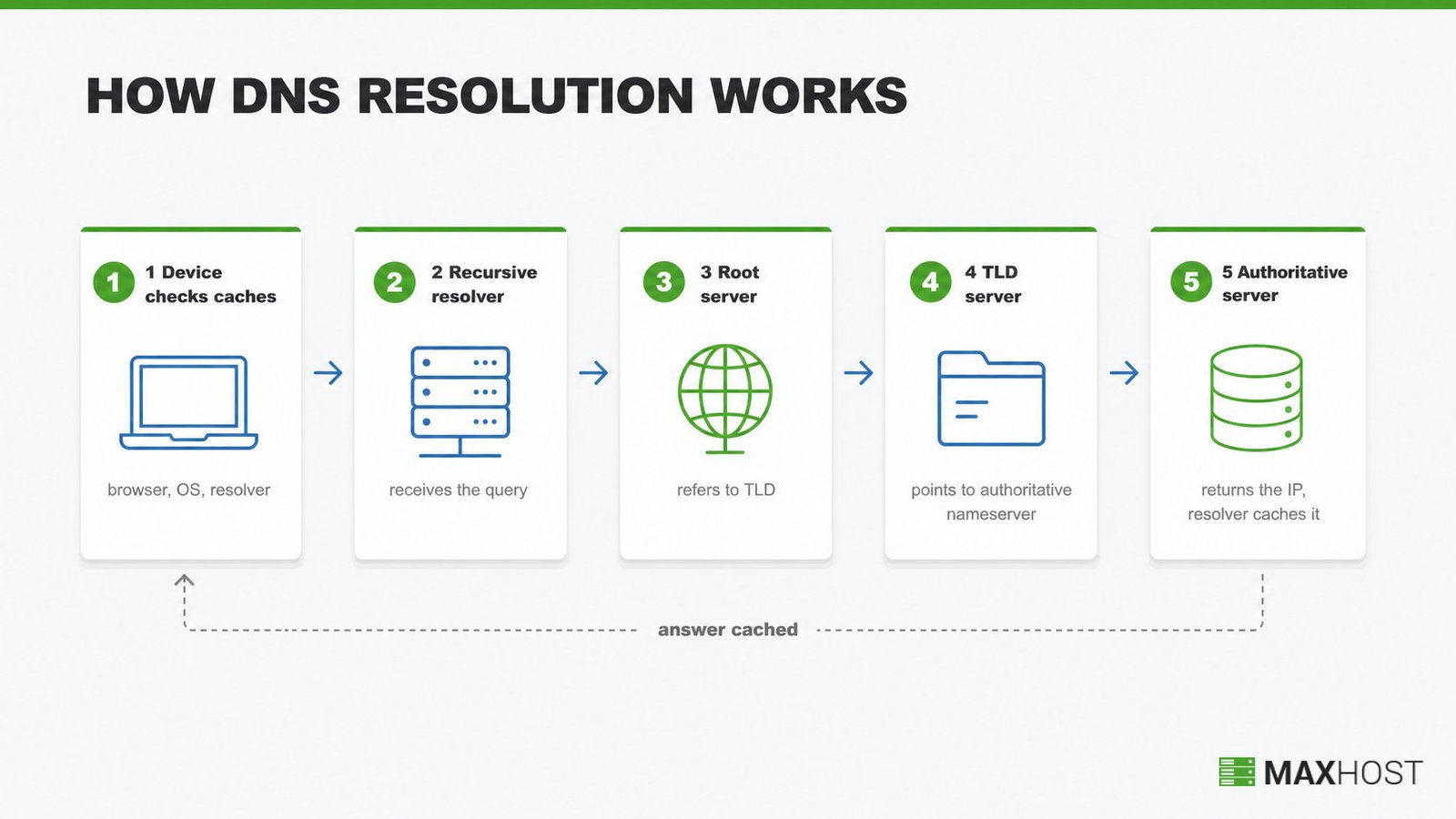
- Your device checks its caches first. Before any external query, your browser, then your operating system, then the resolver check their own caches for a recent answer. A cache hit ends the lookup immediately.
- A recursive resolver receives the query. If no cache holds the record, your device sends the domain name to a recursive resolver, often run by your ISP or a public provider.
- A root server responds with a referral. The resolver asks one of the internet's thirteen groups of root name servers, which do not answer directly but point to the correct top-level domain (TLD) server.
- The TLD server points to the authoritative server. For a ".com" domain, the resolver asks the ".com" TLD server, which returns the address of the domain's own authoritative nameserver.
- The authoritative server returns the answer. The authoritative nameserver holds the domain's actual DNS records and sends back the IP address, which the resolver caches and hands to your browser.
Root servers exist as thirteen logical groups. They replicate worldwide through anycast addressing, so no single physical server handles global traffic alone. The resolver repeats this referral chain until it reaches an authoritative answer. It then caches the result, so the next request skips straight to the cached IP.
What Are the Most Common DNS Record Types?
A DNS zone stores several record types, each controlling a different part of how a domain behaves. The table below covers the six types every domain owner encounters most often.
| Record Type | What It Does | Example Use |
|---|---|---|
| A | Points a domain to an IPv4 address | example.com resolves to 192.0.2.1 |
| AAAA | Points a domain to an IPv6 address | example.com resolves to 2001:db8::1 |
| CNAME | Aliases one domain name to another domain | www.example.com points to example.com |
| MX | Routes email to a mail server, ranked by priority | Mail for example.com delivers to a mail host |
| TXT | Stores arbitrary text for verification and policy | SPF and DKIM records prove sender authenticity |
| NS | Names the authoritative nameservers for a domain | Tells the internet which servers hold example.com's records |
CNAME and TXT records do double duty beyond simple aliasing. A CDN typically asks you to point a CNAME record at its edge network instead of your origin server's IP address directly. Certificate authorities also use a TXT or CNAME record to confirm you control a domain, the domain validation step behind most SSL certificate issuance.
Four more records round out most DNS zones, even if owners edit them less often.
- SOA (Start of Authority). Every zone holds exactly one, storing the primary nameserver and the timers that govern how the zone refreshes.
- PTR (Pointer). Maps an IP address back to a domain, the reverse of an A record, and mail servers check it to filter spam.
- CAA (Certification Authority Authorization). Lists which certificate authorities are allowed to issue SSL certificates for the domain.
- SRV (Service). Points a service such as VoIP or chat to a specific host and port.
What Are DNS Propagation and TTL?
DNS propagation is why a record change is not visible everywhere at once. Every DNS answer carries a time to live, or TTL. TTL is a number of seconds that tells other servers how long to cache the answer before asking again.
A short TTL, such as 300 seconds, refreshes fast but generates more lookups. A long TTL, ranging from a few hours to several days, caches longer and reduces load but delays visibility of any change.
Propagation matters most during a domain or hosting change. When you migrate a WordPress site to a new host, you update the domain's A record or nameservers to point at the new server. Visitors whose resolvers still hold the old cached answer keep reaching the old server until that record's TTL expires everywhere. Lowering the TTL a day or two before a planned migration shortens that transition window.
Which Public DNS Resolvers Are Worth Using?
Three free public resolvers dominate the category: Cloudflare's 1.1.1.1, Google Public DNS at 8.8.8.8, and Quad9 at 9.9.9.9. They differ most on privacy stance and threat blocking, summarized below.
| Resolver | Speed | Privacy | Threat Blocking |
|---|---|---|---|
| 1.1.1.1 (Cloudflare) | Ranked the fastest public resolver by DNSPerf, August 2024 | Cloudflare states it never sells user data and encrypts DNS traffic | Not included by default; added through Cloudflare's paid Gateway product |
| 8.8.8.8 (Google Public DNS) | Fast, globally distributed infrastructure | Supports DNS over TLS and DNS over HTTPS for encrypted queries | Returns unfiltered answers; Google markets "no redirection," not malware blocking |
| 9.9.9.9 (Quad9) | Not marketed on raw speed; routes to the nearest of many global nodes | Logs no IP addresses and was built GDPR compliant from 2017 | Blocks malicious domains using 25 or more threat-intelligence feeds, over 670 million blocks daily |
A r/dns thread on home router choice named Quad9 as its pick. This session's fetch of quad9.net corroborates Quad9's threat blocking, though the recommendation itself remains a single-source data point.
What Causes Common DNS Problems?
Most DNS problems trace back to one of three causes. The usual suspects are propagation delay, a misconfigured record, or confusion over a proxy toggle in a service like Cloudflare.
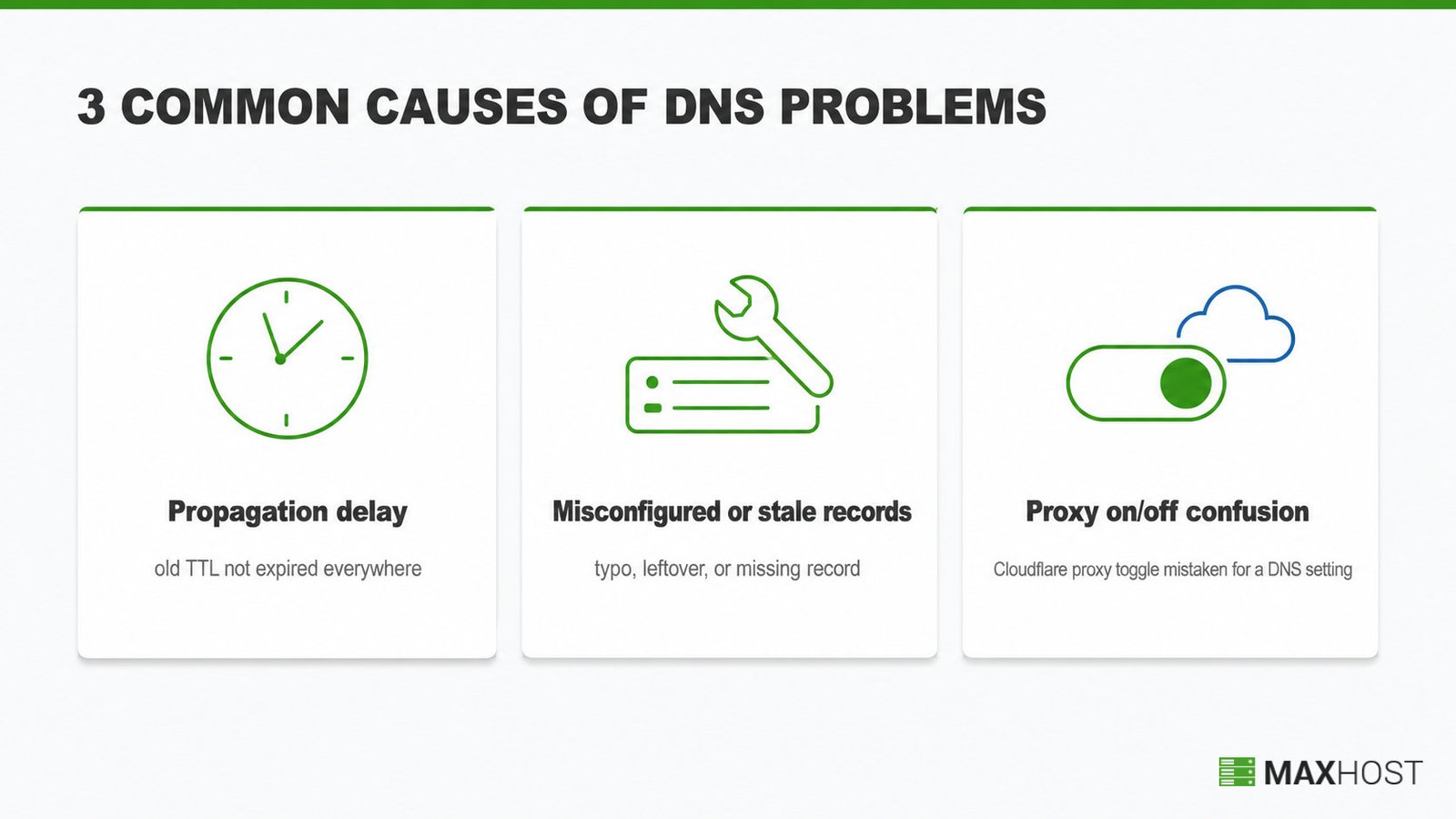
- Propagation delay. A change was made correctly, but the old TTL has not expired everywhere yet, so some visitors still see the previous server.
- Misconfigured or stale records. A typo in an IP address, a leftover record from an old host, or a missing record blocks resolution entirely.
- Proxy on and off confusion. Cloudflare style DNS management adds a proxy toggle on top of plain DNS, and treating that toggle as a DNS setting causes avoidable outages.
One network architect's LinkedIn framing puts troubleshooting priority plainly. During an outage, the DNS definition matters less than what answer a record gives and which server gave it.
How MaxHost Supports DNS Setup for Hosting Businesses
MaxHost does not manage DNS records, zones, or nameservers directly. Its bundled Domain Search module surfaces domain availability before DNS ever comes into play. A hosting reseller running MaxHost still walks customers through pointing DNS at the new host.
That gap matters because a reseller cannot sell web hosting without also handling the DNS step every new customer hits at signup. MaxHost's AJAX domain search widget lets a visitor check availability directly on your marketing site. It then hands off to your WHMCS domain search, transfer, and reseller flow to complete the purchase.

Many hosting resellers sell domains alongside hosting plans as a bundled offer. That is the same domain reseller model MaxHost's theme and WHMCS templates are built to support. Once a customer buys through that flow, guiding them through the DNS or nameserver change is a support step your team still owns.
See how MaxHost's Domain Search helps a hosting reseller manage domains to add this widget to your own WordPress hosting site.
FAQs
What is DNS?
DNS is the internet's naming system that translates domain names into the numeric IP addresses servers use to connect. It works like a phonebook, so browsers reach the right server without anyone memorizing raw IP addresses.
What's the difference between DNS and a domain name?
A domain name is the human readable address a person types, like example.com. DNS is the system that looks up that name and returns the server's IP address. The domain name is the label; DNS is the lookup mechanism that makes the label work online.
How do I find my DNS records or nameservers?
Find your DNS records with a free online lookup tool, or run nslookup -q=ns example.com on Windows or dig example.com ns on Mac and Linux. Both commands return the domain's current nameservers. Your domain registrar's dashboard also lists the nameservers and any records you manage there directly.
Is 1.1.1.1 still the best DNS resolver?
1.1.1.1 remains one of the fastest public resolvers, ranked first by DNSPerf in August 2024, and Cloudflare states it never sells user data. Google's 8.8.8.8 and Quad9 are close alternatives, and Quad9 adds free malware blocking. The best choice depends on your own network, not one fixed ranking.
Is 8.8.8.8 the fastest DNS?
8.8.8.8, Google Public DNS, is fast and globally distributed, but it is not always the fastest. DNSPerf ranked Cloudflare's 1.1.1.1 as the fastest public resolver in August 2024. Real speed depends on your location and network, so test both from your own connection before deciding.
Should my DNS be on or off?
This depends on your Cloudflare setup, not DNS in general. A proxied record hides your origin server's IP address and adds DDoS protection, while a DNS only record sends traffic straight to your server. Proxy the records that serve web traffic, and keep mail records DNS only so delivery works correctly.
How do I fix a DNS server problem?
Most DNS server problems clear up by waiting out propagation, since a recent record change needs its TTL to expire everywhere. If the issue persists, check the record for typos, confirm your registrar's nameservers match your host, and flush your local DNS cache before testing again.