WHM is a server-level control panel that hosts and resellers use to create and manage many cPanel accounts. cPanel is the single-account panel each of those customers uses to run their own site, email, and files.
Below: a side-by-side comparison table, plus who actually logs into each tool. Then what each one lets you do, and whether a growing hosting business ever needs both.
What's the Difference Between cPanel and WHM?
cPanel and WHM are two levels of the same control panel family, not two products competing for the same job.
| Attribute | cPanel | WHM |
|---|---|---|
| User level | Account owner, one site | Server admin, host, or reseller |
| Access | Account-scoped login | Root or reseller-level admin access |
| What you manage | Files, email, databases, one domain | Many cPanel accounts, packages, server settings |
| Typical hosting tier | Shared hosting | Reseller, VPS, or dedicated hosting |
| Security scope | One account's SSL and passwords | Server-wide updates, firewall, and SSL |
| Reseller capability | None | Creates and brands cPanel accounts for resale |
cPanel Inc. frames the split the same way. cPanel lets a user create sites and manage files, while WHM lets an admin create cPanel accounts for customers, monitor the server, and run backups.
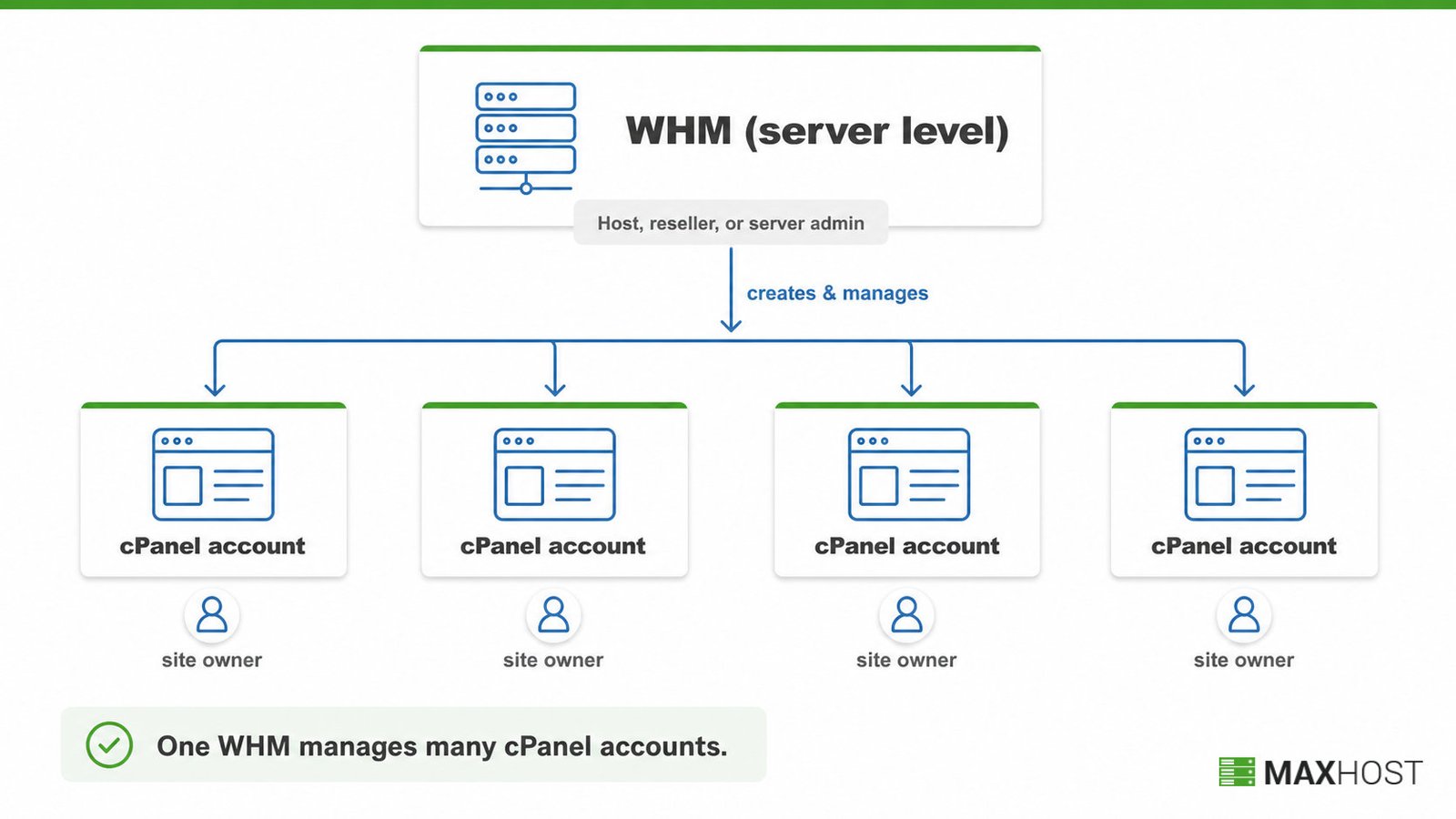
Who Uses cPanel and Who Uses WHM?
End customers and site owners use cPanel. Hosts, resellers, and server admins use WHM.
- cPanel users: site owners, bloggers, and shared hosting customers. They only see the account-level dashboard.
- WHM users: hosts, resellers, web design agencies, and server admins who provision, suspend, and manage other people's cPanel accounts.
A new shared hosting signup lands the customer straight in cPanel, with no WHM access at all. A new VPS or dedicated reseller package instead lands the buyer in WHM. That is how reseller hosting actually creates a branded cPanel account for every client.
What Can You Do With cPanel?
cPanel manages one account: files, email, databases, and a single domain's settings.
- Upload, edit, and organize website files
- Add addon domains and subdomains, and edit the account's DNS records
- Create email accounts, forwarders, and filters
- Create and manage MySQL or MariaDB databases
- Install a CMS or app through a one-click installer
- Check bandwidth, disk usage, and visitor statistics
cPanel cannot create another account. That capability belongs to WHM alone. For the full picture of cPanel's account-level toolkit, see what is cPanel.
What Can You Do With WHM?
WHM creates, suspends, and manages every cPanel account on a server, plus the server-wide settings behind them.
- Create, suspend, and terminate individual cPanel accounts
- Define hosting packages and resource limits per plan
- Configure server-wide settings, DNS zones, and nameservers
- Brand the service with private nameservers, a custom logo, and colors
- Log into any cPanel account directly, without the account holder's password
- Run backups, transfers, and security monitoring across every account
- Reset passwords and handle support for any cPanel account on the server
WHM requires root or reseller-level access, so it ships only on reseller, VPS, or dedicated hosting, never standard shared hosting. For the full mechanics of server-level administration, see what is WHM.
Do You Need Both cPanel and WHM?
Yes, if you resell hosting or manage a server for other people. No, if you only run your own site.
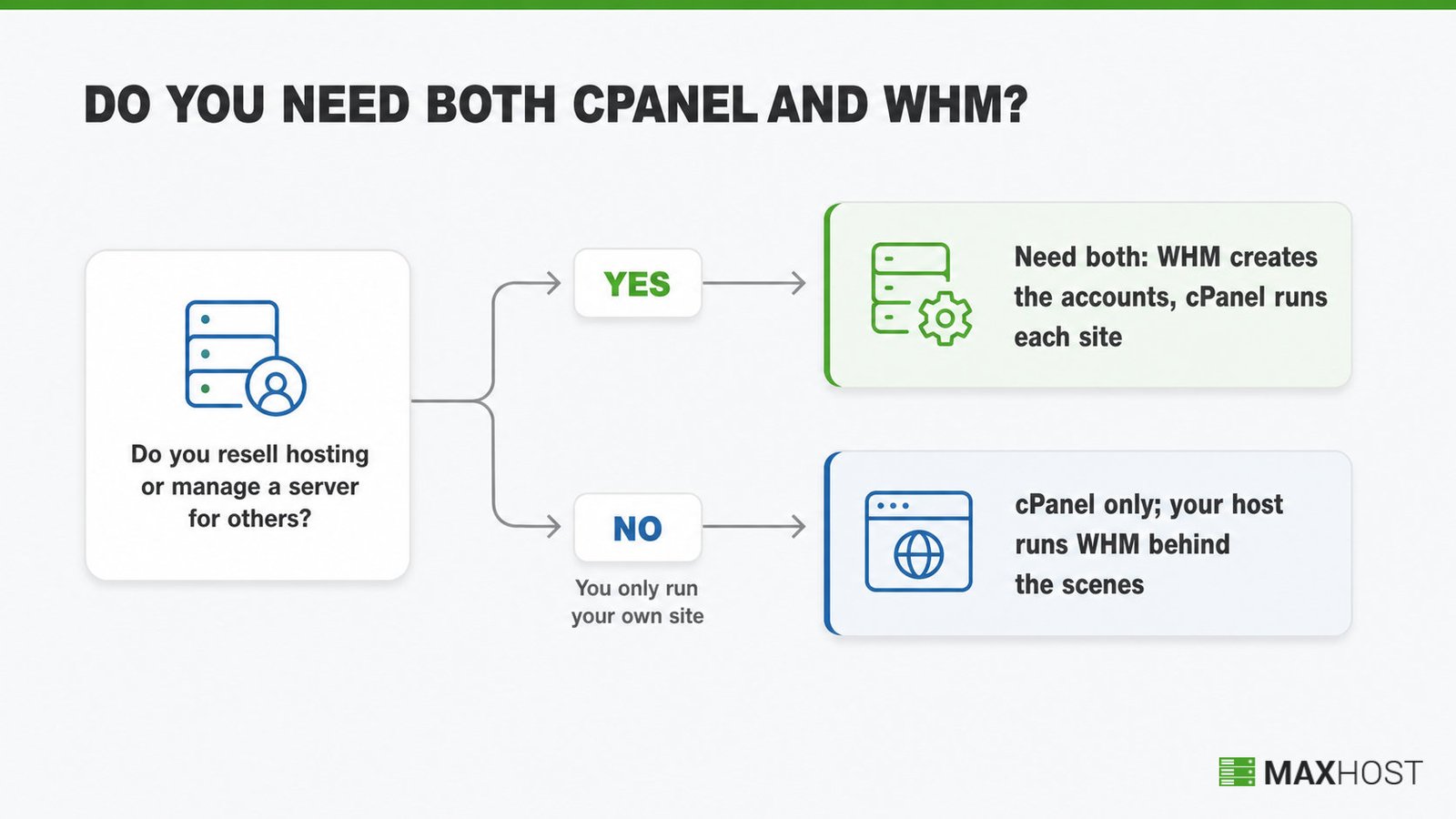
A single-site owner, or a freelancer's individual client, only ever touches cPanel. Their host runs WHM behind the scenes, and the customer never logs into it.
A reseller or server admin needs WHM to create each client's cPanel account. Every account WHM creates still gets its own full cPanel, so the two are not competing tools. They are two layers of one system, and neither replaces the other.
Shared hosting means you only ever see cPanel, never WHM. Check your own plan's tier against the full breakdown of types of web hosting if you are unsure.
How MaxHost Supports Resellers Running WHM and cPanel
MaxHost never touches cPanel or WHM directly. It is the WordPress marketing site and WHMCS client area that sits on top of a reseller's WHM-provisioned accounts.
MaxHost ships 20 bridge-free WHMCS client-area templates that install straight into WHMCS. A reseller's storefront and checkout then share one design from the first WHM-created cPanel account onward. The theme also bundles pricing tables and a live domain-search module for the marketing pages a new reseller builds before they ever open WHM.
Anyone new to the billing layer itself can start with what is WHMCS; MaxHost's wordpress theme with WHMCS integration covers the template details. View the MaxHost demo to see a reseller's storefront and WHMCS client area built on this theme.
FAQs
What's the difference between cPanel and WHM?
cPanel is the account-level panel one hosting customer uses for files, email, databases, and one domain. WHM is the server-level tool hosts and resellers use to create and manage many cPanel accounts.
Is WHM necessary, or can I just use cPanel?
WHM is only necessary if you resell hosting or manage a server for other people. A single-site owner never needs WHM, since their host runs it in the background instead.
What are the disadvantages of cPanel?
cPanel adds licensing cost on many hosts, restricts direct edits to some configuration files, and can strain resources on small VPS plans. Reported limitations also include file-access requests that slow down troubleshooting.
What are the 4 types of web hosting?
The four main types are shared, VPS, dedicated, and cloud hosting. cPanel typically ships alone on shared hosting, while WHM needs the root access that reseller, VPS, and dedicated plans provide.
Can I have WHM without cPanel?
Only in one specialty case. WHM and cPanel ship as a single software suite, so normal hosting always runs both, and you cannot run cPanel without WHM. The lone exception is a DNS-only server, where WHM runs without full cPanel accounts.