Below are 9 ready-to-copy appointment confirmation email templates, covering salons, clinics, consultations, classes, rentals, and pay-later bookings. Copy any template below, edit the bracketed fields, and send, free, no signup required.
Each template pairs a subject line with a full body, so you can match it to your business in seconds. After the templates: a merge-field key, common questions, and how to send these automatically from WooCommerce.
What every appointment confirmation email must include
A complete appointment confirmation email covers 13 elements. Missing any of them forces the customer to reply and ask, which defeats the point of confirming automatically.
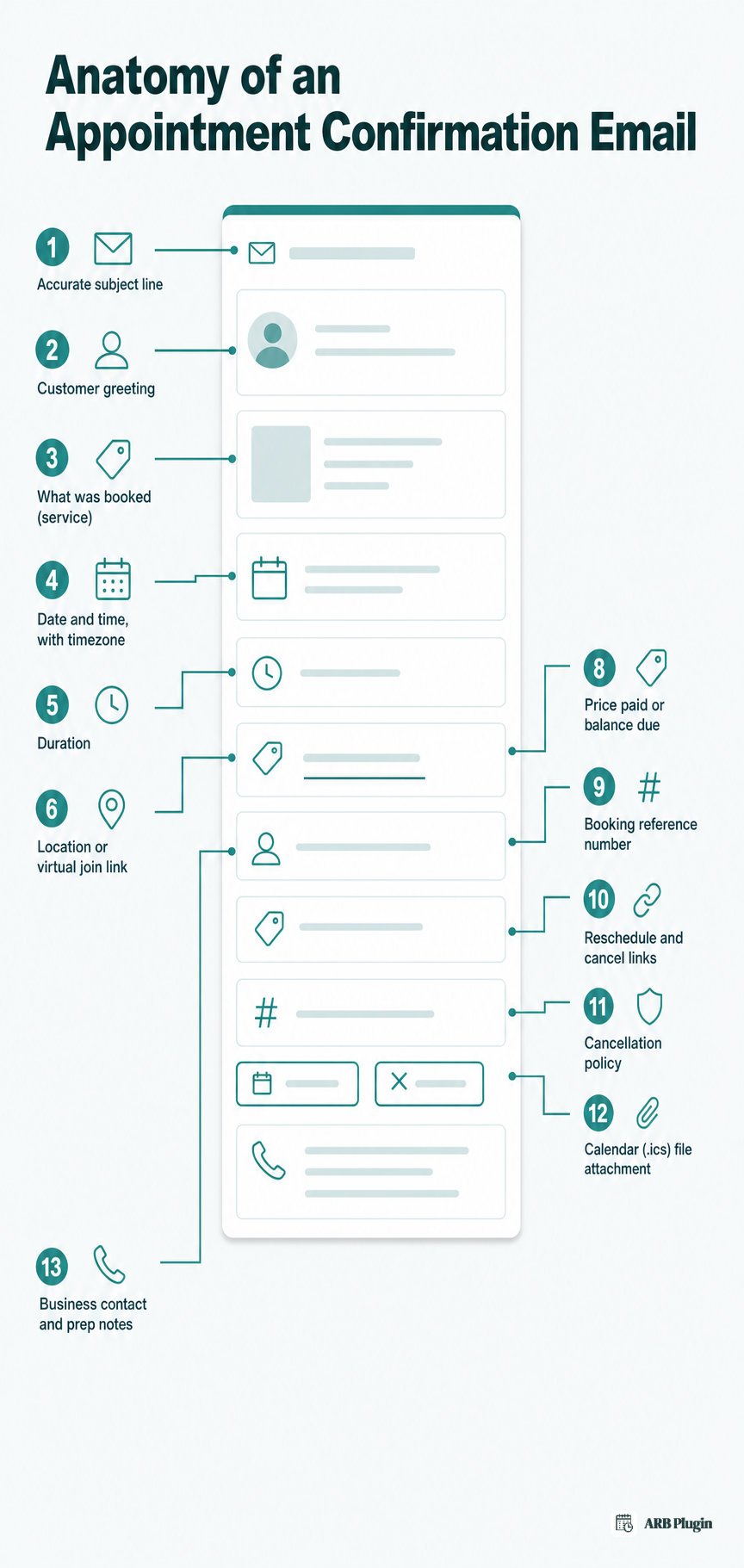
- An accurate, non-deceptive subject line naming the action and the business
- The customer's name in a direct greeting
- What was booked: the service, class, or resource
- The date and time, with timezone noted for virtual or multi-location bookings
- The duration of the appointment
- The location (street address plus a map link) or the join link for virtual meetings
- The provider or staff member's name
- The price paid, the balance due, or both
- A booking reference number
- A reschedule link and a cancel link
- The cancellation policy in one plain sentence
- An add-to-calendar file (.ics) attachment
- Business contact details, plus any prep instructions such as "arrive 10 minutes early"
The subject-line rule traces to the FTC's CAN-SPAM guidance. A transactional email's subject must accurately reflect its content, and the sender must be clearly identified. A vague subject like "Update" gets mistaken for spam and ignored.
For the full breakdown of what to include in a booking confirmation email and why each element matters, see the linked guide.
Appointment confirmation email templates
Pick the template that matches your business, copy it, swap the bracketed fields, and send. Every template below uses the same token style, defined in the merge-field table further down.
Standard appointment confirmation email template
This is the default template for any service business that does not fit a more specific scenario below.
Subject: Your appointment with {{business_name}} is confirmed for {{date}} at {{time}}
Hi {{customer_name}}, Your appointment is confirmed. Here are the details: Service: {{service}} Date and time: {{date}} at {{time}} ({{duration}}) Location: {{location}} ({{map_link}}) Reference: {{order_number}} Need to make a change? Reschedule: {{reschedule_link}}. Cancel: {{cancel_link}}. We've attached a calendar file so you can add this to your calendar. See you then. {{business_name}} �� {{business_phone}}
Salon and spa appointment confirmation email template
This template fits salons, spas, barbers, and nail or beauty studios, and names the stylist or therapist directly.
Subject: You're booked in for {{service}} on {{date}} 💇
Hi {{customer_name}}, You're all set for {{service}} with {{provider}} on {{date}} at {{time}} ({{duration}}). Where: {{location}} ({{map_link}}) Before you come: {{prep_note}} Price: {{price}} Need to change your slot? Reschedule: {{reschedule_link}}. Cancel: {{cancel_link}}. See you soon, {{business_name}}
Medical and clinic appointment confirmation email template
This template fits clinics, doctors, dentists, and therapists. It keeps a formal tone and omits sensitive health detail from the subject line.
Subject: Appointment confirmed: {{provider}} on {{date}} at {{time}}
Dear {{customer_name}}, This confirms your appointment with {{provider}} on {{date}} at {{time}}. Location: {{location}} ({{map_link}}) Please arrive 10 minutes early and bring {{documents}}. Need to reschedule or cancel? Cancellations require 24 hours' notice: {{reschedule_link}} �� {{cancel_link}}. Questions? Call us at {{business_phone}}. A calendar file is attached for your records.
Consultation and professional services confirmation email template
This template fits coaches, consultants, lawyers, and accountants, and supports a virtual join link for video calls.
Subject: Confirmed: your {{service}} consultation on {{date}}
Hi {{customer_name}}, Your {{service}} consultation is confirmed for {{date}} at {{time}} ({{duration}}), {{timezone}}. Join link: {{location}} Before we meet: {{prep_note}} Reference: {{order_number}} Reschedule: {{reschedule_link}} �� Cancel: {{cancel_link}} Looking forward to it, {{provider}}
Class, course, and workshop confirmation email template
This template fits studios, course providers, and workshops, and covers multiple attendees per booking.
Subject: You're registered: {{service}} on {{date}}
Hi {{customer_name}}, You're registered for {{service}} on {{date}} at {{time}}, for {{persons}} attendee(s). Location: {{location}} ({{map_link}}) What to bring: {{prep_note}} Reference: {{order_number}} Need to change your spot? Reschedule: {{reschedule_link}}. Cancel: {{cancel_link}}. A calendar file is attached. See you in class. {{business_name}}
Rental and equipment reservation confirmation email template
This template fits equipment, vehicle, and property rentals, and covers a pickup-and-return date range instead of a single slot.
Subject: Your reservation is confirmed: {{service}}, {{date}}
Hi {{customer_name}}, Your reservation for {{service}} ({{resource}}) is confirmed. Pickup: {{date}} at {{time}} �� Return by the end of your booked range Pickup location: {{location}} ({{map_link}}) Deposit or balance due: {{price}} Please bring: {{prep_note}} Reference: {{order_number}} Reschedule: {{reschedule_link}} �� Cancel: {{cancel_link}} {{business_name}}
Appointment confirmation with reschedule and cancel links
This template fits any business that wants to cut no-shows by making self-service changes easy, ahead of a reminder later.
Subject: Confirmed: {{service}} on {{date}}, reschedule anytime
Hi {{customer_name}}, Your {{service}} appointment is confirmed for {{date}} at {{time}}. Reschedule: {{reschedule_link}} Cancel: {{cancel_link}} Cancellations made less than 24 hours before your appointment may be subject to our cancellation policy. We'll send a reminder before your appointment. {{business_name}}
Pair this template with matching appointment reminder email templates, and see how to send appointment reminders automatically once you're ready to automate both.
Pay-later and deposit-due confirmation email template
This template fits quote-first, approval-first, and deposit-based businesses that collect a balance separately from the initial booking.
Subject: Appointment confirmed: {{amount_due}} due to secure your booking
Hi {{customer_name}}, Your booking for {{service}} on {{date}} at {{time}} is confirmed. Amount paid: {{price}} �� Balance due: {{amount_due}} Pay now: {{payment_link}} If the balance isn't paid by {{date}}, your slot may be released to another customer. Reschedule: {{reschedule_link}} �� Cancel: {{cancel_link}} Reference: {{order_number}}
Short SMS appointment confirmation (bonus)
Keep an SMS confirmation under 160 characters. Full SMS reminder depth lives on the linked reminder-template page above.
Hi {{customer_name}}, your {{service}} with {{business_name}} is confirmed for {{date}} at {{time}}. Reschedule: {{reschedule_link}}
Merge fields: how to personalize these templates
Every token above follows the same {{field_name}} pattern, so you can find and replace consistently across all 9 templates.
| Token | What it means |
|---|---|
{{customer_name}} | The customer's name, pulled from the order or booking record |
{{business_name}} | Your business or store name |
{{business_phone}} | Your business contact number |
{{service}} | The booked service, class, or rented item |
{{provider}} | The staff member, practitioner, or resource assigned |
{{resource}} | The specific room, unit, or item reserved |
{{date}} | The appointment or pickup date |
{{time}} | The appointment or pickup start time |
{{duration}} | How long the appointment or rental period lasts |
{{timezone}} | The timezone shown for virtual or cross-location bookings |
{{location}} | The physical address or the virtual join link |
{{map_link}} | A map link to the physical location |
{{persons}} | The number of attendees or units booked |
{{price}} | The amount already paid, or the total charged |
{{amount_due}} | The deposit or balance still owed |
{{payment_link}} | A link the customer uses to pay the remaining balance |
{{order_number}} | The unique booking reference number |
{{reschedule_link}} | A self-service link to move the appointment to a new time |
{{cancel_link}} | A self-service link to cancel the appointment |
{{prep_note}} | A scenario-specific instruction, such as what to bring |
{{documents}} | Paperwork or identification the customer should bring |
These double-brace placeholders are generic and work in any template tool. A real booking system auto-fills the equivalent field instead. A WooCommerce booking plugin, for example, uses single-brace dynamic tags such as {customer_name} rather than the {{customer_name}} shown here. Map each placeholder to your own system's tag syntax before you automate the send.
FAQs
How do you write an appointment confirmation email?
To write one:
- Write an accurate subject line naming the action and your business
- Confirm the 6 core details: service, date, time, duration, location, and price
- Add a reschedule link, a cancel link, and a calendar (.ics) attachment
- Send it immediately, automatically, the moment the booking completes
The checklist above covers every element in full.
What should an appointment confirmation email include?
At minimum, it should include the service booked, the date, time, and location, the price, and a booking reference. It also needs reschedule and cancel links. See the full 13-item checklist above for the complete list.
When should you send an appointment confirmation email?
Send the confirmation immediately, automatically, at the moment of booking. A reminder email follows separately, closer to the appointment date, to reduce no-shows.
How do you confirm an appointment by email?
Pick the template that matches your business above, fill in the bracketed fields with the customer's actual booking details, and send it. No reply from the customer is required for the confirmation itself to count as sent.
What is a good subject line for an appointment confirmation email?
A good subject line names the action, your business, and the date. For example: "Your appointment with {{business_name}} is confirmed for {{date}}." Keep it accurate so it is never mistaken for spam.
What is the difference between a confirmation email and a reminder email?
A confirmation email sends right after booking with full appointment details. A reminder email sends closer to the appointment date specifically to reduce no-shows.
Are these appointment confirmation email templates free to use?
Yes. Copy, paste, and edit every template on this page freely, with no signup required.
How to automate appointment confirmation emails in WordPress and WooCommerce
Copy-pasting these templates works, but a WooCommerce booking plugin sends them automatically the moment a customer books, personalized, with the calendar file attached.
Doing this manually has four real limits. First, someone has to remember to send each confirmation and paste in the booking details by hand. Second, merge fields like {{customer_name}} do not fill themselves; a person has to type the real values every time. Third, a manually sent email has no automatic calendar attachment or reschedule and cancel links unless someone builds them per message. Fourth, there is no automatic reminder follow-up closer to the appointment date.
ARB, a WooCommerce booking plugin, solves all four inside the WooCommerce checkout you already run. Customizable notification emails send automatically the moment a customer completes checkout, personalized with dynamic tags such as {customer_name}. Every notification attaches an iCalendar (.ics) file automatically, and admins manage reschedule, cancel, and status changes from the Reservations screen, with a one-click resend-invoice option. Manual and bulk reminder sends cover the follow-up, using the same dynamic tags.
Three honest limits to know before switching: ARB is a one-time license around $55, not a subscription, and it has no free tier. Syncing directly to Google Calendar needs ARB's separate paid Google Calendar add-on, and that sync only runs one way, from ARB to Google Calendar. That add-on costs $19 one-time. Sending these as SMS, not just email, needs ARB's separate paid SMS add-on ($15 one-time); the core plugin handles email only.
To use ARB, set up online booking in WordPress first, then define your booking slots when you set up availability. If your business uses the pay-later template above, see how to collect the balance when you accept payments for appointments.
See the automated confirmation flow yourself in the live ARB demo.