Amelia, the WordPress booking plugin, isn't WooCommerce-native. It bridges into WooCommerce through a hidden product and gates payments and integrations behind $49 to $679 per year tiers. Eleven alternatives fix one or both problems, led by ARB (native, one-time price), PluginHive (native, top-rated support), and YITH (native, rental calendar sync).
This guide covers a quick list of all 11 picks, the honest reasons teams leave Amelia, and a switching-criteria framework. A full comparison table against Amelia and migration guidance for the top three native picks come after.
Best Amelia Alternatives at a Glance
The strongest Amelia alternatives split into three groups. One is WooCommerce-native and one-time (ARB). Another is WooCommerce-native and support-led (PluginHive, YITH, WooCommerce Bookings). The last is standalone with a lifetime license option (Booknetic, Bookly). All 11 below are ranked by the same review-methodology score, tier first.
- ARB: best for Amelia users who want bookings native inside WooCommerce, at a one-time price with a built-in quote mode (Tier 1)
- PluginHive Bookings and Appointments: best for teams leaving Amelia's bridge integration, with native two-way Google and Outlook sync (Tier 1)
- YITH Booking and Appointment: best for rental and accommodation owners, with iCal sync to Airbnb, Booking.com, and Vrbo (Tier 1)
- WooCommerce Bookings: best for buyers who want the official first-party extension, backed by Automattic (Tier 1)
- Booknetic: best for Amelia users who want the same SaaS-style polish, with a lifetime license option (Tier 2)
- Bookly: best for appointment businesses wanting a mature plugin, with a genuinely usable free tier (Tier 2)
- LatePoint: best for teams wanting an Amelia-like standalone engine, with a cheaper lifetime license (Tier 3)
- BookingPress: best for small service businesses on a budget, with many payment gateways included free (Tier 3)
- FluentBooking: best for teams already using FluentCRM, with a modern booking interface (Tier 3)
- Simply Schedule Appointments: best for solo consultants and first-timers, with the simplest setup (Tier 3)
- WP Booking Calendar: best for simple date and availability bookings, on the smallest budget (Tier 3)
Disclosure: This guide is published by Fluent-Themes, the team behind ARB. ARB competes with Amelia and every other tool on this list. It appears in the ranking, scored by the same rubric as everyone else, not self-ranked first.
How we score: Every product carries an overall score from our published review methodology. That score weights booking rules, WooCommerce integration, pricing, setup, calendar sync, maintenance, and support. This list is ordered by switching-fit tier, then that score. Read the full method at how we score booking plugins.
Why People Switch from Amelia
Teams leave Amelia mainly because it isn't WooCommerce-native and because its pricing gates payments and integrations behind higher tiers. Amelia still excels at multi-employee and multi-location scheduling, which keeps it the right choice for salons, clinics, and gyms that don't need a WooCommerce cart.
What Amelia still does well
Amelia's admin and booking forms are genuinely polished. A rival vendor calls it "one of the most polished booking plugin admins" tested in the category. Its Employee Panel gives staff their own login, schedule, and days-off controls, deeper than the generic resources every WooCommerce-native alternative here uses instead.
Amelia's events module ships ticket types, QR e-tickets, waiting lists, and recurring events, a depth no alternative on this list matches. Its native two-way sync with Google, Outlook, and Apple calendars, plus Zoom, Meet, and Teams, beats every WooCommerce-native competitor here. A free WordPress.org tier and a spot in Google's AI Overview for both major booking-plugin searches add to its trust edge. The alternatives here don't have that yet. For the full picture, see our full Amelia review.
The switching pressure comes from three specific friction points.
- Not WooCommerce-native. Amelia's own documentation confirms that enabling WooCommerce integration redirects bookings to checkout through a hidden bridge product, and admins must manually map order statuses to booking statuses themselves.
- Recurring, tier-gated pricing. Amelia's four pricing tiers run $49 to $679 per year, and core integrations, like payment gateways, deposits, and packages, sit behind the Standard tier or higher. One WordPress.org reviewer put it bluntly: "Don't waste your money, there are better free options."
- Post-update stability and erratic support. Amelia's version 9.0 release in December 2025 triggered a wave of one-star reports: "Completely buggy since the update," wrote one reviewer, while another described a "Support Unable to Resolve 409 Booking Error" ticket that went nowhere.
Honest carve-out: Amelia remains the right tool for multi-employee, multi-location service businesses like salons, clinics, and gyms that value polish and events over WooCommerce-native checkout. The alternatives below fit best for teams whose bookings must run through the WooCommerce cart, tax, and coupons they already have.
How to Choose an Amelia Alternative
Three questions decide the right Amelia alternative. Does it run natively inside WooCommerce? Is the license one-time or a recurring, tier-gated plan? How reliable is it after an update? The answers below map directly to why people leave Amelia.
Does it run natively inside WooCommerce?
A native alternative adds a real WooCommerce product type, so bookings flow through the store's existing cart, checkout, tax, and coupons. ARB, PluginHive, YITH, and WooCommerce Bookings all do this. Booknetic and Bookly do not: WooCommerce is one payment integration inside a separate booking engine, the same structural gap Amelia has.
One-time or lifetime license vs a recurring, tier-gated plan
Over three years, a $55 one-time license costs far less than a $149 to $249 per year subscription, even before add-ons. ARB is one-time. Bookly and Booknetic offer a lifetime option alongside their annual tiers. PluginHive, YITH, and WooCommerce Bookings are annual only, and Amelia gates key integrations behind its Standard tier and above.
Reliability and support after an update
A booking plugin that breaks after a WordPress or WooCommerce update costs real bookings, not just annoyance. Amelia's v9.0 release drew a wave of stability complaints. PluginHive's support is the most consistently praised in this category. ARB's own support window is a standard six-month Envato term, without an SLA, so weigh that honestly against a rival's track record.
For plugins outside the WooCommerce-native set entirely, see our best WordPress booking plugins roundup. The table below applies these three criteria across all six full-coverage alternatives, plus Amelia for reference.
How Do the Best Amelia Alternatives Compare?
The WooCommerce-native, one-time and lifetime options cluster at the top of the table below; Amelia's own row shows exactly what switching actually changes.
| Plugin | Score /5 | WooCommerce-native? | Pricing model (entry) | Free tier/trial | Dynamic/range pricing | Staff/employee mgmt | Native calendar sync | Quote/RFQ mode | Best for |
|---|---|---|---|---|---|---|---|---|---|
| ARB | 4.2 | Yes | One-time, ~$55 | No (live demo only) | Yes (slot, person, date, time, day) | Resources only (no staff logins) | No (Google add-on, one-way) | Yes, built in | WooCommerce-native, one-time price |
| PluginHive Bookings and Appointments | 4.0 | Yes | $149/yr | No | Yes (multi-axis rules) | Yes, native staff module | Yes, two-way (Google + Outlook) | No | Support and native calendar sync |
| YITH Booking and Appointment | 3.9 | Yes | $249.99/yr | No | Yes (advanced price rules) | Resources/People (no logins) | Partial (one-way global, two-way per product) | Add-on plugin | Rentals with OTA sync |
| WooCommerce Bookings | 3.8 | Yes | $249/yr | No | Yes (cost ranges) | Resources only | One-way, single calendar | No | Official first-party option |
| Booknetic | 3.4 | No (Woo is payment-only) | $45/yr or $99 lifetime | Free version | Conditional prices (not range-based) | Yes, staff + commissions | Yes, two-way (Google + Outlook) | No | SaaS polish with a lifetime option |
| Bookly | 3.3 | No (limited cart data) | Free, or $49/yr / $129 lifetime | Yes | No (per-service/staff price only) | Yes, staff scheduling (login is an add-on) | One-way (two-way is an add-on) | No | Mature freemium option |
| Amelia (your current tool) | 3.6 | No (bridge product) | $49/yr Starter | Yes | Pricing by date, time, and people | Yes, employee panel + logins | Yes, two-way (Google, Outlook, Apple) | No | Multi-employee, multi-location |
Prices and features verified as of July 2026. Amelia data sourced from its own pricing page. Visit each product's site for current rates.
1. ARB: Best WooCommerce-Native, One-Time Alternative to Amelia (4.2/5)
ARB is the best alternative to Amelia for WooCommerce store owners who want bookings running natively inside their existing cart, checkout, and coupons. It replaces Amelia's yearly renewal with a one-time price. ARB scores 4.2 out of 5 overall on our WooCommerce booking-plugin methodology, the highest Tier-1 score, just ahead of PluginHive at 4.0. It takes the top spot for one reason. It is the only Tier-1 pick that solves both of Amelia's biggest triggers: the missing WooCommerce-native flow and the recurring, tier-gated price.
Best for: WooCommerce store owners leaving Amelia's bridge integration who want per-person, per-resource, and range-based pricing at a one-time price.
Why ARB fits teams leaving Amelia
ARB adds a Reservable Product, a real WooCommerce product type. A booking then flows through the same cart, checkout, tax rules, coupons, and payment gateways the store already runs. There is no bridge product and no manual order-status mapping to configure, the exact friction Amelia's own WooCommerce documentation describes.
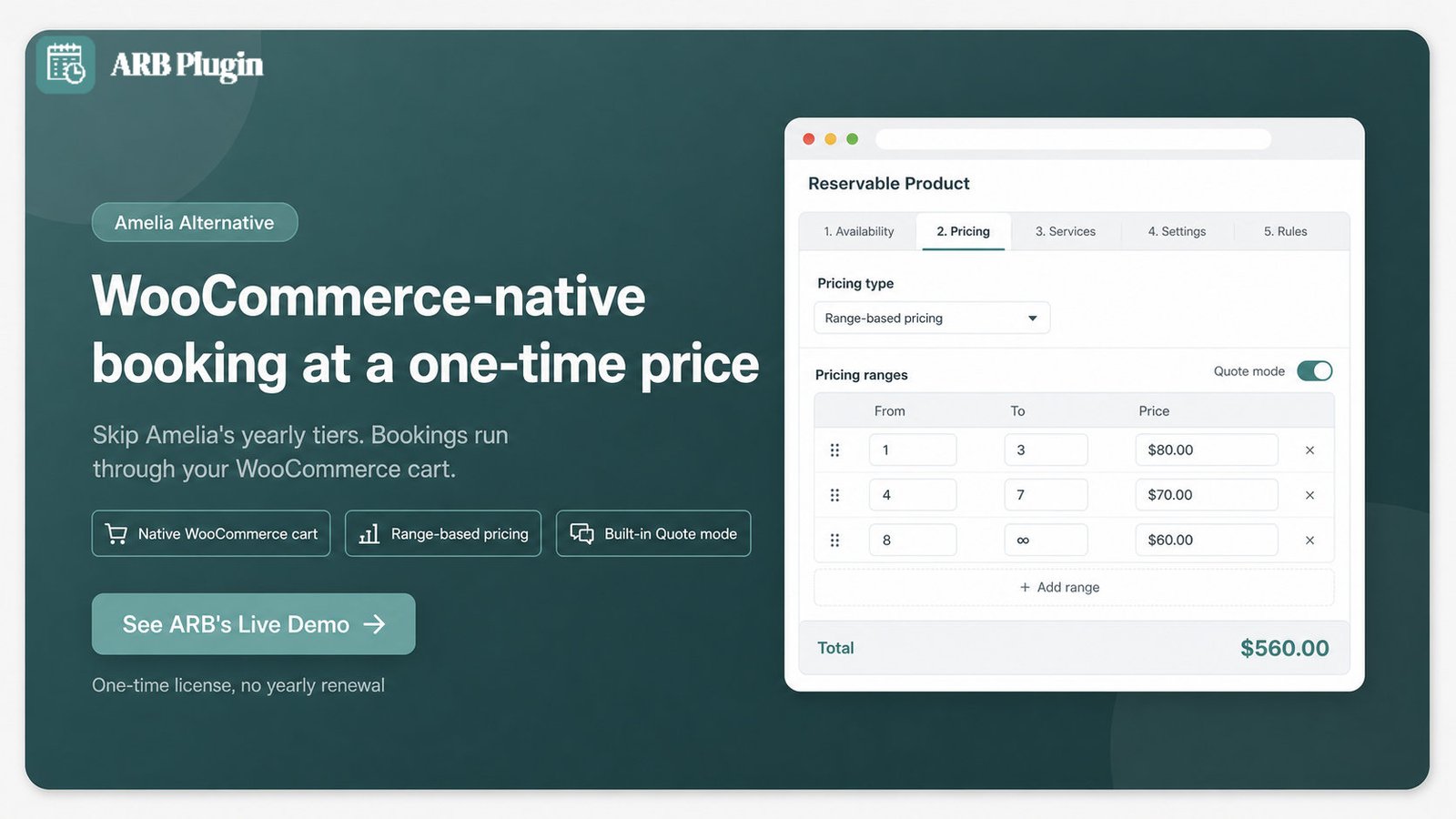
Pricing is range-based across slot count, person count, date, time, and day of week, plus separate per-person-type and per-resource rates. A salon can charge more for Saturday afternoons, more per adult than per child, and a different rate per stylist, all inside one Reservable Product.
ARB also ships a Quote Request mode. The booking form becomes a quote request, and the admin sets the final price before anything is charged. That suits services Amelia would otherwise force through instant payment. All of this ships in a single one-time license, around $55, instead of Amelia's $49 to $679 per year tiers. For a full head-to-head, see ARB vs Amelia.
Key Features
ARB's five configuration tabs cover the booking rules that matter most for teams leaving Amelia's bridge setup.
- Reservable Product across five tabs (General, Availability, Costs, Persons, Resources), so you can configure a full booking rule set from one WooCommerce product screen
- Range-based dynamic pricing by slot count, person count, date, time, and day, so you can charge Saturday rates or group discounts without custom code
- Person types and resources as independent priced objects, so you can bill an adult differently from a child, or one stylist differently from another
- Quote Request mode, so you can collect a request and set a custom price before any payment is taken
- Daily Agenda and bulk reminders, so you can see the day's bookings at a glance and cut no-shows
- iCalendar export, so bookings import into any external calendar app
- Every WooCommerce payment gateway inherited automatically, so you can keep the gateways, tax rules, and coupons already configured
Best Use Cases
ARB fits WooCommerce stores already running salons, spas, rentals, courses, or quote-first services that are outgrowing Amelia's standalone engine.
- Salons and spas migrating off Amelia's employee panel toward WooCommerce-native per-stylist pricing
- Rental and hotel stores that need date-range pricing without a separate booking system
- Course and workshop providers charging different rates by person type or time slot
- Quote-first services, such as custom installations, that need approval before payment
Pros
Verified against ARB's own documentation and its CodeCanyon listing, these are the strongest reasons to switch.
- WooCommerce-native flow. Bookings inherit the store's cart, checkout, tax, and every payment gateway with no bridge product to configure.
- One-time price. Around $55 replaces Amelia's $49 to $679 per year renewal.
- Range-based pricing depth. Slot, person, date, time, and day rules stack in one Reservable Product.
- A built-in Quote Request mode that Amelia does not offer without add-ons.
Cons
Three real gaps stand out before switching from Amelia.
- No native two-way calendar sync. Google Calendar sync is a paid add-on ($19 one-time) and only pushes bookings one way; there is no Outlook or Apple sync at all, while Amelia syncs all three natively, both ways.
- No deposits and no dedicated staff module. Staff are modeled as generic resources with no individual logins, and there is no partial-payment option, both of which Amelia includes.
- A thin third-party review footprint. ARB has no G2, Capterra, or Trustpilot listing, and support runs on Envato's standard six-month window with no SLA.
Pricing
ARB sells one license on CodeCanyon, not a subscription.
- Regular license: a one-time ~$55 purchase (was $49), covering a single site the end customer is not charged for
- Extended license: a higher one-time price for developers reselling to paying clients
- Google Calendar add-on ($19 one-time) and SMS add-on ($15 one-time): separate one-time purchases
Both licenses include Envato's standard update access; support runs roughly six months post-purchase with no formal SLA.
See ARB's full pricing and licensing for the license terms and add-on details before you buy.
What Users Say
Third-party review volume for ARB is thin, so weigh this honestly alongside the pros and cons above.
- "4.81 out of 5" rating from 16 buyers on CodeCanyon, out of 510 total sales.
- No G2, Capterra, or Trustpilot listing exists for ARB yet, a gap worth weighing against a more established rival like PluginHive.
Migrating From Amelia to ARB
There is no automated Amelia-to-ARB importer, so migration is a manual rebuild inside the same WooCommerce store.
- Recreate each Amelia service as an ARB Reservable Product.
- Recreate each Amelia employee as an ARB resource (ARB has no staff-login equivalent).
- Rebuild Amelia's tier-based pricing rules as ARB range-based cost rules by slot, person, date, time, or day.
- Export historical Amelia bookings via CSV directly from Amelia; ARB has no documented Amelia-import routine.
- WooCommerce gateways, tax rules, and coupons carry over automatically, since ARB uses the same cart the store already runs.
Budget a few hours per service to rebuild pricing rules by hand; there is no bulk-import shortcut for existing Amelia bookings.
2. PluginHive Bookings and Appointments: Best Supported WooCommerce-Native Alternative (4.0/5)
PluginHive Bookings and Appointments is a WooCommerce-native plugin that scores 4.0 out of 5 overall, just behind ARB. It is the strongest pick for Amelia switchers who want native WooCommerce checkout plus the category's most consistently praised support. It costs $149 per year, more than ARB, but with deeper calendar sync and a dedicated staff module.
Best for: teams leaving Amelia's bridge integration who want native two-way calendar sync and hands-on support during setup.
Key Features
PluginHive covers the same booking-rule depth as ARB, plus staff and calendar features Amelia switchers ask for most.
- 9 booking types, including per-night accommodation and minute-level appointments, so you can run rentals and consultations from one plugin
- Native staff management, so each staff member gets their own availability, pricing, and leave settings without an add-on
- Native two-way Google and Outlook calendar sync, so bookings update on every connected calendar in both directions
- Multi-axis pricing rules by day, person count, weekday, time, season, and staff member
- Zoom meetings, available as an add-on, so telehealth and consulting bookings auto-generate a meeting link
Pros
Verified against PluginHive's own product page and its on-page reviews, here is where it beats ARB and Amelia's bridge.
- Support reputation. One switcher wrote, "I switched to PluginHive Bookings and had everything going how I wanted it same day."
- A native staff module with individual availability, pricing, and leave, ahead of ARB's generic resources.
- Native two-way Google and Outlook sync, ahead of ARB's one-way, add-on-only Google sync.
- Minute-level scheduling for consultations and telehealth appointments.
Cons
Weigh these against the support reputation above before switching.
- Recurring cost. $149 per year, plus $69 to $99 per year for each add-on, including recurring bookings, Zoom, Dokan, and deposits.
- A dated UI. One buyer wrote the booking plugin "is not intuitive and they really should have better tutorials."
- No one-time license and no WordPress.org free tier, so there is no low-cost way to trial it first.
Pricing
PluginHive sells one annual tier plus separate add-ons.
- Single Site: $149 per year, including one year of updates and support, with a 30-day money-back guarantee
- Recurring Bookings, Zoom, and Dokan add-ons: $69 per year each
- WooCommerce Deposits add-on: $99 per year
What Users Say
PluginHive's own store shows a 4.96 out of 5 rating across 369 reviews. Support is the recurring theme in both the praise and the caveats.
- PluginHive testimonial: "The fastest support that I have experienced in all my 10 years of web work."
- On-page 4-star review (Lynn Lazzarini): "The booking plugin is not intuitive and they really should have better tutorials."
Migrating From Amelia to PluginHive
PluginHive has no published Amelia importer either, so plan the same manual rebuild ARB requires.
- Recreate Amelia services as PluginHive bookable products.
- Recreate Amelia employees as PluginHive staff, using its native Assets feature for availability and leave.
- WooCommerce checkout, tax, and coupons carry over automatically once the product type is native.
- Export historical Amelia bookings via CSV before switching, and confirm PluginHive's current import options on its own documentation before committing.
3. YITH Booking and Appointment: Best for Rentals and OTA Calendar Sync (3.9/5)
YITH Booking and Appointment scores 3.9 out of 5 overall. It is the strongest pick for rental and accommodation owners leaving Amelia who need calendar sync with Airbnb, Booking.com, and Vrbo. It is WooCommerce-native, like ARB, so this is not a native-versus-bridge decision the way Amelia is. It is a depth-versus-price decision at $249.99 per year against ARB's one-time price.
Best for: rental and accommodation businesses that need external OTA calendar sync inside a native WooCommerce booking flow.
Key Features
YITH's pricing and availability engine is at least as deep as ARB's, plus rental-specific sync ARB does not offer.
- Advanced price rules by time range, weeks, days, time slots, person count, person type, and duration
- iCal sync with Airbnb, Booking.com, and Vrbo, so external channel bookings block the same calendar automatically
- People and Resources modules for per-person-type pricing and shared staff or equipment
- Custom search forms by location, date, people, and services
Pros
Genuine strengths that hold up against ARB and Amelia alike.
- WooCommerce-native, exactly like ARB, so bookings inherit the store's cart, checkout, and gateways with no bridge.
- Pricing and availability depth that matches or exceeds ARB's range rules.
- OTA sync to Airbnb, Booking.com, and Vrbo, a rental feature no other alternative on this list documents.
- "It's intuitive, flexible, and integrates perfectly with WooCommerce," one buyer wrote.
Cons
The honest tradeoffs against a one-time license like ARB's.
- $249.99 per year, auto-renewing, with renewals explicitly non-refundable per YITH's own support team.
- Deposits, SMS, request-a-quote, and multi-currency each require a separate paid YITH plugin, not included in the $249.99 base.
- No product variations and no WooCommerce Bundles compatibility.
Pricing
YITH sells one annual license: $249.99 per year, including one year of updates and support, with a 30-day guarantee on the first purchase only. Renewals are not refundable, per YITH's own stated policy.
What Users Say
YITH's on-site reviews average 4.39 out of 5 across 124 ratings, and they split cleanly between product praise and billing complaints.
- On-site 5-star review (Ella-2053): "It's intuitive, flexible, and integrates perfectly with WooCommerce."
- On-site 2-star review (etiena.com): "Feels Deceptive on Billing Practices... the FULL PRICE was automatically charged without any prompt."
4. WooCommerce Bookings: Best First-Party Official Alternative (3.8/5)
WooCommerce Bookings scores 3.8 out of 5 overall. It is the official, first-party option from Woo itself for buyers who want brand safety over Amelia's standalone engine. It costs $249 per year and is named the top "Official Solution" in Google's AI Overview for WooCommerce booking searches. Yet its own marketplace rating sits at just 2.7 out of 5.
Best for: buyers who want the sanctioned, first-party WooCommerce booking extension and are willing to pay for that safety.
Key Features
WooCommerce Bookings covers the same five-tab structure as ARB, with deeper resource and availability tooling.
- Bookable Product type with General, Availability, Costs, Persons, and Resources tabs, plus preset templates for common use cases
- Three-level availability rules (store, product, and resource), with a priority system to resolve conflicts
- Base, block, and display cost rules with add, subtract, multiply, divide, or set-equal operators
- Native Google Calendar sync, syncing bookings to a single connected calendar
- Accommodation Bookings, a free add-on for night-based hotel and B&B stays
Pros
The genuine strengths behind its AI Overview placement.
- First-party trust. Made by Woo (Automattic), the company behind WooCommerce itself.
- A deep resources and availability engine, ahead of ARB on shared-resource priority rules.
- A full developer API and template library for agency customization.
Cons
Its own marketplace reviews describe a gap between the official promise and daily use.
- 2.7 out of 5 from 60 marketplace reviews, with 38 percent at one star.
- "API that isn't working at all," one reviewer wrote, and another described the calendar getting "stuck in an infinite loop."
- "Far too complicated for normal users," according to a two-star review, which also reported losing vendors over the complexity.
- No native recurring bookings, deposits, or on-page availability calendar; each requires a separate paid add-on, and Google Calendar syncs to only one calendar.
Pricing
WooCommerce Bookings sells two subscription terms, with no one-time option.
- 1-Year Plan: $249 per year
- 2-Year Plan: $398.40 for two years, a 20 percent savings versus paying annually
- WooCommerce Deposits and Bookings Availability add-ons: sold separately, prices not published on the core listing
What Users Say
The gap between third-party roundups and the plugin's own 2.7 out of 5 marketplace rating is the clearest signal here.
- "The most flexible plugin on the market today," per a third-party roundup.
- "For a plugin of this price it's really disappointing," wrote a one-star marketplace reviewer.
Migrating From Amelia to WooCommerce Bookings
WooCommerce Bookings has no published Amelia importer, so plan a manual rebuild like the other native picks.
- Recreate Amelia services as WooCommerce Bookable Products, using the built-in templates to speed up setup.
- Recreate Amelia employees as WooCommerce Resources, which share availability across products.
- WooCommerce checkout, tax, and coupons carry over automatically since bookings use the native cart.
- Export bookings from Amelia via CSV first, and confirm WooCommerce Bookings' own CSV import options before the cutover.
For the full verdict, read our WooCommerce Bookings review; if it isn't the right fit, see our WooCommerce Bookings alternatives roundup.
5. Booknetic: Best SaaS-Style Alternative With a Lifetime Option (3.4/5)
Booknetic scores 3.4 out of 5 overall. It is the pick for Amelia users who want the same SaaS-style polish and staff management, but with a lifetime license option. It is not WooCommerce-native: WooCommerce is one payment route inside Booknetic's own booking engine, exactly like Amelia's bridge setup.
Best for: Amelia users who value polish and staff tools over WooCommerce-native checkout, and want to stop renewing annually.
Key Features
Booknetic's breadth rivals Amelia's, plus a lifetime license Amelia does not offer on its entry tier.
- Three dedicated interfaces (admin, booking widget, customer panel) and a native mobile app for staff
- Staff management with commissions, roles, and a reporting module by location, staff, and service
- Workflows automation, triggering email, SMS, WhatsApp, or webhook actions on booking events
- Boostore add-on marketplace, covering calendar sync, video meetings, SMS, and white-labeling as individual purchases
Pros
Genuine advantages over ARB that switchers should weigh honestly.
- Best-in-class UX polish, called out by name in Google's AI Overview for WordPress appointment booking.
- A lifetime license option, unlike ARB's single one-time price tier.
- Deep team management: roles, commissions, multi-location reporting, and a native mobile app.
Cons
The add-on model is the single most common complaint.
- "Recurring complaints across all sources are predictable: add-on cost," per a third-party review; most headline features, including payments, calendar sync, video, SMS, and white-labeling, are separate Boostore purchases.
- The Basic tier ships with zero add-ons, so most buyers need Standard or higher to get anything useful.
- Not WooCommerce-native. WooCommerce Payments only routes payment, the same structural gap Amelia has.
Pricing
Booknetic sells four annual tiers or four lifetime tiers.
- Annual: Basic $45, Standard $99, Premium $149, Elite $299 per year
- Lifetime: Basic $99, Standard $239, Premium $599, Elite $699, one-time
- CodeCanyon also lists a separate $225 regular license as its own SKU
What Users Say
Booknetic holds a 4.90 out of 5 rating across 472 CodeCanyon buyers, though its Trustpilot sits lower at 3.4 out of 5. The two poles show up in the quotes below.
- "I checked a lot of booking plugins, and Booknetic is by far the best," one buyer wrote.
- "Recurring complaints across all sources are predictable: add-on cost," per an independent review.
6. Bookly: Best Mature Freemium Appointment Alternative (3.3/5)
Bookly scores 3.3 out of 5 overall. It is the pick for appointment businesses that want a 12-year incumbent with a genuinely usable free tier and a lifetime option. It is not WooCommerce-native: its own WordPress.org reviewers describe the WooCommerce cart integration as limited.
Best for: appointment-based businesses that want to start free and are not tied to WooCommerce for checkout.
Key Features
Bookly's ecosystem is the largest on this list, spread across a free core and 40-plus paid add-ons.
- Unlimited staff and services on the paid Pro tier, each with its own schedule and pricing
- Native iOS and Android staff apps via Bookly Cloud
- Email, SMS, and WhatsApp notifications, with SMS and WhatsApp billed through Bookly Cloud
- 40-plus individually priced add-ons, covering deposits, coupons, recurring appointments, and two-way Google Calendar sync
Pros
What 12 years and 60,000-plus businesses genuinely earned.
- A real free tier: 1 staff member and 5 services, enough to test the product before paying anything.
- A $129 lifetime Pro option. One buyer wrote it "would not cost me hundreds of dollars in annual renewals."
- The deepest add-on ecosystem in this list, at 40-plus modules, for teams that want to assemble a custom stack.
Cons
The add-on model draws Bookly's sharpest complaints.
- "To each of those features there is an ADD on," one WordPress.org reviewer wrote, describing essentials like deposits, coupons, and taxes as separate purchases.
- "Lacks of WooCommerce check out support. The Cart Data is very limited," per another reviewer, confirming Bookly is not WooCommerce-native.
- No rental or hotel model. Bookly's own FAQ states the plugin "won't fit hotel or rental business."
Pricing
Bookly is priced by site, with a genuine free entry point.
- Free: 1 staff, 5 services, core booking form
- Pro: $49 per year or $129 lifetime, unlimited staff and services
- Business: $149 per year or $349 lifetime; Ultimate: $249 per year or $599 lifetime
- 40-plus add-ons: $9.95 to $18.95 per year each, or $29 to $59 lifetime each
What Users Say
Bookly holds a 4.4 out of 5 rating across 570 WordPress.org reviews, and buyers most often weigh its value against its add-on model.
- "Would not cost me hundreds of dollars in annual renewals," wrote one lifetime-license buyer.
- "Lacks of WooCommerce check out support. The Cart Data is very limited," per a WordPress.org reviewer.
Read our full Bookly review for the complete verdict, or browse Bookly alternatives if a WordPress standalone plugin still isn't the right fit.
Other Amelia Alternatives Worth a Look
Five more Amelia alternatives did not make the full-coverage list above, but each fits a specific niche.
- LatePoint: a standalone appointment engine, similar in shape to Amelia, with a lifetime license option and a higher Trustpilot rating than Amelia in third-party comparisons. Best for teams that want an Amelia-like engine without the yearly renewal.
- BookingPress: a freemium plugin with many payment gateways included on its free tier. Best for small service businesses on a tight budget.
- FluentBooking: built for teams already using FluentCRM, with a modern booking interface. Best for shops standardized on the Fluent ecosystem.
- Simply Schedule Appointments: the simplest setup of any tool on this list, and cited in Google's AI Overview for WordPress booking searches. Best for solo consultants and first-time booking-plugin buyers.
- WP Booking Calendar: a simple date and availability calendar, without the pricing-rule depth of the six full-coverage picks above. Best for teams that just need a basic calendar, on the smallest budget.
Which Amelia Alternative Is Right for You?
The right Amelia alternative depends on which specific problem is pushing you to switch, not a single universal winner.
- If Amelia isn't WooCommerce-native and you want a one-time price: choose ARB.
- If you want that same native-WooCommerce fix but prefer top-tier support and native two-way calendar sync: choose PluginHive.
- If you run rentals or accommodation and need Airbnb, Booking.com, or Vrbo sync: choose YITH.
- If official, first-party safety matters more than price: choose WooCommerce Bookings.
- If you want Amelia's SaaS-style polish and staff tools with a lifetime license: choose Booknetic.
- If you want a mature, free-to-start appointment tool: choose Bookly.
Amelia itself is still the right call if you run a multi-employee, multi-location service business. It fits when you value its events module, native two-way calendar sync, and polish more than a WooCommerce-native cart. Every alternative above beats it specifically on price, WooCommerce fit, or reliability, not on every dimension at once. For the full category ranking beyond just Amelia's alternatives, see our best WooCommerce booking plugins roundup.
For the WooCommerce-native, one-time option, see ARB's live booking demo and test the Reservable Product before buying.
FAQs
Can I move my Amelia bookings and data to another plugin?
Moving off Amelia is a manual process for every alternative on this list; none publish an automated Amelia importer. Export your Amelia bookings via CSV, then recreate services, employees, and pricing rules in the new plugin. Budget a few hours per service rather than expecting a one-click migration.
Is there a free alternative to Amelia?
Bookly offers the most usable free tier among these alternatives, covering 1 staff member and 5 services with no time limit. Amelia itself also ships a free WordPress.org version. ARB is not free; it is a low one-time cost of around $55, not a subscription. The genuinely free starting points:
- Bookly Free: 1 staff member and 5 services, no time limit, the most usable free tier here.
- Amelia Lite: the free WordPress.org build of Amelia itself, if you are not leaving over stability.
- BookingPress: a freemium tier that includes several payment gateways at no cost.
For a deeper comparison of no-cost options, see our best free WordPress booking plugins roundup.
What is the best WooCommerce-native alternative to Amelia?
ARB, PluginHive, YITH, and WooCommerce Bookings are all genuinely WooCommerce-native. ARB is the only one at a one-time price, PluginHive has the strongest support reputation, and YITH adds OTA calendar sync for rentals.
Is Amelia WooCommerce compatible?
Yes, but only through a bridge. Enabling Amelia's WooCommerce integration, available on its Standard tier and above, redirects bookings to WooCommerce checkout through a hidden product. Admins must then manually map order statuses to booking statuses themselves.
What is the cheapest Amelia alternative?
ARB is the cheapest WooCommerce-native option at a one-time price around $55, paid once rather than every year. Bookly is the cheapest standalone option, with a free tier and a $129 lifetime upgrade. Some annual rivals list a lower first-year price. The recurring math still flips within two to three years:
- ARB: ~$55 one-time, the lowest lifetime cost for a WooCommerce-native flow.
- Bookly: free tier, or $129 lifetime Pro for a standalone engine.
- RadiusBooking: $39 per year for one site, cheaper in year one but recurring.
- Amelia Starter: $49 per year, the cheapest paid Amelia entry, also recurring.
Why is Amelia buggy after the latest update?
Amelia's version 9.0 release in December 2025 triggered a wave of stability complaints on WordPress.org. Before switching, weigh each alternative's own maintenance history in the comparison table above. One reviewer summed up the update bluntly: the plugin was "completely buggy since the update."