ARB scores 4.2 out of 5 in our review; Amelia scores 3.6. ARB wins for WooCommerce stores that want bookings inside their real cart and checkout at a one-time price near $55. Amelia wins for multi-staff salons and clinics that want polish and native calendar sync.
This comparison scores both plugins on the same public rubric. It then walks through pricing, WooCommerce integration, booking rules, staff and events, calendar sync, and setup. A verdict split by who each plugin actually fits closes the page.
ARB vs Amelia: Which Should You Choose?
ARB scores 4.2 out of 5 in our review; Amelia scores 3.6. The gap comes from WooCommerce fit and one-time value, ARB's strengths. Amelia wins outright for multi-staff businesses that want polish, staff panels, and native calendar sync.
ARB publishes this comparison and is one of the two plugins reviewed here. We scored both plugins on the same public rubric, the same evidence, and the same weights.
ARB was not placed first by default, and its honest limitations are not hidden. See how we review booking plugins for the full methodology.
The core structural difference sits underneath every number below. ARB adds a native WooCommerce product type, so every booking runs through the store's own cart, checkout, tax, coupons, and order management.
Amelia is a standalone booking engine. When WooCommerce is enabled at all, it routes finished bookings to WooCommerce checkout through an auto-created hidden bridge product. It then requires manually configured status-mapping rules.
ARB vs Amelia Scorecard: How We Score Both Plugins
ARB's overall is 4.2 out of 5; Amelia's is 3.6. ARB leads on WooCommerce integration and value, Amelia leads on notifications and calendar sync, and the two tie on booking rules.
| Dimension (weight) | ARB | Amelia |
|---|---|---|
| Booking Rules and Pricing Flexibility (24%) | 4.5/5 | 4.5/5 |
| WooCommerce and Commerce Integration (18%) | 5.0/5 | 2.5/5 |
| Value and Licensing, Total Cost of Ownership (16%) | 4.5/5 | 3.0/5 |
| Setup and Admin Experience (12%) | 3.5/5 | 3.5/5 |
| Notifications, Calendar Sync and Customer Management (12%) | 3.0/5 | 4.5/5 |
| Maintenance and Compatibility (10%) | 4.5/5 | 4.0/5 |
| Support and Documentation (8%) | 3.5/5 | 3.0/5 |
| Overall | 4.2/5 | 3.6/5 |
Both plugins are scored on the same seven weighted dimensions from our published methodology, applied to ARB with no favorable weighting.
ARB vs Amelia at a Glance
ARB and Amelia diverge most on WooCommerce fit and pricing model. The table below compares both at equal specificity.
| ARB | Amelia | |
|---|---|---|
| Our score | 4.2/5 | 3.6/5 |
| Best for | WooCommerce stores that want native bookings at a one-time price | Multi-staff salons, clinics, and gyms that want polish and calendar sync |
| Starting price | $55 one-time | $49/yr |
| Pricing model | One-time license, plus two paid add-ons | Annual or lifetime tiers, feature-gated |
| Free tier or trial | None; hosted demo only | Free WordPress.org version; no trial; 15-day refund |
| WooCommerce-native | Yes, native reservable product | No, hidden bridge product with manual status mapping (Standard tier and up) |
| Dynamic or range pricing | Slot, person, date, time, and day ranges | By date, time, party size, and duration |
| Person types and resources | Yes, independently priced | Resources gated to Pro and Elite |
| Staff and multi-location panels | No, staff modeled as generic resources | Yes, employee panels plus locations |
| Calendar sync | Google, one-way, paid add-on; iCal export | Native two-way Google, Outlook, and Apple sync |
| Events | Person-types can act as tickets; no QR or waitlist | Full events module with QR e-tickets and waiting lists |
| Deposits | No | Yes |
| Setup | Five-tab config inside WooCommerce; demo data included | Step-by-step wizard, polished; no demo data |
| Support | Envato support window, about six months; deep docs | Ticket and live chat; mixed sentiment |
Prices verified July 2026.
What Is Amelia?
Amelia is a standalone WordPress plugin for appointment and event booking. It targets multi-staff, multi-location service businesses like salons, clinics, and gyms, and it scores 3.6 out of 5 in our review.
The plugin comes from the studio TMS-Plugins and reports more than 90,000 customers. Google's AI Overview names Amelia for multi-employee, multi-location booking, ahead of ARB, which does not appear there.
Amelia's genuine strengths are staff and location management, a full events module, and native two-way calendar sync. Even rival reviewers call its admin one of the more polished in the category.
Its stability took a real hit after the version 9 release in December 2025. Buyers on WordPress.org reported the update as "completely buggy," with calendars that stopped reliably blocking booked staff.
Read our full Amelia review for the complete feature and pricing breakdown.
What Is ARB?
ARB is a WooCommerce-native booking plugin by Fluent-Themes that turns any WooCommerce product into a bookable Reservable Product. It targets WooCommerce store owners and developers in booking and rental verticals, and it scores 4.2 out of 5 in our review.
ARB has run since about 2019 and ships version 8.0.0, with High-Performance Order Storage support added this year. It configures dynamic pricing across slot count, person count, date, time, and day of week, all inside the WooCommerce product editor.
Its public review footprint is thin, and that is worth stating plainly. CodeCanyon lists 4.81 out of 5 from 16 ratings and 510 sales. There is no G2 or Capterra listing, and no presence in Google's AI Overviews for the category's head terms.
See ARB's homepage for the live demo and the full feature list.
Pricing: One-Time License vs Annual Tiers
ARB costs about $55 once. Amelia costs $49 to $679 a year, or roughly $269 to $1,799 as a lifetime license, with core capability split across tiers. The one-time-versus-recurring split is the clearest pricing divide between them.
| ARB | Amelia | |
|---|---|---|
| Price model | One-time license | Annual subscription or lifetime license |
| Entry price | $55 one-time | $49/yr, Starter, annual only |
| Free tier | None; hosted demo only | Free WordPress.org Lite version |
| WooCommerce tier | Included in the single license | Standard tier and up, $99/yr |
The full tier breakdown and three-year math follow below.
Amelia Pricing
Amelia sells four tiers on its pricing page, each available as an annual subscription or a one-time lifetime license, billed through Paddle.
| Tier | Annual (regular to first year) | Lifetime (regular to discounted) | Domains | Notable gating |
|---|---|---|---|---|
| Starter | $49/yr | Not available | 1 | Individuals and small sites; no lifetime option |
| Standard | $99 to $89/yr | $339 to $269 | 1 | WooCommerce integration starts here |
| Pro | $199 to $149/yr | $499 to $399 | 1 or 5 | Resources, packages, Stripe Connect, refund, WhatsApp |
| Elite | $419 to $249/yr | $1,189 to $599 | 20 or unlimited | REST API, WordPress and JavaScript hooks |
Amelia also offers a free, limited WordPress.org version, with no trial on the paid plans and a 15-day money-back guarantee. For more no-cost options, see our roundup of the best free WordPress booking plugins.
ARB Pricing
ARB's Regular license costs $55, a one-time payment that includes every core booking feature. Only two add-ons cost extra. The Google Calendar sync add-on is $19 and the SMS notifications add-on is $15, both one-time on CodeCanyon.
Developers deploying ARB for paying clients need the Extended license instead, priced higher and still one-time. The Regular license includes roughly six months of Envato author support.
ARB has no free tier. Evaluation runs through a hosted live demo only, not a trial account.
Which Is Cheaper for Your Setup?
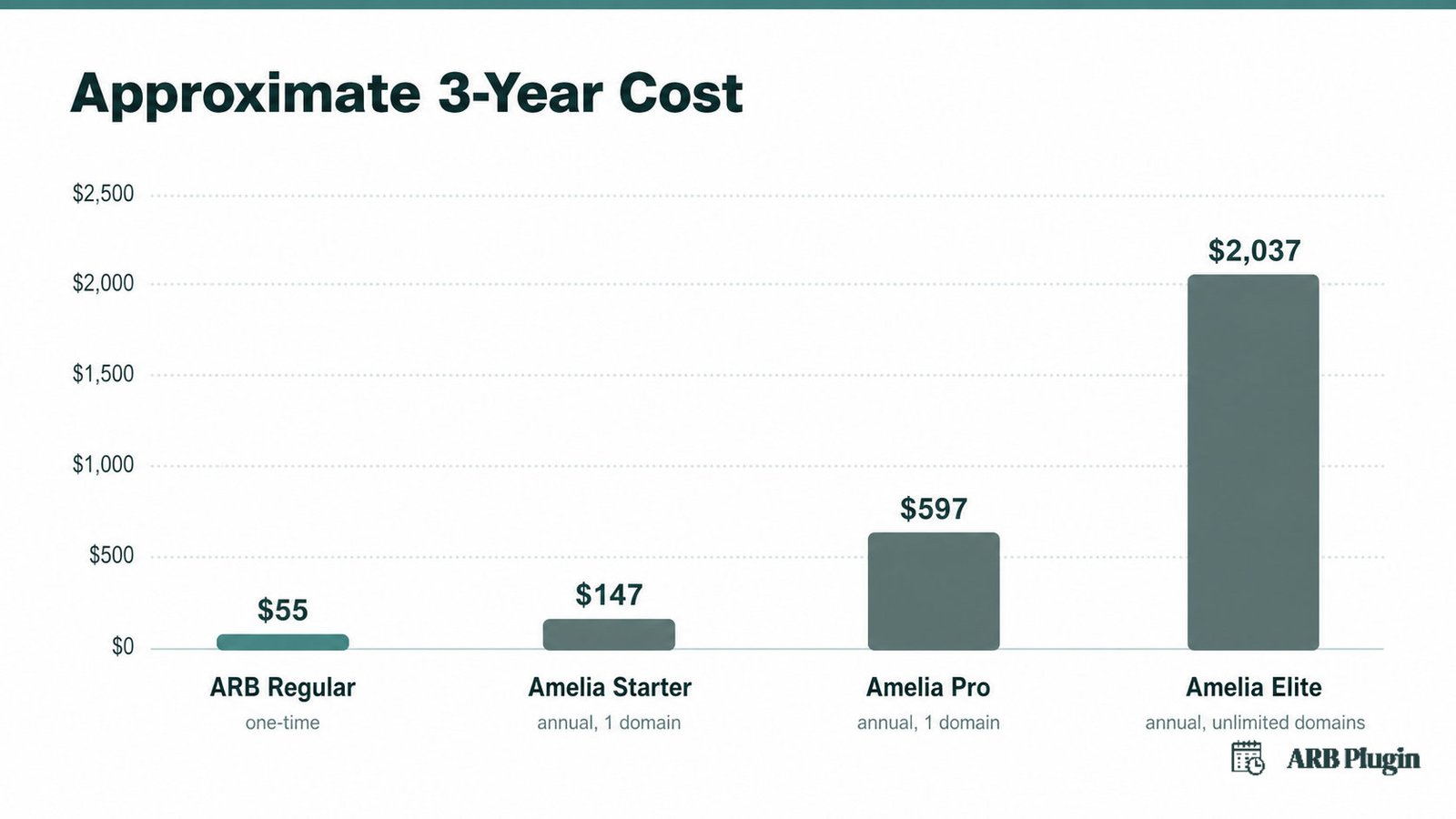
For a single WooCommerce store, ARB is cheaper almost immediately. Over three years, ARB costs about $55 once, against roughly $147 for Amelia Starter, $597 for Amelia Pro, and $2,037 for Amelia Elite.
| Plan | Model | Approximate 3-year cost |
|---|---|---|
| ARB Regular license | One-time | $55 |
| Amelia Starter | Annual, 1 domain | $147 |
| Amelia Pro | Annual, 1 domain | $597 |
| Amelia Elite | Annual, unlimited domains | $2,037 |
The math inverts for anyone who needs what ARB does not offer. If a free tier to start, or deposits, staff panels, and events matter most, Amelia's tiers buy real capability ARB genuinely lacks.
WooCommerce Integration: Native Product vs Bridge
ARB wins decisively for WooCommerce stores. It is a native reservable product that reuses the real cart, checkout, tax, coupons, and every WooCommerce gateway. Amelia routes bookings out to WooCommerce checkout through an auto-created hidden bridge product, available only on Standard tier and above.
On ARB, a booking flows the same way any other WooCommerce sale does. The reservable product goes into the cart, taxes and coupons apply automatically, and the order lands in WooCommerce alongside every other sale.
On Amelia, WooCommerce is optional and starts at the Standard tier. Enabling it takes several manual steps ARB's native product skips.
- Amelia auto-creates a hidden WooCommerce product, commonly named "Appointment," to act as the bridge.
- The finished booking redirects to that bridge product's WooCommerce checkout.
- The admin maps Amelia's booking statuses to WooCommerce order statuses through manually configured rules.
- Because Amelia's own WooCommerce documentation states the plugin cannot pick the correct rule setup for every site, the admin runs test bookings to align them.
Booking Rules and Pricing Flexibility
ARB and Amelia tie on this dimension at 4.5 out of 5, though each wins in a different place. ARB wins for range-based pricing and quote-first workflows inside WooCommerce. Amelia wins for packages, cart checkout, and party-size pricing tied to staff and services.
ARB models duration from minutes to months and prices independently by resource and person type. It layers range-based rules across slot count, person count, date, time, and day of week. It also ships a Request-for-Quote mode for approval-first bookings, something Amelia does not offer as a direct equivalent.
Amelia counters with custom service durations, a shopping cart for multi-service bookings, and recurring appointments. Its pricing also adjusts by party size, date, and time. Its packages bundle multiple services at a set price, a bundling option ARB does not have.
Neither plugin is flawless here. ARB has no deposits or partial payments; Amelia has no quote-custom-pricing form. Test your own pricing rules against either plugin's live demo before committing.
Staff, Locations, and Events
Amelia wins clearly for multi-staff, multi-location businesses and ticketed events. It has Employee Panels, per-staff schedules, unlimited locations on paid tiers, and a full events module with QR e-tickets and waiting lists. ARB models staff only as generic resources, with no logins or dashboards, and covers events through person-types rather than a dedicated module.
| Capability | Amelia | ARB |
|---|---|---|
| Staff | Employee Panels with per-staff logins, schedules, and days off | Generic resources, no logins or dashboards |
| Locations | Unlimited on paid tiers, each with contact data and geolocation | Single WooCommerce store, no multi-location structure |
| Events | Full module: ticket types, per-attendee QR check-in, recurring events, and a waiting list | Person-types can stand in for tickets; no QR, no waiting list |
Amelia's Employee Panel lets each staff member log into their own schedule, set working hours and days off, and see their own bookings. Locations carry their own contact data and geolocation, and Amelia supports unlimited locations on every paid tier.
ARB has no equivalent. Staff and rooms are both modeled as generic "resources," each with its own price and availability. There is no employee login, no per-staff dashboard, and no multi-location structure beyond what a single WooCommerce store already provides.
Amelia's events module adds ticket types, per-attendee QR check-in, recurring events, and a waiting list for sold-out dates. ARB's person-types can stand in for tickets in a pinch, but there is no QR check-in and no waiting list.
If a dedicated staff panel or ticketed events are must-haves, Amelia is the fit here. ARB should not claim parity it does not have.
Calendar Sync, Notifications, and Customer Management
Amelia wins for calendar-heavy operations. It syncs natively and two-way with Google, Outlook, and Apple calendars, plus Zoom, Google Meet, and Microsoft Teams for online sessions. ARB offers one-way Google sync through a paid add-on and iCalendar export, alongside email reminders and a customer account area.
| Channel | Amelia | ARB |
|---|---|---|
| Calendar sync | Native two-way Google, Outlook, and Apple | One-way Google via paid add-on; iCal export |
| Video meetings | Zoom, Google Meet, and Microsoft Teams | None |
| Reminders | Email, SMS, and WhatsApp (WhatsApp on Pro) | Email, automated and bulk, with dynamic tags |
| Customer self-service | Customer Panel with auto time-zone detection | Account area to view and manage reservations |
Amelia sends reminders by email, SMS, and WhatsApp, though WhatsApp requires the Pro tier. Customers manage their own bookings through a Customer Panel, and time zones detect automatically.
ARB sends automated and manual or bulk reminder emails with dynamic tags. Every customer also gets an account area to view and manage their own reservations after checkout. Google Calendar sync is a paid add-on that pushes bookings one-way; core ARB otherwise offers only .ics export.
Neither plugin's calendar reliability is spotless. Amelia's own version 9 release drew complaints of calendars that stopped blocking booked staff correctly. Buyers on both sides should verify sync behavior on their own site before relying on it for a busy schedule.
Setup, Support, and Track Record
Amelia wins for out-of-the-box polish. Its step-by-step wizard is widely praised, even by rival reviewers, though its support reputation is mixed and version 9 introduced real stability regressions. ARB's setup is config-heavy across five tabs inside the familiar WooCommerce product editor, with demo data included, and its track record is thin but clean.
Amelia's wizard walks a buyer through company settings, employees, services, and locations before a single booking form goes live. There is no demo data to start from. That depth is also why setup takes longer: expect roughly seven configuration stages before the first form is ready.
Amelia holds 3.5 out of 5 on Trustpilot across 250 reviews and 4.6 out of 5 on WordPress.org across 779 reviews. Its own pricing page cites a higher 4.9 out of 5 from Capterra across 182 reviews, a figure that quotes only one platform.
ARB configures through five tabs (General, Availability, Costs, Persons, Resources) inside the reservable product editor. The purchase bundles demo data that recreates the live demo. ARB holds 4.81 out of 5 from 16 ratings on CodeCanyon, from 510 sales, with roughly six months of Envato author support included.
That CodeCanyon number is a thin sample next to Amelia's hundreds of reviews, and ARB's support is Envato-standard rather than independently proven at scale. Neither claim should be overstated in either direction.
ARB vs Amelia: The Verdict
ARB scores 4.2 out of 5 overall; Amelia scores 3.6. Amelia still wins two specific segments outright: multi-staff salons and clinics, and businesses running ticketed events.
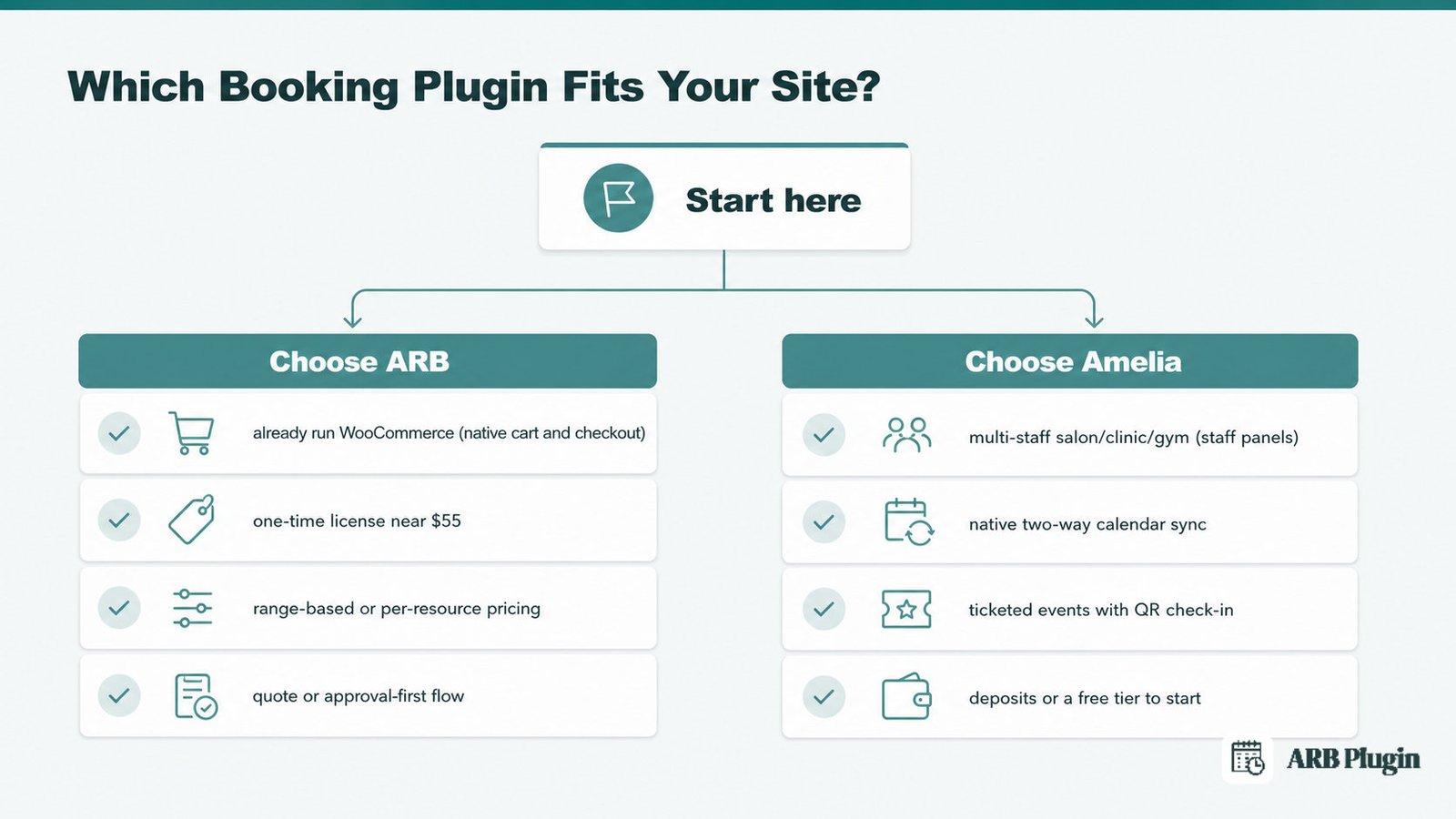
Choose Amelia if:
- You run a multi-staff salon, clinic, spa, or gym and need per-employee panels and schedules.
- You want native two-way Google, Outlook, or Apple calendar sync, plus Zoom or Meet meetings.
- You run ticketed events and need QR check-in or a waiting list.
- You need deposits to cut no-shows, or a polished wizard and a free tier to start.
Choose ARB if:
- You already run WooCommerce and want bookings inside your real cart, checkout, tax, and coupons, not a bridge.
- You want a one-time license near $55 instead of $49 to $679 a year.
- You need range-based pricing by weekend, person, slot, or day, or per-resource pricing for rentals and hotels.
- You want a quote or approval-first flow, or you are a developer deploying per client on the Extended license.
The Layer-1 overall favors ARB, but a segment winner can differ from it. Re-weighted for a multi-staff salon or clinic, Amelia wins that segment outright. ARB fails the per-staff scheduling gate, since staff are generic resources with no logins, despite its higher overall score.
Both plugins are scored here on the same public rubric. ARB is recommended only for the segments it wins on evidence, not by default. Amelia's genuine wins (staff tools, events, calendar sync, polish, and a free tier) are named plainly above.
If Amelia's limitations for a WooCommerce store rule it out, our Amelia alternatives roundup covers other options. To weigh more than these two, see our best WooCommerce booking plugins and best WordPress booking plugins comparisons.
Try the ARB live demo to see a booking flow through your own cart and checkout before you buy.
FAQs
Is ARB better than Amelia?
ARB scores 4.2 out of 5 overall against Amelia's 3.6, driven by WooCommerce-native fit and one-time value. Amelia is still the better pick for multi-staff service businesses that need polish, events, and native calendar sync.
Is Amelia WooCommerce-native?
No. Amelia is a standalone engine that pass-through-integrates WooCommerce through an auto-created hidden bridge product and manual status-rule mapping, available on Standard tier and above. ARB is a native reservable product, with no bridge required.
Does Amelia have a free plan and does ARB?
Amelia has a free, limited WordPress.org version, with no trial and a 15-day refund on paid plans. ARB has no free tier: evaluation happens through a hosted live demo, and the license is a one-time purchase.
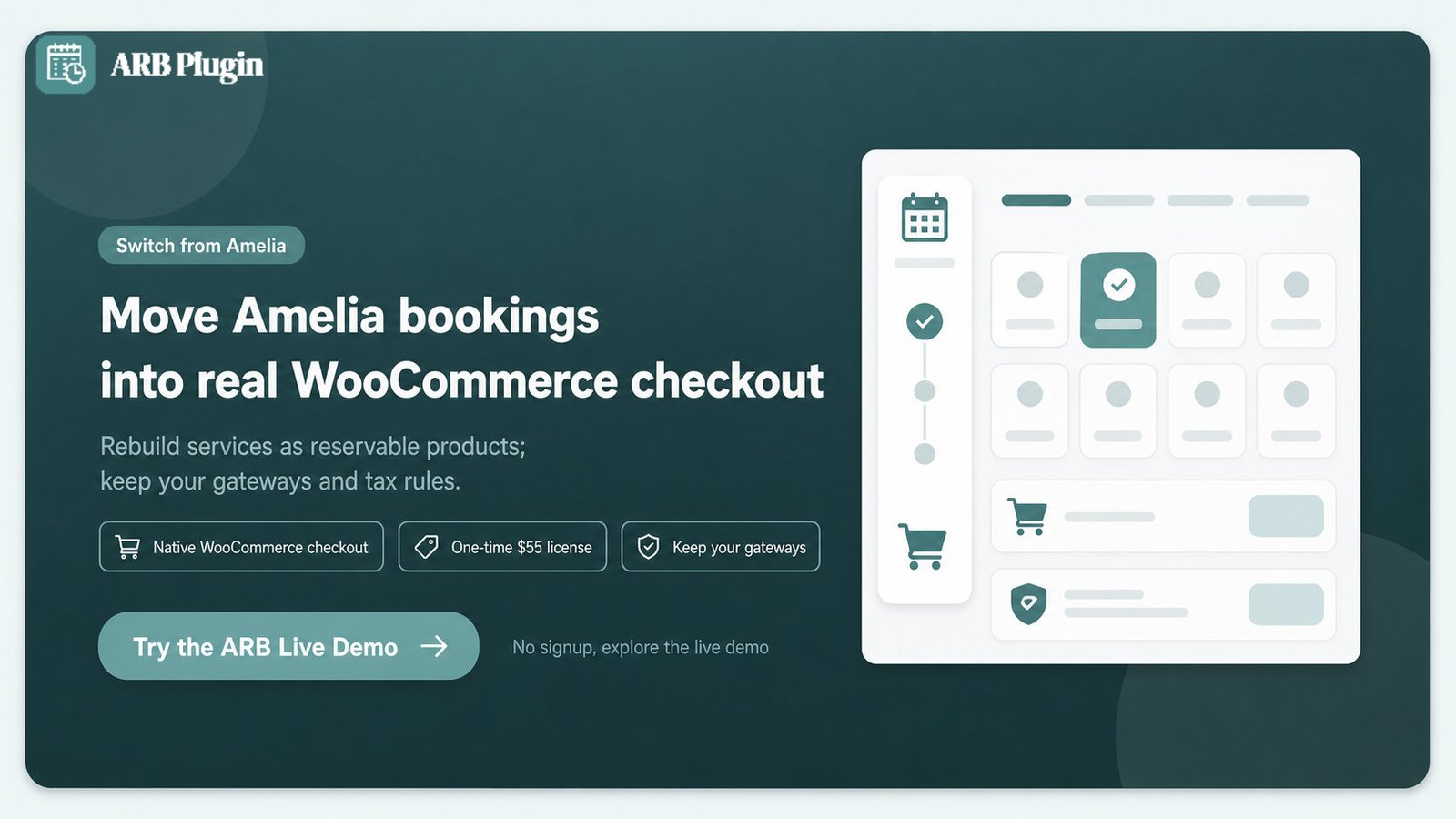
Can I switch from Amelia to ARB?
Yes. Because ARB lives inside WooCommerce, you rebuild your services and resources as reservable products and keep your existing payment gateways and tax rules. There is no automated importer, so recreate services and resources by hand.
Does ARB support deposits and staff logins like Amelia?
No. ARB has no deposits or partial payments, and no per-staff logins or dashboards, since staff are modeled as generic resources. If those are must-haves, Amelia leads on both.
Which is easier to set up for a WooCommerce store?
For a WooCommerce store specifically, ARB is simpler. It is a native product with no bridge or status-rule mapping, and it ships with demo data. Amelia's wizard is polished, but its WooCommerce path adds the bridge and mapping steps on top.
How much does Amelia cost?
Amelia's paid plans run $49 to $679 a year, or roughly $269 to $1,799 as a one-time lifetime license. A free WordPress.org version exists, and WooCommerce integration starts on the Standard tier at $99 a year.