This web hosting business plan template is a free, 10-section, fill-in-the-blank document, from executive summary through financial projections. It is built around hosting-specific decisions: your infrastructure model, WHMCS billing, and plan pricing.
It fits reseller-first hosting startups, small VPS or dedicated hosts, and agencies drafting a plan for a hosting client. Copy each section below, fill in the brackets, and build your numbers as you go.
The complete template is on this page. Copy each of the 10 sections below into a Google Doc, Word file, or Notion page, then fill in the brackets. No email, no download, and no sign-up required.
What's Included in This Web Hosting Business Plan Template?
This template is a free, 10-section, fill-in-the-blank document. It is built around hosting-specific decisions: your infrastructure model, WHMCS billing, and plan pricing. A generic business-plan template skips those numbers; this one names them.
What This Template Includes
Each section below covers one part of the plan, in the order you fill them in.
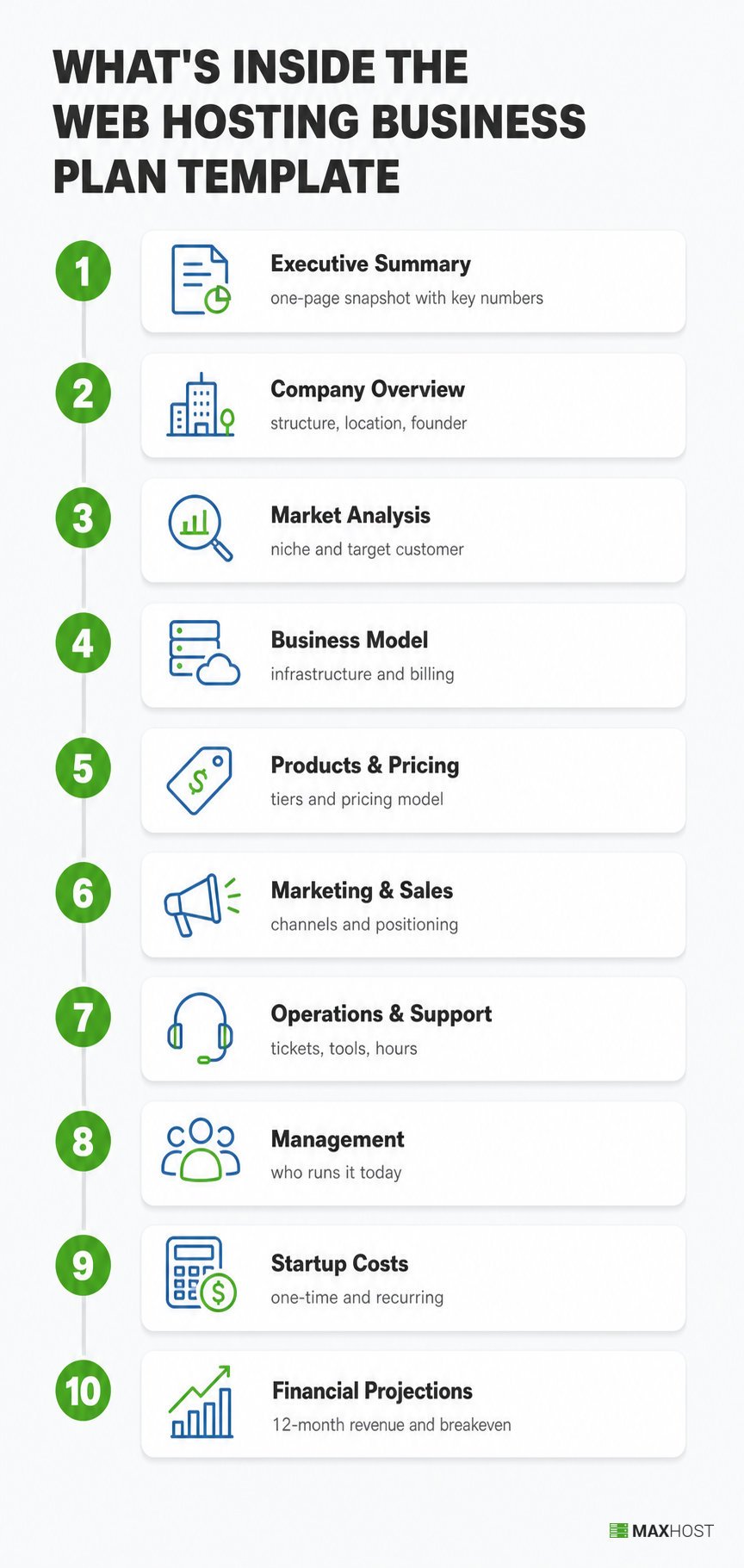
- Executive Summary: the one-page snapshot a lender or partner reads first, business name, model, niche, and your key numbers.
- Company Overview: your business structure, location, and the founder background that makes you credible.
- Market Analysis: your niche, target customer profile, and how you differ from the hosting giants and other resellers.
- Business Model: the infrastructure you sell on and the upstream provider or billing platform behind it.
- Products & Pricing: your plan tiers, price points, and the pricing model that sets them.
- Marketing & Sales: the channels you use to find customers and how you position against commodity, low-cost hosts.
- Operations & Support: how tickets get answered, which tools run billing and provisioning, and your support hours.
- Management: who runs the business today, and who you bring in as it grows.
- Startup Costs: every one-time and recurring cost you need before your first client signs up.
- Financial Projections: your revenue, cost, and profit numbers across your first 12 months, plus your breakeven client count.
Who This Template Is For
This template fits four hosting-business situations, each one filling in a plan before spending real money.
- Bootstrapped resellers starting their first hosting business on a wholesale reseller plan.
- Small hosting startups buying their own VPS or dedicated server capacity.
- Freelancers or agencies drafting a plan on behalf of a hosting client.
- Operators deciding between a reseller-only launch and a full hosting-company scope.
Skip this template if you need a fundraising-grade plan for institutional investors, or you already run a 50-plus-client operation. Those plans need audited financials and a formal capitalization table this template does not build.
When to Use This Web Hosting Business Plan Template
Use this template once you decide to start or evaluate a hosting business. You need a written plan for yourself, a lender, or a partner. It replaces a blank page with hosting-specific structure, so you fill in numbers instead of inventing sections.
Four situations trigger it most often.
- You have picked hosting as your business idea and need the plan in writing.
- A lender, partner, or co-founder asked to see your numbers before committing.
- You are comparing a reseller-only launch against a full hosting-company build.
- You already have a rough idea but no structure to organize it.
This template assumes you already know your niche and rough numbers. How to write a web hosting business plan covers the reasoning behind each section, useful before you fill in the blanks below. For the complete operational launch sequence, from picking a niche to going live, see how to start a web hosting business.
How to Fill In This Web Hosting Business Plan Template
Fill in this template in the same order as its 10 sections, since later sections build on the numbers earlier ones set.
- Executive Summary
- Company Overview
- Market Analysis
- Business Model
- Products & Pricing
- Marketing & Sales
- Operations & Support
- Management
- Startup Costs
- Financial Projections
Step 1: Executive Summary
Write this section last, even though it appears first on the page. It summarizes every other section in one page, so writing it before the rest forces you to guess numbers you have not calculated yet.
[Executive Summary]
- Business name and infrastructure model: [ ]
- Target niche or audience: [ ]
- Startup capital needed: [ ] USD
- Target breakeven client count: [ ]
- One-sentence differentiation from other hosts: [ ]
Step 2: Company Overview
Name your legal structure and location before anything else. A lender or partner reads this section to confirm the business is real and who stands behind it.
[Company Overview]
- Business name and legal structure (sole proprietor, LLC, or other): [ ]
- Location and jurisdiction: [ ]
- Founder or team background relevant to hosting: [ ]
- Business start date or launch target: [ ]
- Mission in one sentence: [ ]
Step 3: Market Analysis
Name a specific niche pattern here, platform-specific, geographic, or bundled with a service you already offer. A generalist "we host everyone" answer competes on price against hosts far larger than you.
[Market Analysis]
- Target customer profile (who buys, and why): [ ]
- Niche pattern (platform-specific, geographic, or bundled with an existing service): [ ]
- Direct competitors and their pricing: [ ]
- Your positioning against them in one sentence: [ ]
Step 4: Business Model
Your infrastructure choice is the core business-model decision for a hosting company. Reseller hosting needs no server administration; a rented VPS or dedicated server gives full root access at a higher monthly cost. If reselling under an upstream provider is your model, how to start a reseller hosting business covers the narrower setup this section assumes.
[Business Model]
- Infrastructure model chosen (reseller, VPS, dedicated, or owned hardware): [ ]
- Upstream provider or reseller plan (if reselling): [ ]
- Billing and automation platform: [ ]
- Revenue model (monthly billing, annual billing, or both): [ ]
Step 5: Products & Pricing
Pick a pricing model before you set any number. Cost-plus adds a fixed margin to your real cost; market-rate matches competitors; value-based prices around service and uptime. For how to actually set and present that price, see how to price your hosting plans.
[Products & Pricing]
- Plan tiers and what each includes: [ ]
- Price per tier: [ ]
- Pricing model (cost-plus, market-rate, or value-based): [ ]
- Add-ons and upsells (SSL, domains, maintenance retainers): [ ]
Step 6: Marketing & Sales
Name your channels and your positioning against commodity, low-cost hosts specifically. Competing on price alone against "$1 hosting" ads is a race you cannot win on a small reseller allocation.
[Marketing & Sales]
- Primary marketing channels: [ ]
- Target new-client count per month: [ ]
- Positioning statement against low-cost commodity hosts: [ ]
- Sales process (self-serve signup, sales call, or both): [ ]
Step 7: Operations & Support
Support is the largest ongoing cost in a small hosting business, measured in your time rather than dollars. Decide your coverage model now, before a client's site goes down at 2 a.m. and you have no plan.
[Operations & Support]
- Support coverage model (solo, staffed, or automated): [ ]
- Support hours: [ ]
- Tools used for ticketing and provisioning: [ ]
- Escalation plan for outages caused by your upstream provider: [ ]
Step 8: Management
Fill this in even as a solo operator. A lender or partner wants to see who runs what today, and your own plan for the first hire when support outgrows one person.
[Management]
- Owner or founder role: [ ]
- Other team members and roles, if any: [ ]
- Advisors or contractors you rely on: [ ]
- Plan for your first support hire: [ ]
Step 9: Startup Costs
Split every cost into one-time and recurring, since the two hit your cash flow differently. The table below uses current published pricing so you can fill in your own estimate against a real range instead of a guess.
[Startup Costs]
| Cost item | Type | Typical range | Your estimate |
|---|---|---|---|
| Reseller hosting plan or VPS | Recurring | $20 to $59 per month | [ ] |
| Billing software (WHMCS or similar) | Recurring | $10 to $85 per month | [ ] |
| Domain reseller signup deposit | One-time | About $25 | [ ] |
| Your own domain and branding | One-time | $10 to $200 | [ ] |
| Website or storefront build | One-time | $0 to $500 or more | [ ] |
| Payment processor setup | One-time | $0 | [ ] |
| Total startup capital | About $1,000 typical | [ ] |
WHMCS billing software runs $9.99 a month for a 25-client cloud plan up to $84.95 a month self-hosted for 1,000 clients. Reseller hosting plans commonly run $19.88 to $58.88 a month by account-count tier.
Step 10: Financial Projections
Project revenue, cost, and profit across your first year, not just a single snapshot month. Cross-check your own margin assumptions against real operator numbers in is a web hosting business profitable before you commit to them here.
[Financial Projections]
| Line item | Month 1 | Month 6 | Month 12 |
|---|---|---|---|
| Active clients | [ ] | [ ] | [ ] |
| Revenue (clients times average price) | [ ] | [ ] | [ ] |
| Fixed tooling cost (hosting plus billing) | [ ] | [ ] | [ ] |
| Gross profit | [ ] | [ ] | [ ] |
| Breakeven client count | [ ] |
Extend this skeleton to all 12 months in a spreadsheet for the full picture. A complete build also covers an income statement, a cash flow statement, a balance sheet, and a break-even analysis. Smartsheet's business-plan financial template guidance walks through each of those four statements.
Available Formats
This template lives on this page in plain text, so it copies cleanly into any editor without a download.
| Format | How to use it | Best for |
|---|---|---|
| This page (copy directly) | Select and copy any section, then paste it | The fastest start, no new software |
| Google Docs | Paste the text sections, then format the headings | Collaborative editing with a co-founder or advisor |
| Google Sheets | Rebuild the Startup Costs and Financial Projections tables as a live spreadsheet | Running the real math with formulas |
| Word or Notion | Paste the whole template, then reformat | Offline drafting or an existing team workspace |
| PDF (export from Docs or Word) | Finish in Docs or Word, then export to PDF | A clean copy to send a lender or partner |
| PowerPoint or Slides | Rebuild the executive summary and projections as slides | Pitching the plan to a partner or co-founder |
FAQs
What should a web hosting business plan template include?
A complete plan covers an executive summary, company overview, market analysis, business model, pricing, marketing, operations, management, startup costs, and financial projections. A hosting-specific template adds the decisions generic templates skip: your infrastructure model, WHMCS billing setup, and reseller margin math.
Is this web hosting business plan template really free?
Yes. Every section is on this page with no email, no download, and no sign-up gate. Free, ungated access-to-template resources is the norm in this category, not an exception.
What's the difference between this template and the full step-by-step guide?
This template is fill-in-the-blank sections you complete with your own numbers. The full guide above explains the reasoning behind each decision first, useful if you have not settled your niche, model, or pricing yet.
Can I use ChatGPT or AI to write my web hosting business plan?
Yes, for a first draft. AI tools fill each section fast, but they invent your numbers, so treat every figure as a placeholder. This template gives the AI the right 10 sections, then you replace its guessed costs, pricing, and projections with your real numbers.
Can I use this template for a reseller-only business, or do I need the full hosting-company version?
Use it for either. The Business Model section (Step 4) scales to reseller-only, VPS, dedicated, or owned-hardware operations, since the same 10 sections apply regardless of infrastructure. Reseller-only operators typically leave Management and Operations & Support the shortest.
Do I need a separate financial-projections spreadsheet, or is it built into the template?
Both. The Startup Costs and Financial Projections sections above give you fill-in tables directly on the page. Rebuild them as a live Google Sheet once you want formulas that recalculate as you change your client count or price.
How long should my finished business plan be?
Most small-business plans run 10 to 20 pages once filled in. Financing-oriented plans built for a lender or investor often run 20 to 40 pages, with more detail in Market Analysis and Financial Projections.
Is a one-page lean business plan enough, or do I need the full template?
A one-page lean plan works for personal clarity or testing an idea fast. It skips the detail a lender, partner, or co-founder needs to evaluate you. Use the full 10-section template for anything past your own planning.
What format is the template available in?
This page itself, ready to copy into Google Docs, Google Sheets, Word, or Notion. See Available Formats above for which format fits which use.
Web Hosting Business Plan Template in MaxHost: When You're Ready to Move Past the Spreadsheet
One line in your Startup Costs table stays vague longer than any other: your own domain and branding. MaxHost turns that estimate into a fixed, verifiable number.
A custom-built marketing site plus a hand-styled WHMCS client area easily runs past a few hundred dollars in developer time. A WordPress and WHMCS theme built for hosting companies, like MaxHost, replaces both for a one-time $49.
Its WordPress theme for a hosting company installs WHMCS client-area templates directly, no bridge plugin required. MaxHost has updated this theme every year since 2016, so the templates match current WHMCS and WordPress versions.
That one line updates; your margin, financing, and every other section of this plan stay yours to fill in. See the MaxHost demo to view the matching hosting site and WHMCS client area.