Elementor and WPBakery are the two WordPress page builders bundled with MaxHost, so as a MaxHost buyer you get to build in either one. Elementor is a modern front-end live editor with a large addon ecosystem and a free tier. WPBakery is an older shortcode-based builder sold as a one-time lifetime license. This guide covers both builders, a side-by-side table across seven dimensions, verdicts on editing, pricing, lock-in, and speed, and how MaxHost supports both.
What's the Difference Between Elementor and WPBakery?
The core difference is editing model and how you pay. Elementor is a modern, front-end WYSIWYG builder: you drag elements onto a live preview and edit in place. WPBakery is an older, shortcode-based builder with both front-end and back-end editors, sold once for lifetime use.
Elementor favors visual designers and beginners who want to see changes instantly, and it runs on a freemium subscription. WPBakery favors developers and teams who like a structured back-end grid for mapping content, and it favors buyers who prefer a single one-time cost. Neither is universally better. The right pick depends on how you build and how you want to pay.
What Is Elementor?
Elementor is a modern WordPress page builder that launched in 2016 and now powers more than 22 million websites. You build visually on a live front-end canvas rather than in the WordPress back end. Its headline model is drag-and-drop editing with instant preview.
Core Strengths
Elementor's strengths center on visual, real-time building and a deep ecosystem.
- Live front-end editing, so you see the final design as you work.
- A large third-party addon and template ecosystem for extending widgets.
- A free version that covers basic sites before any paid upgrade.
- Strong responsive controls for mobile, tablet, and desktop layouts.
How Elementor Works
You drag individual widgets directly onto the page and style them in a left-hand panel. Changes render immediately on the live preview. The Pro tier adds a Theme Builder for headers, footers, and dynamic content, plus a form builder and popup builder. You work almost entirely on the front end.
Best For
Elementor fits specific builder types rather than everyone.
- Visual designers and beginners who want to edit in place and see results instantly.
- Freelancers and agencies who want a broad library of addons and templates.
- Teams testing ideas or launching small sites on the free tier first.
Limitations of Elementor
Elementor has real tradeoffs, not vague ones.
- Pro is an annual subscription priced per site tier, so ongoing cost recurs.
- Heavy widget use on complex layouts adds markup that needs caching to stay fast.
- Deep customization can push you into the paid tier quickly, since key widgets are Pro-only.
What Is WPBakery Page Builder?
WPBakery Page Builder, formerly Visual Composer, is an older, shortcode-based WordPress builder with more than a decade of history and around 4.3 million active users. It offers both a front-end editor and a back-end grid editor. It works with any WordPress theme and is frequently bundled free inside premium themes, including MaxHost.
Core Strengths
WPBakery's strengths center on structured building and one-time ownership.
- A back-end grid editor that developers favor for fast, structured content mapping.
- Both front-end and back-end editing modes in one plugin.
- A lifetime, one-time license with no recurring subscription.
- 50-plus content elements and 80-plus predefined layouts out of the box.
How WPBakery Works
You assemble rows and columns, then drop content elements in from a menu. The back-end grid shows your page structure as stacked blocks, which is fast for mapping long pages. The front-end editor renders a live preview, though element settings open in pop-up panels. Output is stored as WordPress shortcodes.
Best For
WPBakery fits developers and theme-bundled projects.
- Developers and teams who prefer a structured back-end grid over free-form canvas editing.
- Projects where the theme already bundles WPBakery, so the license cost is absorbed.
- Corporate and IT-services sites, such as when you build a business website with WordPress on a bundled theme.
Limitations of WPBakery
WPBakery has genuine tradeoffs to weigh.
- The front-end editor can feel clunky, since settings open in stacked pop-up panels.
- There is no free tier, only a free trial before purchase.
- Shortcodes remain in your content if you deactivate the plugin, creating cleanup work.
Elementor vs WPBakery: Side by Side
Here is how the two builders compare across the dimensions that drive the choice.
| Dimension | Elementor | WPBakery Page Builder |
|---|---|---|
| Editing UX | Live front-end canvas, drag elements onto the page | Front-end plus a back-end grid editor, settings in pop-ups |
| Performance | Marginally lighter, wins Cumulative Layout Shift | Roughly equal page weight, slightly better LCP |
| Learning curve | Gentler, modern visual interface | Steeper, dual editors and shortcode logic |
| Ecosystem and addons | Large third-party addon and template market | Smaller ecosystem, 50-plus built-in elements |
| Pricing model | Freemium, Pro subscription from about $59/year per site | One-time lifetime license from $82, no free tier |
| Portability and lock-in | Layout stored in post meta, styling lost on removal | Visible shortcodes left in content on removal |
| Best for | Visual designers, beginners, addon-heavy builds | Developers, structured content, theme-bundled projects |
Editing model, pricing structure, and lock-in behavior are the primary factors driving this comparison.
Interface: Which Is Easier to Build With?
Elementor is generally easier for visual, hands-on building, while WPBakery is faster for developers mapping structured pages in its back-end grid. The key difference is direct canvas editing versus a menu-and-grid workflow. Neither wins for every user.
Elementor's Interface
Elementor puts everything on a live front-end canvas. You drag a widget onto the page, then style it in a side panel while the preview updates instantly. Beginners reach a usable layout quickly, because what you see is what you get. This directness is Elementor's main interface advantage.
WPBakery's Interface
WPBakery offers two modes. The back-end grid editor shows your page as stacked rows and blocks, which is efficient for planning long, structured pages. The front-end editor gives a live preview, but element settings open in pop-up panels that can feel less fluid. Developers often prefer the grid for speed and control.
Verdict
For visual designers and beginners who want to edit in place, Elementor's live canvas is the easier tool. For developers who want to map structured content fast, WPBakery's back-end grid is more efficient. The deciding factor is whether you think visually or structurally.
Pricing: Elementor vs WPBakery
Elementor is freemium, with a free tier and paid Pro plans billed annually per site. WPBakery has no free tier and sells a one-time lifetime license instead. Your choice depends on whether you prefer a low entry point with recurring cost or a single upfront payment.
Elementor Pricing
Elementor offers a genuinely free version with drag-and-drop editing, core widgets, and basic templates. Paid Elementor Pro plans start at about $59 per year, billed annually, for a single site with 57 Pro widgets. Higher Pro tiers add more sites and the full widget set. Pro billing is a recurring annual subscription, priced per site tier.
WPBakery Pricing
WPBakery has no free tier, only a free trial and demo sandbox before purchase. It sells a lifetime, one-time license: the Regular single-site plan lists at $82, with 5-site and 10-site tiers at $299 and $592. Each license includes one year of Support Plus, which then renews at $59 per year. Crucially, WPBakery is often bundled free inside premium themes. MaxHost includes it at no extra cost within its one-time theme price.
Verdict
Elementor's free tier suits testing and small sites that may upgrade later. WPBakery's one-time license suits buyers who want to pay once and own it. For MaxHost buyers, the theme bundles both builders, so the pricing question largely disappears.
What Happens If You Uninstall Elementor or WPBakery?
Removing either builder leaves residue, but WPBakery's is more visible. This is the main lock-in consideration between the two. It is a switching cost to plan for, not a reason to avoid either builder outright.
Uninstalling Elementor
Elementor stores its layout data in the post meta, separate from your main content. If you deactivate it, your saved text remains, but the visual styling and layout are lost. You keep your words and lose the design, which then needs rebuilding in another tool.
Uninstalling WPBakery
WPBakery outputs pages as shortcodes embedded directly in your content. If you deactivate the plugin, those shortcode tags, such as [vc_row] and [vc_column], appear as visible text on the page. This "shortcode lock-in" means messier cleanup than a metadata-based builder.
Verdict
Both builders create switching costs, so this is a planning point rather than a dealbreaker. WPBakery's inline shortcodes are harder to clean than Elementor's stored metadata. In practice, MaxHost buyers who commit to one builder per project rarely uninstall mid-build.
Performance: Is Elementor or WPBakery Faster?
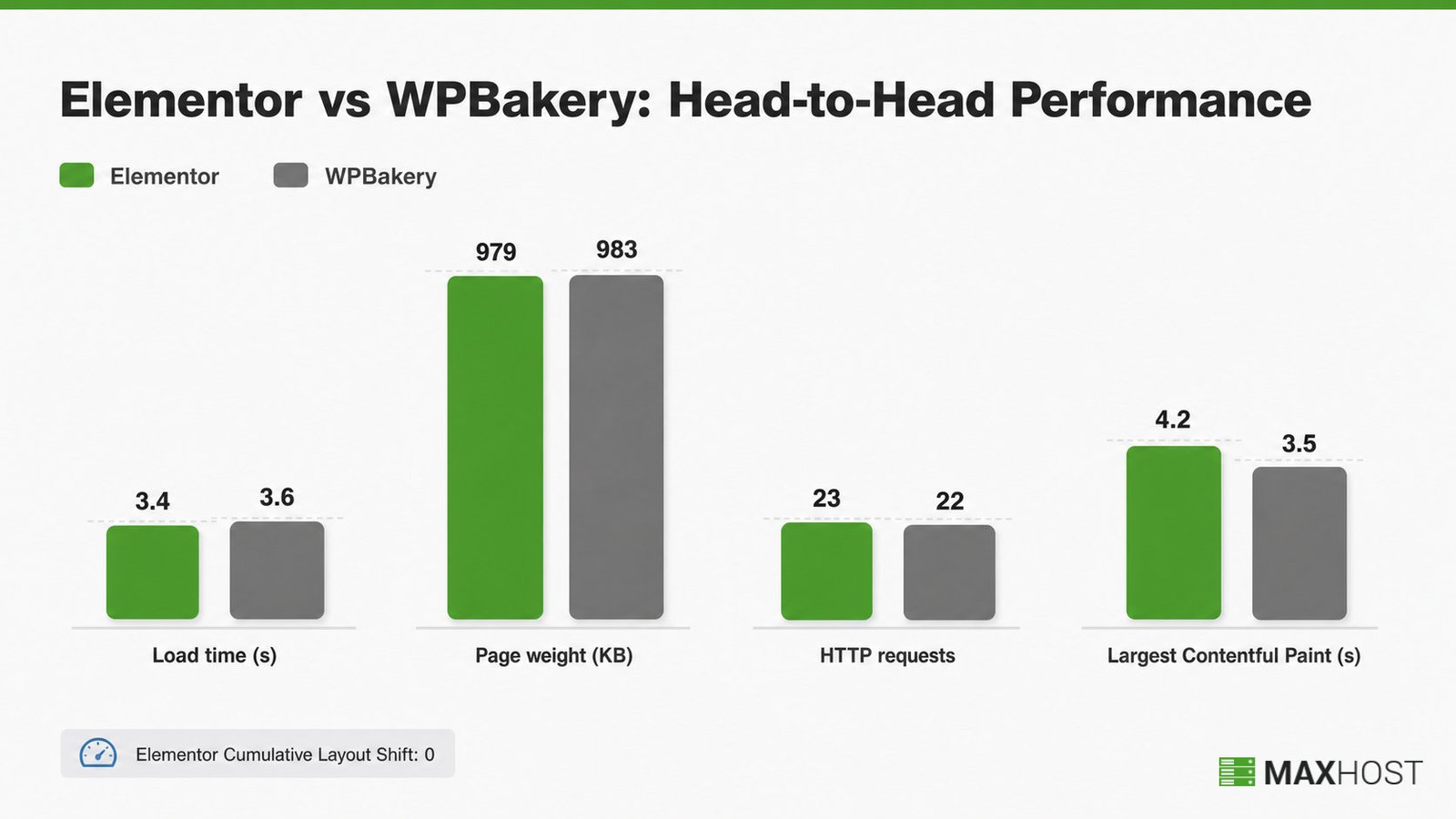
The two builders perform closely, and the common claim that Elementor is dramatically faster is overstated. On the same unoptimized test, page weight was nearly identical. Each builder wins a different Core Web Vital, and caching narrows any gap further.
Elementor's Performance
In one head-to-head test, Elementor loaded a sample page in about 3.4 seconds at 979 KB across 23 requests. Its standout metric was Cumulative Layout Shift at 0, meaning no visible layout jump. Elementor also offers strong native controls for mobile editing and global styling.
WPBakery's Performance
In the same test, WPBakery loaded in about 3.6 seconds at 983 KB across 22 requests, almost matching Elementor on raw weight. It actually posted a better Largest Contentful Paint, at 3.5 seconds versus Elementor's 4.2. On complex layouts, WPBakery benefits from caching and image optimization.
Verdict
On simple hosting-plan pages, the speed difference between the two is negligible. Elementor edges layout stability, while WPBakery edges initial paint, so neither is a clear performance winner. Both builders reach top scores once you add caching and compress images.
When to Use Elementor vs WPBakery
Choose Elementor if you build visually and want a free starting point with a large addon library. Choose WPBakery if you prefer a structured back-end grid, one-time pricing, or a theme that already bundles it. The choice hinges on your building style and payment preference.
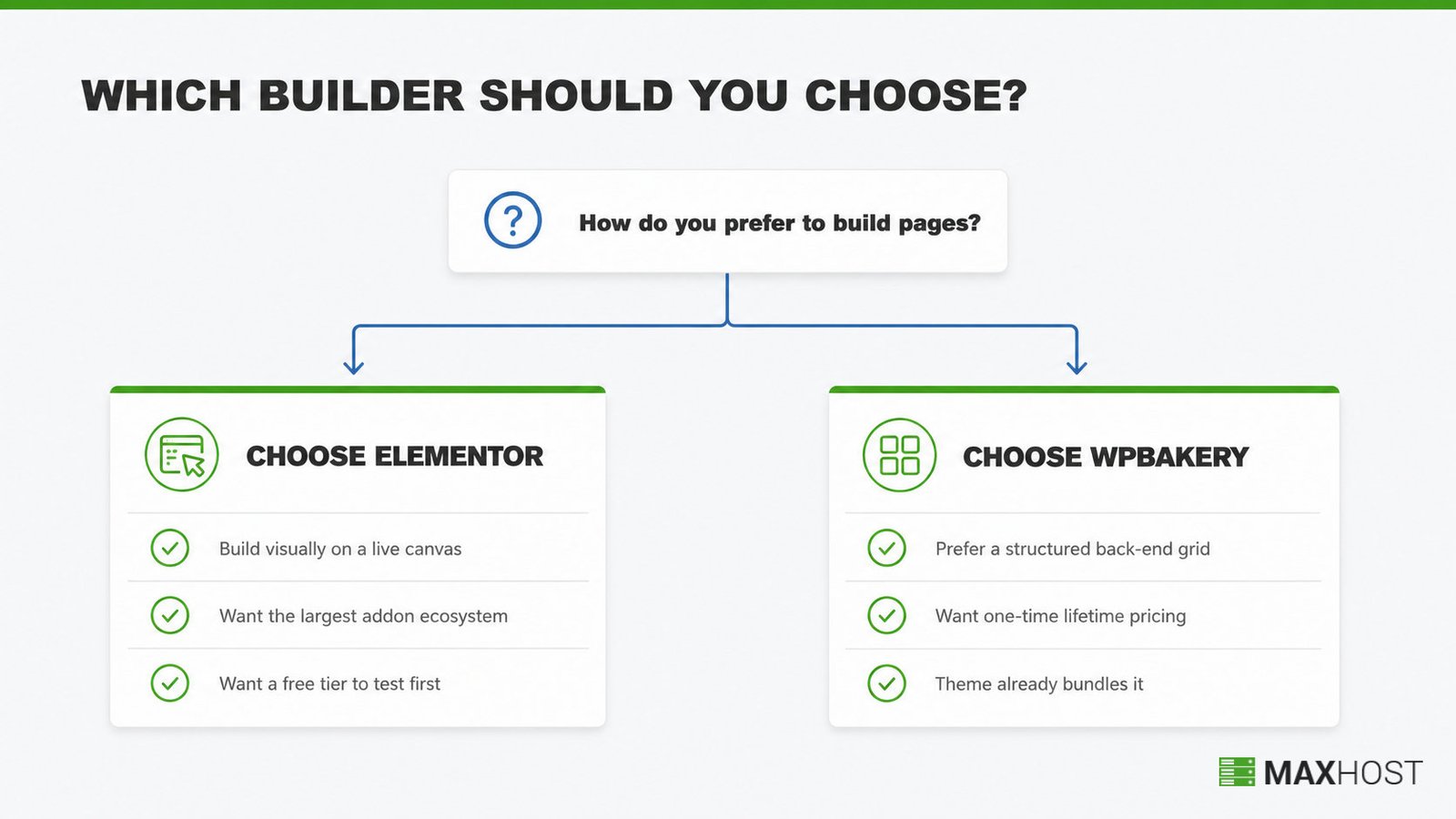
Elementor is the right pick when these conditions fit.
- You want to edit visually on a live canvas and see changes instantly.
- You want the largest ecosystem of third-party addons and templates.
- You want a free tier to test before committing any budget.
WPBakery is the right pick when these conditions fit instead.
- You prefer a structured back-end grid for mapping long pages.
- You want to pay once for a lifetime license rather than subscribe.
- Your theme already bundles it, so the license cost is absorbed.
If you are still comparing themes, our guide to the best WordPress hosting themes shows how builder support factors in. For the full build process, see how to make a web hosting website.
How MaxHost Supports Both Elementor and WPBakery
MaxHost bundles both Elementor and WPBakery, so you never have to choose one builder and lock out the other. MaxHost is a one-time WordPress hosting theme that ships importable demos built to work with either builder. That means you can switch approaches project to project without changing themes.
MaxHost for Elementor
MaxHost includes a bundled Elementor and Elementor Pro integration with custom widgets built for hosting sites. You can import a hosting demo and refine it visually on Elementor's live canvas. Related build tasks, like adding hosting pricing tables in WordPress, work directly inside the Elementor editor.
MaxHost for WPBakery
MaxHost bundles WPBakery Page Builder and ships 10-plus homepage layouts built with it. You can map long hosting pages in the back-end grid, then add modules like domain search in WordPress. The builder choice covers only your marketing site. Your billing and client area run through MaxHost's WHMCS integration, which pairs with either builder's front end.
Because both builders ship in the theme, the either-or decision never blocks your purchase. See both in action before you buy: View the MaxHost demo.
FAQs
Is Elementor better than WPBakery?
Neither is universally better. Elementor is better for visual, hands-on building and for teams wanting a free tier and a large addon ecosystem. WPBakery is better for developers who prefer a structured back-end grid and buyers who want a one-time lifetime license. Your building style decides.
Which page builder does MaxHost support, Elementor or WPBakery?
MaxHost supports both. The theme bundles Elementor with Elementor Pro integration and custom widgets, and it also bundles WPBakery Page Builder with more than ten homepage layouts. You can build any MaxHost project in whichever builder you prefer, without switching themes or paying extra.
What happens to my content if I uninstall Elementor or WPBakery?
Both leave residue. Elementor stores layout data in post meta, so your text stays but the styling is lost. WPBakery leaves visible shortcode tags in your content, which need manual cleanup. Plan for this switching cost before you migrate a site from either builder.
Is WPBakery free?
No. WPBakery has no free tier, only a free trial before purchase. It sells a one-time lifetime license, with the Regular single-site plan currently around $82. However, it is frequently bundled free inside premium themes, and MaxHost includes it within its one-time theme price.
Can I switch from WPBakery to Elementor later?
Yes, but plan for cleanup. WPBakery leaves shortcode tags in your content on deactivation, so pages built with it need rebuilding in Elementor rather than a clean carry-over. Migrating early, before you have many pages, keeps the shortcode cleanup manageable.
Does MaxHost also support Gutenberg?
MaxHost states block-editor optimization, so basic Gutenberg use works. In practice, though, MaxHost is builder-first: its demos and homepage layouts are built for Elementor and WPBakery. For a full hosting site, you will get the most from one of the two bundled builders rather than Gutenberg alone.