ARB is a one-time, roughly $55 WooCommerce-native booking plugin from Fluent-Themes. WooCommerce Bookings is Automattic's official $249-per-year extension for the same job. Both plug straight into WooCommerce's cart and checkout, so the real decision comes down to cost, calendar sync, and reliability.
Below: the scorecard, a full feature and price comparison, live 2026 pricing, booking-rule depth, calendar sync, reliability, and setup. The verdict closes it out, split by who each plugin actually fits.
ARB vs WooCommerce Bookings: Which Should You Choose?
ARB scores 4.2 out of 5 in our review; WooCommerce Bookings scores 3.8. ARB wins on total cost and pricing-rule depth for budget-minded WooCommerce stores. WooCommerce Bookings wins for buyers who want the official Automattic extension with native Google Calendar sync.
ARB (Fluent Themes) publishes this comparison and is one of the two plugins reviewed here. We scored both plugins on the same public rubric, using the same evidence and the same weights. ARB was not placed first by default.
Its honest limits, including no native two-way calendar sync, no deposits, and a thin review base, are named throughout this comparison. See how we review WooCommerce booking plugins for the full scoring method.
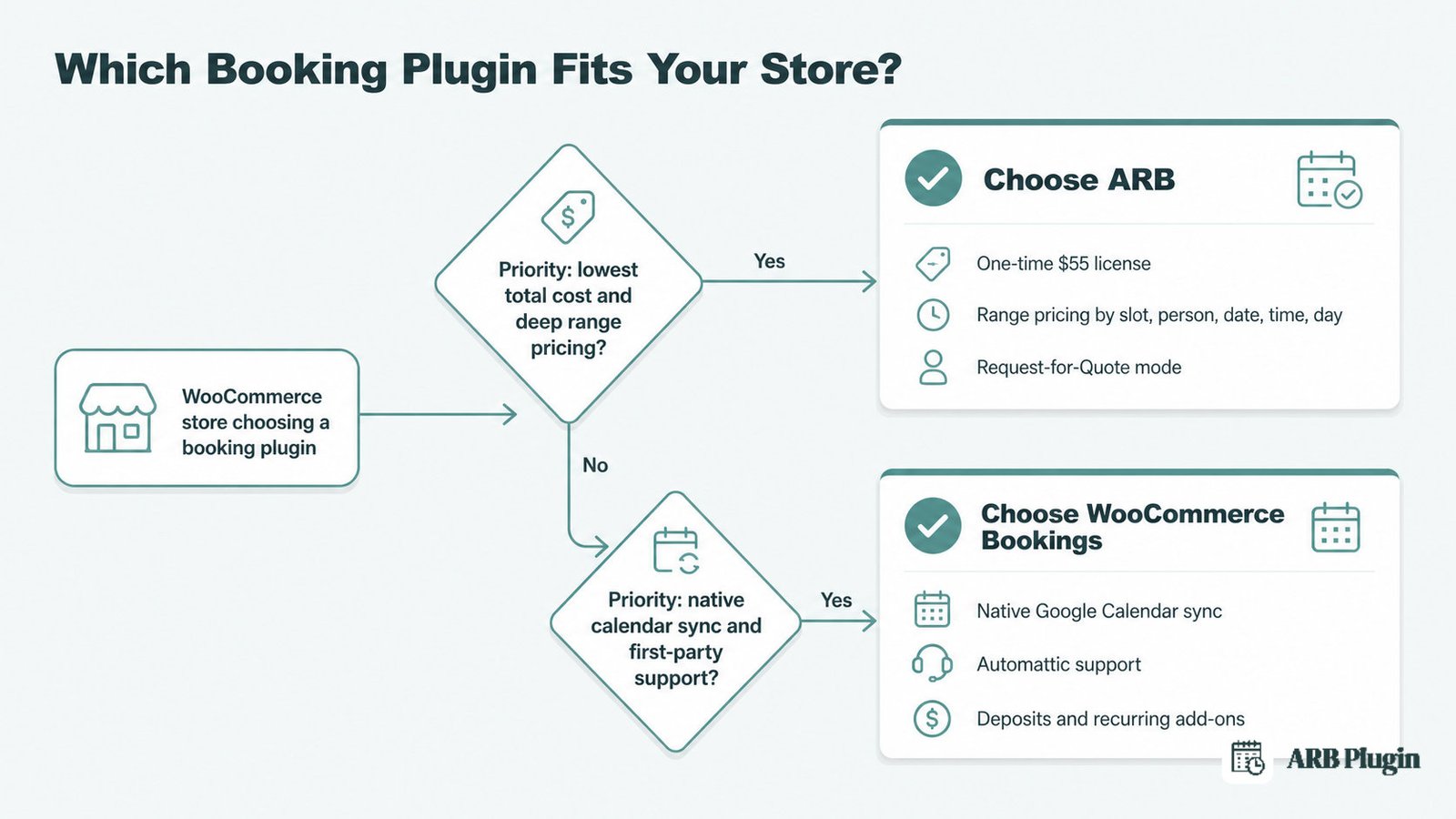
WooCommerce Bookings fits store owners who want the official, first-party extension. They pay $249 a year for native Google Calendar sync and Automattic's support team. ARB fits WooCommerce stores that need deep range pricing and a one-time cost instead of a recurring bill.
The core wedge is total cost. ARB's one-time license runs about $55. WooCommerce Bookings costs $249 every year, and add-ons for deposits, recurring bookings, and on-page availability push the real price higher still.
How We Score Both Plugins: The Scorecard
ARB scores 4.2 out of 5 overall; WooCommerce Bookings scores 3.8. ARB's edge comes from total cost and setup simplicity. WooCommerce Bookings leads on calendar sync and support, the two dimensions where its first-party backing shows.
| Dimension | ARB | WooCommerce Bookings |
|---|---|---|
| Booking Rules & Pricing Flexibility | 4.5/5 | 4.5/5 |
| WooCommerce / Commerce Integration | 5.0/5 | 5.0/5 |
| Value & Licensing (Total Cost of Ownership) | 4.5/5 | 2.0/5 |
| Setup & Admin Experience | 3.5/5 | 2.5/5 |
| Notifications, Calendar Sync & Customer Management | 3.0/5 | 3.5/5 |
| Maintenance & Compatibility | 4.5/5 | 4.5/5 |
| Support & Documentation | 3.5/5 | 4.0/5 |
| Overall | 4.2/5 | 3.8/5 |
The split is clean. ARB wins on price and setup. WooCommerce Bookings wins on calendar sync and support. The two tie on booking rules, WooCommerce integration, and maintenance.
ARB vs WooCommerce Bookings at a Glance
Both plugins are WooCommerce-native, so the choice comes down to cost, pricing-rule depth, and calendar sync. ARB wins on one-time price and a built-in quote mode. WooCommerce Bookings wins on native calendar sync and first-party trust.
| ARB | WooCommerce Bookings | |
|---|---|---|
| Our score | 4.2/5 | 3.8/5 |
| Best for | Budget WooCommerce stores wanting deep range pricing and a quote mode | Stores wanting the official extension and native calendar sync |
| Starting price | $55 one-time (Extended license $249 one-time) | $249 per year |
| Pricing model | One-time license (CodeCanyon) | Annual subscription |
| Free tier or trial | None (hosted demo) | None (30-day money-back guarantee) |
| WooCommerce-native | Yes | Yes |
| Dynamic / range pricing | Yes, by slot, person, date, time, and day | Yes, base, block, and display cost with range operators |
| Person types | Yes, priced individually | Yes, priced individually |
| Resources / staff | Yes, per-resource pricing and availability | Yes, shared resources with auto-assign |
| Quote / RFQ mode | Yes, admin sets a custom price | No, requires-confirmation only |
| Deposits | No | Yes, via the WooCommerce Deposits add-on |
| Calendar sync | Google via a paid, one-way add-on ($19 one-time), plus iCal export | Native Google Calendar sync (single calendar), plus iCal |
| SMS | Via a paid add-on ($15 one-time) | Not in core |
| Recurring bookings | Monthly or weekly only, no subscription-recurring | Via the WooCommerce Subscriptions add-on |
| Reliability (marketplace rating) | 4.81/5 from 16 ratings, CodeCanyon | 2.7/5 from 60 reviews, WooCommerce marketplace |
| Setup complexity | Five-tab config, no wizard | Templates included, but reviewers call it complicated |
| Support | Envato license support, about six months | Automattic Happiness Engineers plus deep docs |
| Platform | HPOS and modern WordPress/WooCommerce stack | HPOS and modern WordPress/WooCommerce stack |
Prices verified July 2026. Buyers comparing WooCommerce plugins also weigh Amelia, which we review separately as a non-WooCommerce-native alternative.
What Is WooCommerce Bookings?
WooCommerce Bookings is Woo's official scheduling and reservations extension, built by Automattic, for stores selling appointments, reservations, or rentals through WooCommerce. It scores 3.8 out of 5 in our review.
Automattic, the company behind WordPress.com and WooCommerce, has sold WooCommerce Bookings since around 2014. The WooCommerce Bookings extension runs on more than 20,000 active installs. Google's AI Overview names it the category's number one official solution. It cites the $249-per-year price, fixed time slots, resource and staff management, and two-way Google Calendar syncing.
WooCommerce Bookings earns its reputation on three real strengths. Its resources and availability engine lets a room, staff member, or piece of equipment carry its own schedule and capacity, shared safely across products. Google Calendar sync ships inside the core license, with no add-on required.
A large first-party add-on ecosystem and a full developer API of hooks and filters make it the most extensible option in the category. Ready-made Bookable Product Templates for salons, rentals, and tours back that up.
For the full breakdown of features, pricing, and user sentiment, read our WooCommerce Bookings review.
What Is ARB?
ARB is Fluent-Themes' WooCommerce-native booking plugin, sold as a one-time CodeCanyon license for stores that need complex booking rules. It scores 4.2 out of 5 in our review.
ARB turns any WooCommerce product into a Reservable Product across five configuration tabs: General, Availability, Costs, Persons, and Resources. Version 8.0.0, released in April 2026, added a Daily Agenda view and HPOS support.
The plugin's range pricing spans slot count, person count, date, time, and day of week. It also bundles a native Request-for-Quote mode that lets an admin set a custom price. Person types and resources each carry their own pricing, configured in the single license.
ARB's honest limits matter here. It sells only on CodeCanyon, with no free tier and no G2 or Capterra presence. Its 4.81 out of 5 rating comes from just 16 ratings, a far smaller sample than WooCommerce Bookings' 60. Its discovery footprint is thin: it does not appear in Google's AI Overview for the category.
Pricing: One-Time $55 vs $249 per Year
ARB costs $55 once. WooCommerce Bookings costs $249 every year, plus separate paid add-ons for deposits, recurring bookings, and on-page availability. Neither plugin has a free tier; for no-cost options, see the field of free WordPress booking plugins.
WooCommerce Bookings Pricing
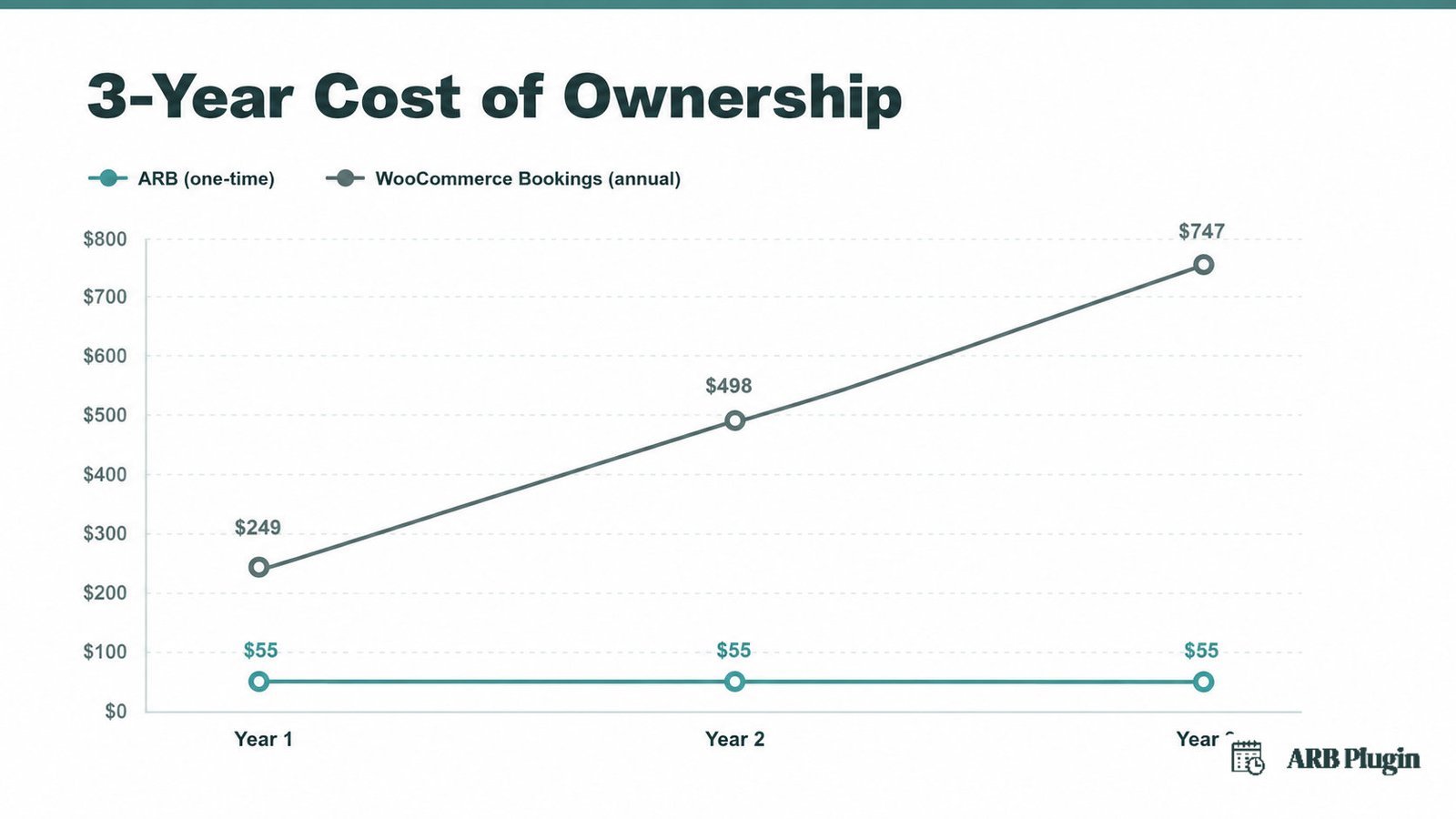
WooCommerce Bookings runs $249 a year for one site, about $20.75 a month. Two years cost $398.40, a 20 percent saving over the $498 list price. There is no one-time license and no free core tier, only a 30-day money-back guarantee.
Deposits, on-page availability calendars, and recurring bookings each require a separate paid add-on: WooCommerce Deposits, WooCommerce Bookings Availability, and WooCommerce Subscriptions. See the WooCommerce Bookings product page for current pricing.
ARB Pricing
ARB sells a Regular license for $55 one-time, covering every core booking feature: range pricing, person types, resources, and the Request-for-Quote mode. An Extended license, priced at $249 one-time, covers deployments where clients pay end users, the license developers and agencies buy for paid client work.
Only the Google Calendar add-on ($19 one-time) and the SMS add-on ($15 one-time) cost extra. See the ARB CodeCanyon listing for current pricing.
Which Is Cheaper for Your Setup?
Over three years, ARB's Regular license still costs about $55 total. WooCommerce Bookings costs roughly $747 over the same period, three annual renewals at $249 each, before any add-ons.
| ARB (Regular) | WooCommerce Bookings | |
|---|---|---|
| License model | One-time | Annual subscription |
| Entry price | $55 once | $249 per year |
| Core booking add-ons | None, all features in one license | Deposits, recurring, and on-page availability each a paid add-on |
| Three-year total | About $55 | About $747, before add-ons |
ARB's Extended license, at $249 one-time, equals exactly one year of WooCommerce Bookings. ARB wins on cost for nearly every store. The exception is a buyer who needs a capability only WooCommerce Bookings' add-on ecosystem provides, such as deposits or a native multi-tool integration. That buyer must also value the official brand enough to pay for it.
Booking Rules and Dynamic Pricing: How Flexible Is Each?
Both plugins model deep booking rules and range pricing. ARB wins for stores that need a native quote mode and broad range axes in one license. WooCommerce Bookings matches on availability depth and edges ahead on shared-resource maturity and recurring bookings.
Both plugins run durations from minutes to months, and both charge by resource, person type, and time period.
ARB prices by slot count, person count, date, time, and day of week, all inside the base license. It is the only one of the two with a native Request-for-Quote mode. An admin sets a custom price directly on the booking, a workflow WooCommerce Bookings does not offer.
WooCommerce Bookings prices with base, block, and display costs plus range operators for add, subtract, multiply, divide, and set-equal. Its resources engine is more mature. A room, staff member, or piece of equipment can be shared across several products and auto-assigned to the first available option. ARB's per-resource setup does not automate that step.
| Pricing axis | ARB | WooCommerce Bookings |
|---|---|---|
| Slot count | Yes | Via block count |
| Person count | Yes | Yes |
| Date and time range | Yes | Yes |
| Day of week | Yes | Yes, as a range of days |
| Quote or custom price | Yes, RFQ mode | No |
Two honest gaps run the other way. WooCommerce Bookings supports recurring bookings through the separate WooCommerce Subscriptions add-on and deposits through WooCommerce Deposits; ARB has neither natively.
Recurring bookings is WooCommerce Bookings' own top feature request, with 281 votes still open. ARB covers monthly and weekly booking, not subscription-style recurring, and it has no deposits feature at all.
Calendar Sync and Notifications: Where WooCommerce Bookings Leads
WooCommerce Bookings wins here outright. It ships native Google Calendar sync in the core license, while ARB's Google sync is a paid, one-way add-on ($19 one-time). That single difference decides the section for any buyer who needs calendar sync on day one.
WooCommerce Bookings sends booking confirmations, day-before reminders, and shows availability in the customer's own time zone. Its Google Calendar sync ships in the core extension, reflecting new bookings within about a minute.
ARB ships iCalendar (.ics) export in its core license, attachable to notification emails and importable into Google Calendar. Automated Google Calendar sync requires ARB's paid Google Calendar add-on ($19 one-time). That sync runs one way only, from ARB into the calendar, never back. ARB does not match WooCommerce Bookings here.
| Calendar capability | ARB | WooCommerce Bookings |
|---|---|---|
| Google Calendar sync | Paid add-on ($19 one-time) | Native, in the core license |
| Sync direction | One way (ARB into the calendar) | Two way |
| Calendars supported | Single | Single by default |
| iCal (.ics) export | Yes, in core | Yes |
Neither plugin syncs natively to Outlook or Apple Calendar. WooCommerce Bookings' native Google sync also targets only a single calendar by default. That is a real limit for stores managing several rooms, units, or vendors at once.
Reliability, Reputation, and Support
On marketplace sentiment, ARB scores higher: 4.81 out of 5 versus 2.7 out of 5 for WooCommerce Bookings. That gap comes from a far smaller sample, 16 ratings against 60 reviews. WooCommerce Bookings wins on first-party support infrastructure and documentation depth.
WooCommerce Bookings holds a 2.7 out of 5 rating from 60 reviews on the WooCommerce marketplace, not on WordPress.org or G2. It has no listing on either. Thirty-eight percent of those reviews are one star. Two reliability themes recur across them:
- The API stops working. Reviewers describe an "API that isn't working at all".
- Calendar sync breaks, sometimes after plugin updates. One reports a calendar that "got stuck in an infinite loop".
Both themes surface repeatedly on the marketplace and in r/woocommerce. They are the strongest reason a buyer picks a more stable WooCommerce-native alternative.
That reliability record sits alongside real first-party support. Automattic's Happiness Engineers back the extension, and its documentation covers more than 20 use-case scenarios. A full developer API of hooks and filters serves the agencies that build on it, across more than 20,000 active installs.
ARB holds a 4.81 out of 5 rating on CodeCanyon, but from only 16 ratings and 510 total sales. That is a far thinner sample than WooCommerce Bookings' 60 reviews. ARB has no G2, Capterra, or WordPress.org listing.
Its support runs through Envato's standard license window, about six months, not an ongoing service agreement. A high rating on 16 data points is not the same evidence as one on 60, and this comparison does not claim otherwise.
Setup and Ease of Use
WooCommerce Bookings gives a head start with Bookable Product Templates, but reviewers call the setup "far too complicated for normal users". ARB uses a five-tab Reservable Product config with a live demo. Call it close, decided by whether templates or simpler configuration matters more.
WooCommerce Bookings' Bookable Product Templates, such as Hair Salon and Boat Cruise, pre-build the product, its resources, and its person types together. New stores start from a working example instead of a blank form. Its admin adds calendar and list views with CSV import and export.
That head start collides with a real complexity complaint. Reviewers call the three-level availability model "far too complicated for normal users". One reviewer reports vendors who "leave because they find creating bookings too complicated".
ARB configures through five tabs: General, Availability, Costs, Persons, and Resources, the same tab count WooCommerce Bookings uses. Neither plugin is a two-click wizard.
A live demo lets a buyer test the flow before purchase, and the v8.0.0 Daily Agenda view speeds up daily reservation management. ARB also displays through Elementor, WPBakery, or a shortcode, without a dedicated template picker.
Setup is close. Choose based on whether a ready-made template or a simpler five-tab configuration matters more to your team.
ARB vs WooCommerce Bookings: The Verdict
ARB scores 4.2 out of 5 overall; WooCommerce Bookings scores 3.8. ARB wins on total cost and pricing-rule depth. WooCommerce Bookings remains the stronger pick where native calendar sync, first-party trust, deposits, or recurring bookings matter most.
Choose WooCommerce Bookings if:
- You want the official Automattic extension and first-party support
- You need native Google Calendar sync out of the box
- You rely on deposits, recurring bookings, or the wider add-on ecosystem
- Brand trust outweighs a recurring $249 a year
Choose ARB if:
- You want a one-time license instead of $249 a year
- You need deep range pricing, by slot, person, date, time, and day, plus a native quote mode in one purchase
- You are a developer or agency deploying per client on a budget
- You want a WooCommerce-native plugin without subscription lock-in
Budget and one-time-license buyers should pick ARB; WooCommerce Bookings' subscription-only pricing fails that test outright. First-party-trust and native-sync buyers should pick WooCommerce Bookings; ARB is not the official extension, and its calendar sync runs through an add-on.
WooCommerce-native stores without a strong preference find the two very close, decided mainly by native calendar sync against one-time cost and range-pricing depth.
Both scores come from the same public rubric. ARB wins the segments the evidence supports, not by default, and WooCommerce Bookings' real wins, native sync, its ecosystem, and first-party trust, are genuine.
For how both rank against the wider field, see the best WooCommerce booking plugins and best WordPress booking plugins roundups.
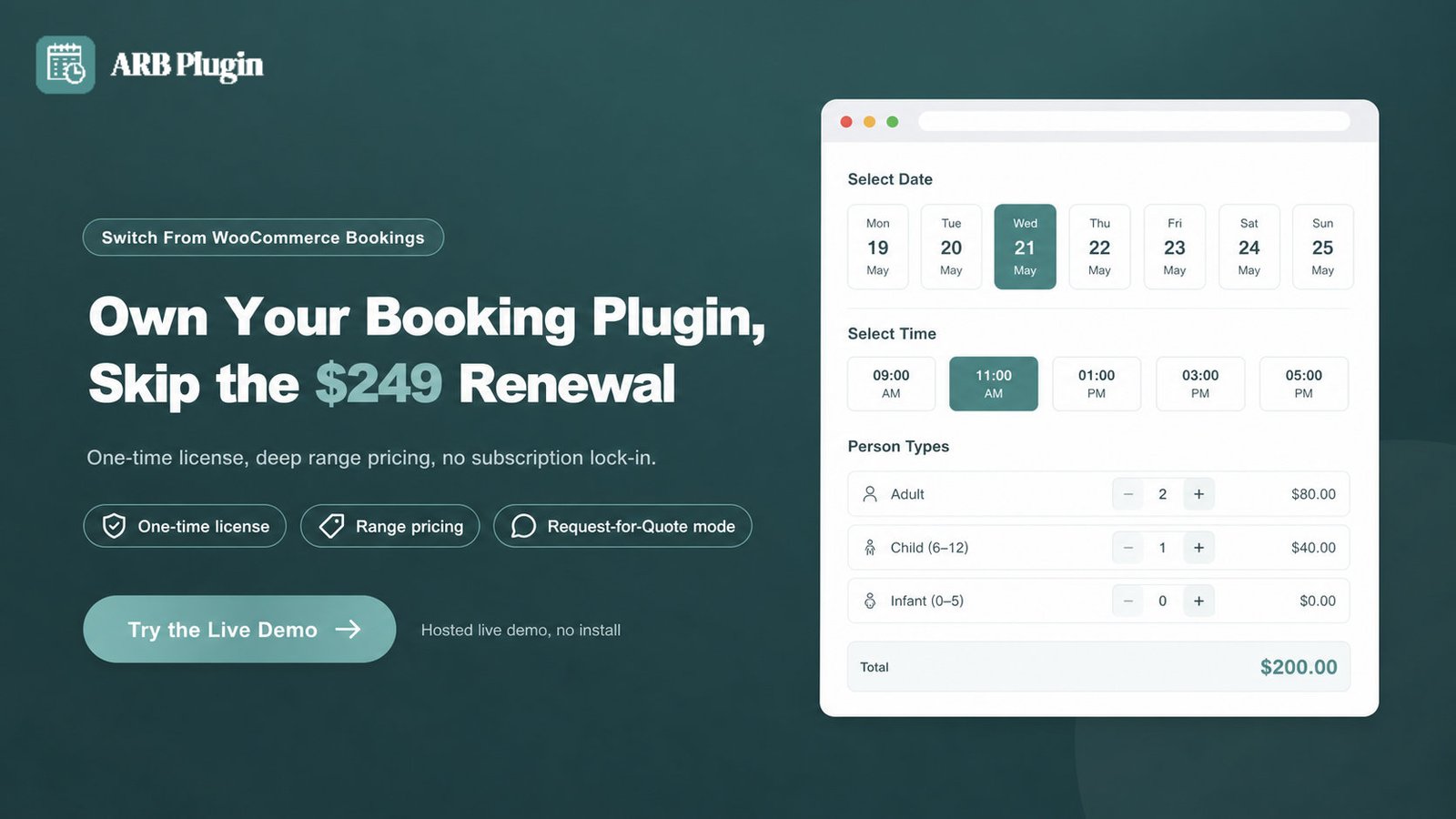
Try the ARB booking flow in the live demo before you decide.
FAQs
Is ARB better than WooCommerce Bookings?
Not universally. ARB scores 4.2 out of 5 against WooCommerce Bookings' 3.8, and it wins on total cost and pricing-rule breadth. WooCommerce Bookings leads on native calendar sync, first-party trust, and its add-on ecosystem. The better choice depends on which of those matters more to your store.
Why is WooCommerce Bookings so expensive, and does it have a free plan?
WooCommerce Bookings costs $249 a year because it is the official Automattic extension, and there is no free tier, only a 30-day money-back guarantee. Add-ons for deposits, recurring bookings, and on-page availability push the real cost higher still.
What are the disadvantages of WooCommerce Bookings?
Four disadvantages stand out. Its $249-per-year cost recurs with no ownership option, and its 2.7 out of 5 marketplace rating reflects recurring API and calendar-reliability complaints. Reviewers also call the setup "far too complicated for normal users". Finally, Google sync covers a single calendar, and deposits, recurring bookings, and on-page availability each need a separate paid add-on.
Does ARB have native Google Calendar sync like WooCommerce Bookings?
No. ARB ships iCalendar export in its core license and offers Google Calendar sync only through a paid, one-way add-on ($19 one-time). WooCommerce Bookings ships native, single-calendar Google sync inside its core price.
Can I switch from WooCommerce Bookings to ARB?
Yes. Both are WooCommerce product types, so your orders, gateways, and tax rules stay in WooCommerce. You rebuild each bookable product as an ARB Reservable Product by hand, since no automatic importer exists between the two. See WooCommerce Bookings alternatives for the wider switching field.
Does WooCommerce have a booking system?
Yes. WooCommerce Bookings is the official first-party booking system, sold separately at $249 a year. Third-party plugins such as ARB also add WooCommerce-native booking, usually at a lower one-time cost.
Which is easier to set up?
Close call. WooCommerce Bookings' Bookable Product Templates give a faster start, but reviewers call the setup "far too complicated for normal users". ARB's five-tab config has no template picker but ships a live demo to test first.
Does ARB support deposits?
No. ARB has no deposits feature; its Request-for-Quote and confirmation-first workflows are the closest equivalent. WooCommerce Bookings supports deposits through the separate WooCommerce Deposits add-on.