The Bookly WordPress booking plugin by Ladela runs staffed appointment bookings inside WordPress. ARB turns any WooCommerce product into a native reservable booking instead. ARB scores 4.2 out of 5 in our review; Bookly scores 3.3. ARB fits WooCommerce stores on a one-time budget; Bookly fits staffed businesses wanting a mature, free-to-start plugin.
Below: a scorecard and comparison table, pricing math for both, WooCommerce integration, and booking-rule flexibility. Then staff scheduling, calendar sync, setup, and an honest verdict on which plugin fits your store.
ARB vs Bookly: Which Should You Choose?
ARB scores 4.2 out of 5 in our review; Bookly scores 3.3. ARB wins for WooCommerce stores that want native bookings inside their existing cart and checkout at a one-time price. Bookly wins for staffed appointment businesses that want a mature, free-to-start plugin with native reminders and mobile staff apps.
ARB (by Fluent-Themes) publishes this comparison and is one of the two plugins reviewed here. Both plugins are scored on the same public rubric, the same evidence procedure, and the same weights. ARB was not placed first by default, and its honest limitations are not hidden below. See how we score booking plugins for the full method.
The core structural difference explains most of the gap. ARB is a native WooCommerce reservable product; Bookly is a standalone WordPress appointment engine with its own checkout. A Reservable Product is a real WooCommerce product type, so bookings reuse the store's cart, checkout, tax, coupons, and every WooCommerce gateway with no bridge.
Bookly runs its own booking flow by default and treats WooCommerce as an optional Pro bolt-on. That bolt-on passes limited cart data to the order, a gap covered in detail below.
ARB vs Bookly Scorecard: How We Score Both Plugins
ARB scores 4.2 out of 5 overall; Bookly scores 3.3. ARB leads on WooCommerce-native fit, pricing-rule depth, and one-time value. Bookly leads on setup polish, notifications, mobile apps, and incumbent trust.
| Dimension (weight) | ARB | Bookly |
|---|---|---|
| Booking Rules and Pricing Flexibility (24%) | 4.5/5 | 3.0/5 |
| WooCommerce and Commerce Integration (18%) | 5.0/5 | 2.5/5 |
| Value and Licensing, Total Cost of Ownership (16%) | 4.5/5 | 3.0/5 |
| Setup and Admin Experience (12%) | 3.5/5 | 4.0/5 |
| Notifications, Calendar Sync, and Customer Management (12%) | 3.0/5 | 4.0/5 |
| Maintenance and Compatibility (10%) | 4.5/5 | 4.5/5 |
| Support and Documentation (8%) | 3.5/5 | 3.5/5 |
| Overall | 4.2/5 | 3.3/5 |
The split has a clear shape. ARB leads decisively on the store-integration and pricing-flexibility axes, the two heaviest-weighted dimensions. Bookly leads on setup polish and notifications, and the two plugins tie on maintenance and on support.
ARB vs Bookly at a Glance
ARB and Bookly solve different booking problems at different prices. The table below lines up both plugins on the specifics that decide the choice.
| Attribute | ARB | Bookly |
|---|---|---|
| Our score | 4.2/5 | 3.3/5 |
| Best for | WooCommerce stores with complex booking rules | Staffed appointment businesses |
| Starting price | About $55 one-time | Free, or Pro at $49/yr or $129 lifetime |
| Pricing model | One-time license plus 2 optional add-ons | Freemium plus Pro plus 40+ paid add-ons plus metered Cloud |
| Free tier or trial | No free tier; hosted demo only | Genuine free WordPress.org base (1 staff, 5 services) |
| WooCommerce-native | Yes, native Reservable Product | No, own checkout plus optional bolt-on with limited cart data |
| Dynamic or range pricing | Slot, person, date, time, and day ranges, in core | Per-service and per-staff pricing; range pricing only via add-ons |
| Person types and resources | Yes, independently priced, in core | Group Booking add-on only; no person-type pricing |
| Staff scheduling | Staff modeled as generic resources, no logins | Unlimited staff, per-staff schedules, pricing, and color coding |
| Mobile apps | None | Staff Cabinet app (iOS and Android), staff-facing, via add-on |
| Calendar sync | Google, one-way, via add-on; iCal export | Google, two-way, via add-on; Outlook add-on; iCal |
| Notifications | Email plus manual and bulk reminders | Email, SMS, WhatsApp, and Voice, via Bookly Cloud |
| Deposits | No | Yes, via the Deposit Payments add-on |
| Rentals or hotels | Yes, nightly, monthly, and date-range | No, per Bookly's own FAQ |
| Setup | Five-tab product configuration inside WooCommerce | Guided Services then Staff then Appearance wizard |
| Track record | CodeCanyon 4.81/5, 16 ratings, 510 sales | WordPress.org 4.4/5, 570 reviews, 60,000+ installs since 2014 |
| Support | Envato 6-month window, deep docs | Deep docs plus tutorials, mixed history, recovering trend |
Prices verified July 2026.
What Is Bookly?
Bookly is a standalone WordPress appointment-booking plugin for staffed service businesses (salons, spas, clinics, tutors, coaches, and fitness studios). It scores 3.3 out of 5 overall in our review.
Bookly has run since 2014 and now powers more than 60,000 active businesses. The product ships as a free base plugin, a paid Bookly Pro upgrade, and 40-plus add-ons. Built by Ladela and published under NOTA-INFO S.R.L., it sells direct on its own site rather than through a marketplace.
Bookly's genuine strengths run deep:
- A 12-year track record on WordPress.org
- Unlimited staff with individual schedules and pricing
- Native email, SMS, WhatsApp, and Voice notifications
- A Staff Cabinet mobile app for iOS and Android, staff-facing, via a paid add-on
Its cost story is honest but layered. Essentials such as deposits, coupons, taxes, and two-way calendar sync each cost extra as separate add-ons.
For the full breakdown, read our Bookly review. If Bookly is not the right fit, our Bookly alternatives guide covers the wider field.
What Is ARB?
ARB is a native WooCommerce reservable-booking plugin by Fluent-Themes, built for WooCommerce stores and the developers who build for them. It scores 4.2 out of 5 overall in our review.
ARB turns any WooCommerce product into a Reservable Product, a real product type with five configuration tabs. Those tabs cover duration, availability, pricing, person types, and resources. Bookings flow through the store's existing cart, checkout, tax, coupons, and payment gateways with no separate system.
ARB is mature but niche. It first released around 2019, now sits at version 8.0.0, and supports High-Performance Order Storage and a long WooCommerce compatibility history. Its public review footprint is honestly thin. CodeCanyon shows a 4.81 out of 5 rating from 16 ratings and 510 sales. There is no G2 or Capterra listing and no independent third-party review. We name that limitation plainly rather than inflate it.
Visit the ARB homepage to see the product and its live demo.
Pricing: One-Time License vs Free Base Plus Paid Add-ons
ARB costs about $55 one-time with all core booking and range-based pricing included. Bookly starts free, then Pro runs $49 per year or $129 lifetime. Deposits, taxes, coupons, group booking, recurring appointments, and calendar sync are sold as separate paid add-ons on top of Bookly Pro.
Bookly Pricing
Bookly's tiers are live-verified from its pricing page as of July 2026.
| Plan | Annual (1 site) | Lifetime (1 site) | Key inclusions |
|---|---|---|---|
| Free | $0 | n/a | 1 staff, 5 services, core form, local payments |
| Pro | $49/yr | $129 | Unlimited staff and services, notifications, WooCommerce bolt-on, add-on catalog access |
| Business | $149/yr | $349 | Pro plus popular add-ons bundled (5 sites: $199/yr or $699 lifetime) |
| Ultimate | $249/yr | $599 | Pro plus all add-ons and priority support (20 sites; 100 sites: $299/yr or $799 lifetime) |
Essential features live outside these tiers as individual paid add-ons, on top of Bookly Pro.
| Add-on | Annual | Lifetime |
|---|---|---|
| Deposit Payments | $12.95/yr | $39 |
| Taxes | $12.95/yr | $39 |
| Coupons | $12.95/yr | $39 |
| Group Booking | $12.95/yr | $39 |
| Recurring Appointments | $12.95/yr | $39 |
| Service Extras | $15.95/yr | $49 |
| Advanced (two-way) Google Calendar | $15.95/yr | $49 |
| Custom Fields | $18.95/yr | $59 |
One transparency caveat applies here. Bookly's pricing page lists Business one-site lifetime at $349, while Bookly's own alternatives blog cites $149 for the same tier. Treat the pricing page as canonical, and verify before you buy.
ARB Pricing
ARB's Regular License costs $55 one-time and includes every core booking feature: range-based pricing, person types, resources, and quote mode. An Extended License covers deployment for paying clients, priced at $249. Only the Google Calendar add-on ($19) and the SMS add-on ($15) cost extra, both one-time on CodeCanyon. ARB has no free tier; evaluation runs through the hosted live demo.
Which Is Cheaper for Your Setup?
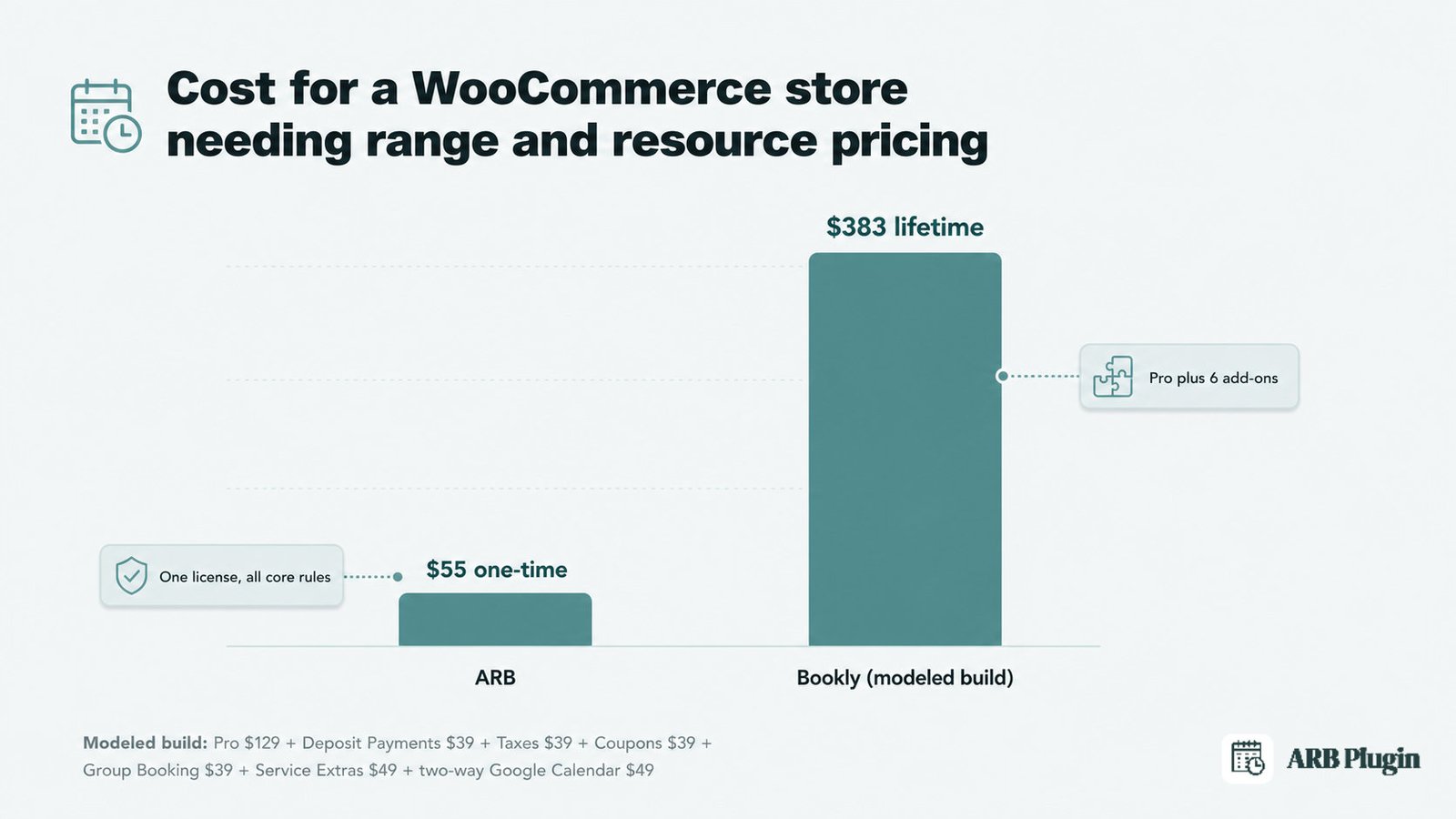
For a single WooCommerce store that needs range, person, or resource pricing, ARB's one-time $55 undercuts Bookly decisively. A comparable Bookly build needs Pro plus the add-ons that replicate ARB's core rules, all at lifetime pricing.
| Bookly component | Lifetime price |
|---|---|
| Pro license | $129 |
| Deposit Payments add-on | $39 |
| Taxes add-on | $39 |
| Coupons add-on | $39 |
| Group Booking add-on | $39 |
| Service Extras add-on | $49 |
| Two-way Google Calendar add-on | $49 |
| Modeled total | $383 |
That total is a modeled estimate from Bookly's own published add-on prices, not a quoted bundle.
The comparison runs both ways, honestly.
| Scenario | Cheaper choice |
|---|---|
| WooCommerce store needing range or resource pricing | ARB, at about $55 one-time versus a modeled ~$383 Bookly build |
| Zero-budget start | Bookly, whose free base plugin has no ARB equivalent |
| Single-staff appointment business, no add-ons | Bookly Pro at $129 lifetime, simpler than ARB's setup |
| Needing native SMS or Google Calendar sync | Neither is free; ARB's add-ons are $19 and $15 one-time, and Bookly meters SMS through Cloud |
If you need a genuinely free starting point, Bookly wins outright since ARB has no free tier. For a pure single-staff appointment business with no range pricing, Bookly Pro alone at $129 lifetime is cheap and simple. ARB's advantage is that its core pricing engine needs no add-ons, while Bookly gates deposits, taxes, coupons, and range-style rules behind them.
WooCommerce Integration: Native Reservable Product vs Bolt-On
ARB wins decisively for WooCommerce stores because Bookly is not WooCommerce-native. A Reservable Product is a real WooCommerce product type. ARB bookings reuse the store's cart, checkout, tax, coupons, orders, and every WooCommerce gateway with no bridge. Bookly runs its own booking and checkout by default. Its optional Pro bolt-on redirects customers to the WooCommerce cart after the details step. That redirect disables Bookly's own payment step and passes only limited cart data.
A booking flows differently through each plugin.
- ARB: the customer selects the Reservable Product and the price calculates in real time. The item enters the WooCommerce cart, and checkout runs through the store's normal gateways, tax, and coupons.
- Bookly: the customer books through Bookly's own multi-step form and checkout by default. The order can instead route through the optional WooCommerce integration.
One WordPress.org reviewer described the WooCommerce route plainly.
"Lacks of WooCommerce check out support. The Cart Data is very limited to what we can pass on to the cart page."
From the store-owner side, the difference is concrete. A Reservable Product behaves like any other WooCommerce product at checkout, so the full order breakdown stays intact. Bookly's optional Woo path, by that reviewer's account, hands over a thinner record of what was actually booked.
Booking Rules and Pricing Flexibility
ARB wins for range-based dynamic pricing, first-class person types and resources, and rental or quote-first workflows. Bookly wins for depth of multi-staff scheduling but has no core range-pricing engine and no reservable or rental model.
ARB prices bookings across five independent axes in its Costs tab: slot count, person count, date range, time range, and day of week. Every one of those rules inherits WooCommerce's own tax and coupon logic. Bookly prices per service and per staff member instead, with range-style adjustments arriving only through the Special Hours and Discounts add-ons. Neither approach is wrong; they solve different pricing problems.
Rental and hotel fit is the sharpest divide. ARB does rentals, nightly and monthly stays, and date-range reservations, plus a Request-for-Quote mode for approval-first bookings.
Bookly's own WordPress.org listing states the gap plainly: "the current version of Bookly won't fit hotel or rental business".
ARB's positioning calls itself "the most flexible and cheapest Booking plugin based on WooCommerce". Its range-pricing engine backs up that claim on the rules Bookly cannot match.
Staff Scheduling, Mobile Apps, and the Add-on Ecosystem
Bookly wins for multi-staff service operations. Unlimited staff with individual schedules and pricing, color-coded calendars, and native mobile apps give it real depth ARB does not match.
Bookly's staff model treats each team member as a first-class object.
- Individual working schedules, personal pricing, and days off per staff member
- Color-coded calendars in the admin day, week, and month views
- A staff-facing Staff Cabinet mobile app for iOS and Android, added through a paid add-on
- A dedicated Events module for ticketed workshops and classes
ARB models staff only as generic "resources," with no per-staff logins or personal dashboards, and it has no mobile app of its own. Its person-types feature can stand in for tickets in a pinch, but there is no dedicated waitlist or QR-ticket module. One Bookly customer captured the staff-side strength directly: "ideal for my hair salon... employees can be assigned according to their shifts". For a multi-staff operation, that is a real gap ARB does not close. We say so plainly rather than claim false parity.
Calendar Sync, Notifications, and Reminders
Bookly wins for reminder-heavy operations. It sends email, SMS, WhatsApp, and Voice notifications, syncs Google Calendar two-way and Outlook one-way through add-ons, and gives customers their own account cabinet. ARB offers email plus manual and bulk reminders, one-way Google sync through a paid add-on, and iCal export. It has no native SMS and no two-way sync.
Bookly's notification breadth runs through Bookly Cloud, its metered hosted service. SMS, WhatsApp, and Voice all bill by consumption on top of the plugin license, and Stripe payments routed through Cloud carry an additional 0.9% fee. That cost caveat sits alongside Bookly's reminder strength, not against it.
ARB's reminders stay simpler by design: automated and manual email notifications, dynamic tags for personalization, and a customer account area for self-service changes. For a store that lives on email reminders and does not need SMS, ARB covers the need. For a business that depends on text or voice reminders to cut no-shows, Bookly leads here plainly.
Setup, Support, and Track Record
Bookly wins on incumbent trust and out-of-box polish. A guided Services-then-Staff wizard, 12-plus years of history, 60,000-plus installs, and 570 WordPress.org reviews at 4.4 out of 5 back that up. ARB has a config-heavy five-tab setup inside the familiar WooCommerce product editor and a thin but clean CodeCanyon record.
Bookly's setup path runs in six documented steps:
- Install the free plugin
- Add the Pro license
- Add a service
- Add a staff member
- Customize the form's appearance
- Publish it
That guided sequence suits a single-staff appointment business well. ARB's setup instead means configuring a Reservable Product's five tabs directly inside WooCommerce. That takes more work up front, but every setting stays inside the store's familiar product editor.
Support history diverges too. Bookly's biggest historical complaint was support quality, with a cluster of one-star reviews from 2020 to 2024. GetApp's current sub-ratings show ease of use at 4.1 and support at 3.7, and its 2025 to 2026 review titles trend toward "Excellent Support". ARB's support runs on Envato's standard roughly six-month window with deep documentation. Its public support track record is unproven at this stage, and we concede that honestly rather than overstate it.
ARB vs Bookly: The Verdict
ARB scores 4.2 out of 5 overall; Bookly scores 3.3. The gap traces directly to WooCommerce-native fit, pricing-rule depth, and one-time value, ARB's strongest dimensions. Bookly still wins specific segments outright, and we name them below.
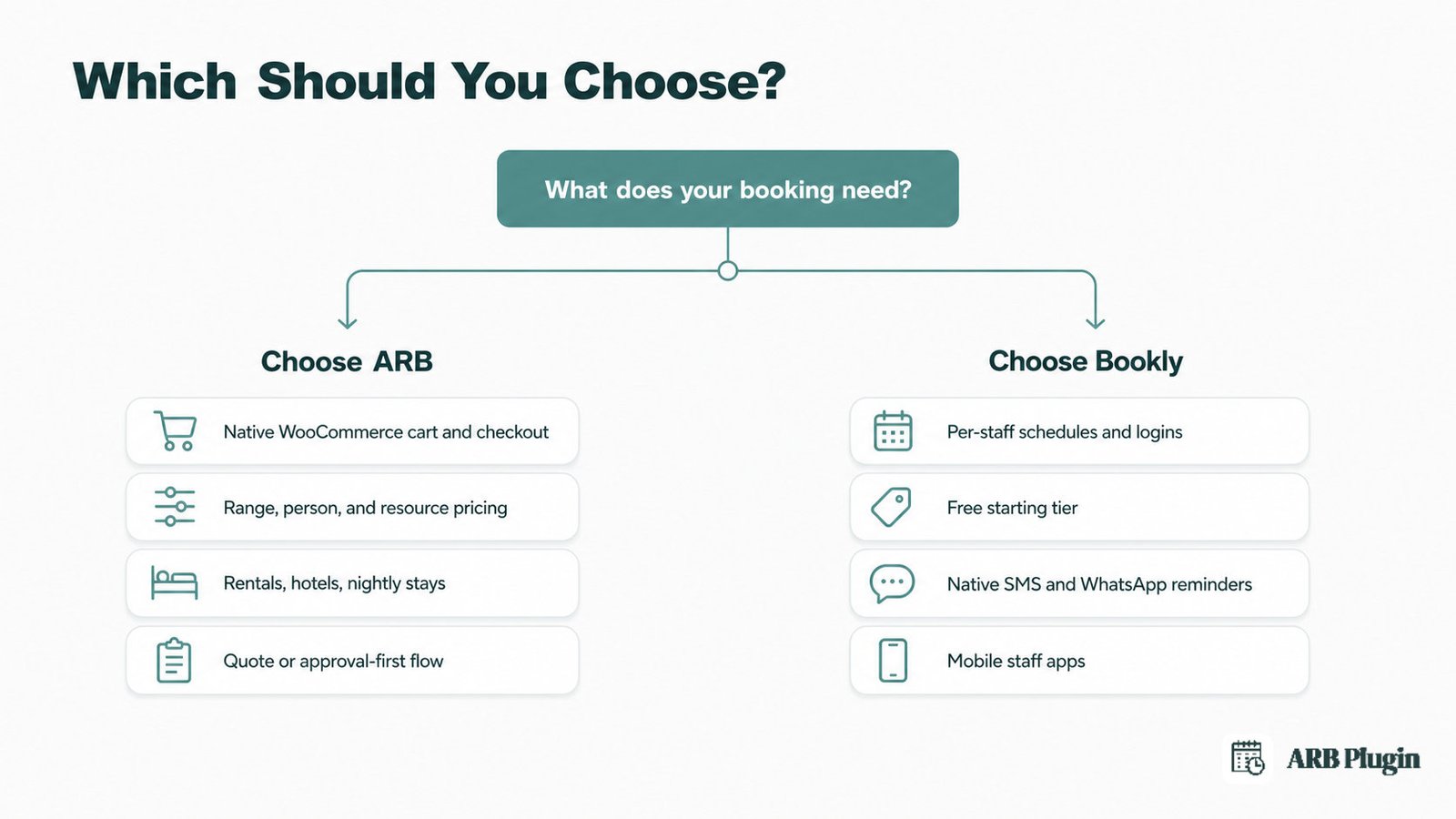
Choose Bookly if:
- You run a staffed appointment business (salon, spa, clinic, tutoring, coaching, or fitness) and need per-staff schedules
- You want to start free and upgrade later, one add-on at a time
- You need native SMS or WhatsApp reminders and two-way Google or Outlook calendar sync
- You want native mobile staff apps or a dedicated Events module
- You value a 12-year track record and the category's deepest review base
Choose ARB if:
- You already run WooCommerce and want bookings inside your real cart, checkout, tax, and coupons, not a limited bolt-on
- You want a one-time roughly $55 license with range, person, and resource pricing included instead of stacking paid add-ons
- You run rentals, hotels, or nightly and monthly stays, which Bookly's own FAQ says it cannot serve
- You need a quote or approval-first flow
- You are a developer deploying per client on the Extended license
The segment picture is not always the headline number. For staffed appointment businesses with multiple staff, Bookly wins the fit even though its overall score is lower. ARB has no per-staff schedules or logins, and that gate rules it out for that audience. For a genuinely free start, Bookly wins outright since ARB has no free tier. For WooCommerce-native stores and for rentals, hotels, and multi-day stays, ARB wins because Bookly fails those gates directly.
Both plugins are scored on the same public rubric here. ARB is recommended for the segments it wins on evidence, WooCommerce-native fit, rentals, and all-core one-time value, never by default. Bookly's genuine wins, staff scheduling, mobile apps, notifications, a free tier, and incumbent trust, are named plainly above.
See the top WooCommerce booking plugins for the wider field, or the best WordPress booking plugins if your store is not on WooCommerce at all. If neither ARB nor Bookly fits your booking style, our Amelia review covers a design-first appointment alternative.
Ready to see the native WooCommerce flow yourself? Try the ARB live demo and build a Reservable Product on your own catalog.
FAQs
Is ARB better than Bookly?
Not universally. ARB scores 4.2 out of 5 overall against Bookly's 3.3, driven by WooCommerce-native fit, range-pricing depth, and one-time value. Bookly is the better pick for staffed appointment businesses that need per-staff scheduling, native reminders, mobile apps, and a free starting tier.
Is Bookly free, and does ARB have a free plan?
Bookly has a genuine free base on WordPress.org, capped at 1 staff member and 5 services; Pro costs $49 per year or $129 lifetime. ARB has no free tier, only a hosted demo and a one-time roughly $55 license. See the best free WordPress booking plugin options if a free start matters most.
Is Bookly WooCommerce-native like ARB?
No. Bookly runs its own booking and checkout flow, and treats WooCommerce as an optional Pro bolt-on that passes limited cart data. ARB is a native WooCommerce Reservable Product that reuses the real cart, checkout, tax, coupons, and gateways instead.
Can I switch from Bookly to ARB?
Yes. Because ARB lives inside WooCommerce, you rebuild each Bookly service as a Reservable Product and keep your existing payment gateways, tax rules, and coupons. There is no automated Bookly-to-ARB importer, so plan to recreate services and resources manually rather than expect a one-click migration.
Does ARB have staff scheduling and mobile apps like Bookly?
No. ARB models staff only as generic resources, with no per-staff logins or dashboards, and has no mobile app. Bookly gives every staff member an individual schedule and personal pricing, plus native iOS and Android staff apps. If those are must-haves, Bookly leads here clearly.
Which is better for hotels or rentals?
ARB. It supports nightly and monthly stays and date-range reservations with per-period pricing. Bookly's own FAQ states plainly that it "won't fit hotel or rental business," so it is not a fit for that use case at all.
Which is easier to set up?
It depends on your store. For a single-staff appointment business, Bookly's guided Services-then-Staff wizard is faster to launch. For a WooCommerce store, ARB is simpler overall. Bookings are a native product, with no separate system, cart bridge, or add-on stack to configure.