A WordPress hosting theme is not a normal WordPress theme. It has to launch a professional marketing site and unify cleanly with WHMCS, the billing platform most hosting businesses run. That second job is where generic theme checklists fail buyers. This guide gives you a weighted framework instead of a flat list. It covers seven criteria that predict regret and the questions that expose weak vendors. It also flags the hosting-specific traps a general theme guide never mentions, like partial bridge-plugin dependency and version-compatibility lag.
What Should You Look for in a WordPress Hosting Theme?
Choose a WordPress hosting theme on seven weighted criteria. In order of weight: WHMCS integration, performance, hosting design, page building, maintenance, value and licensing, and support. WHMCS integration carries the most weight, because a fragile billing connection breaks revenue, not just aesthetics.
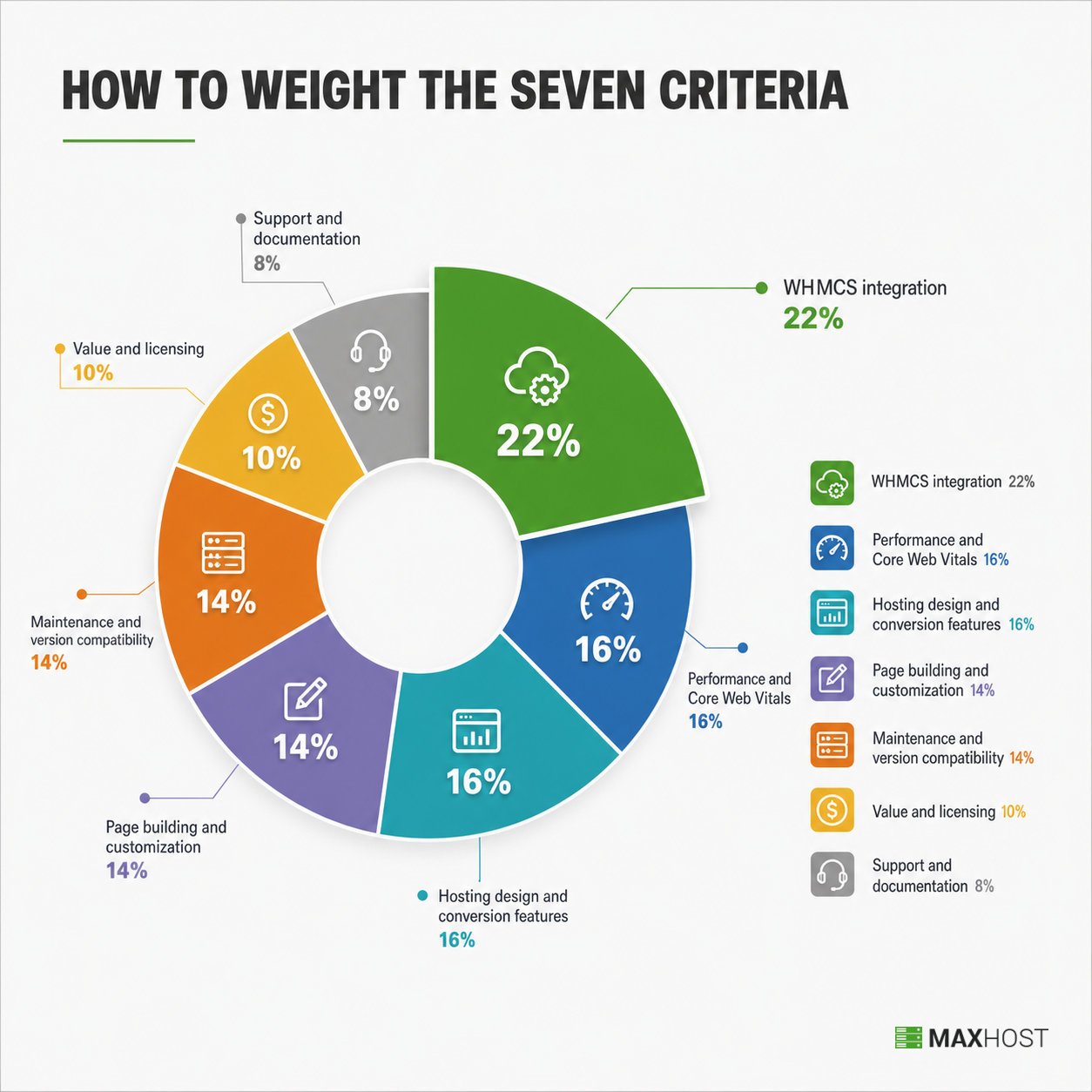
Most buyers rank these criteria by weight, then score each shortlisted theme against them. The criteria are not equal. A theme can have a beautiful homepage demo and still be the wrong buy. Stale WHMCS templates or a bridge plugin that empties the cart will sink it.
Here are the seven criteria and how much each should influence the decision.
| Criterion | Weight in the decision | Why it carries this weight |
|---|---|---|
| WHMCS integration and billing UX | 22% | A hosting site lives or dies on a clean path into billing; a fragile connection costs signups. |
| Performance and Core Web Vitals | 16% | Hosting buyers judge speed on sight, and this category leans heavy by default. |
| Hosting design and conversion features | 16% | Demos and components (domain search, pricing tables) must fit how hosting is actually bought. |
| Page building and customization | 14% | A non-developer must be able to edit plans and pages without hiring help. |
| Maintenance and version compatibility | 14% | An abandoned theme is a liability on revenue infrastructure. |
| Value and licensing | 10% | Real cost per capability, including bundled plugins and resale license terms. |
| Support and documentation | 8% | Docs, tutorials, and how responsive support is when billing breaks. |
This guide is written for the bootstrapped reseller or small agency buying for the first time, or replacing a broken theme. Once you have applied these criteria, the ranked best WordPress hosting themes comparison narrows the field to specific products.
WHMCS Integration: Bundled Templates or a Bridge Plugin?
WHMCS integration is how the theme connects your WordPress marketing site to the WHMCS client area and cart. There are two methods, and the difference decides how often your billing breaks.
Bundled templates install directly into WHMCS and skin it to match your site. A bridge or sync plugin instead mirrors WHMCS pages inside WordPress, adding a moving part that can fail on updates. Bundled templates are the stronger default for reliability, though they tie you to that theme. Their real catch is partial bundling, where only some pages are covered.
What to Look For
Look for evidence that the entire client area is bundled, not just the homepage.
- Distinct, installable WHMCS client-area templates that visually match the marketing demo.
- Support for the current WHMCS major version, stated in the compatibility list.
- A live WHMCS demo you can open, covering the cart, invoices, tickets, and domain management.
- A unified look across the marketing site and the client area, so buyers never feel handed off.
If you are new to the platform, read what WHMCS is before you shortlist. The integration method only makes sense once you know what the client area does.
Red Flags to Avoid
These warning signs surface before you buy, if you know to check.
- A "no bridge needed" headline where specific features still require an optional bridge plugin. Phox ships a bridge-free base template, yet its bridge-mode domain-search redirect, cart widget, and price-table import all depend on the Bridge plugin. Three named buyers had to ask the author directly before they understood the scope.
- Buyer comments describing a cart that empties. One Hostiko buyer reported hosting plans that were selected but never added to cart, on a theme marketed as bridge-free.
- A WHMCS version in the compatibility list that is a major release behind the current one.
Questions to Ask Vendors
Put these questions to the vendor before you commit.
- "Is the entire client area bundled-template only, or do any features require your bridge plugin?"
- "Which WHMCS major versions do the bundled templates support today, and when did you last confirm it?"
- "Can I open your live WHMCS client-area demo, not just the marketing homepage?"
Performance and Core Web Vitals
Score the realistic out-of-the-box speed, not the theoretical best after heavy tuning. This category leans builder-heavy and slider-heavy, so many themes ship slow and need discipline to run fast. The signal that matters is what the vendor's own demo scores today, on mobile, before you touch it.
What to Look For
The signals below are observable in a demo, without trusting any vendor claim.
- A live demo URL you can run through PageSpeed Insights or GTmetrix yourself.
- Mobile performance above roughly 85, with the Core Web Vitals in the green. That means LCP under 2.5 seconds, INP under 200 milliseconds, and CLS under 0.1.
- Lightweight defaults, with heavy sliders, parallax, and font packs optional rather than always on.
- Concrete performance guidance from the vendor, which signals they know where the weight is.
Community advice from r/Wordpress applies here. Use a lightweight theme and keep functionality minimal, so you can switch themes later without a painful migration.
Red Flags to Avoid
Watch for these signs that the theme ships slow by default.
- A flagship demo that scores in the 40s to 60s on mobile PageSpeed.
- Multiple auto-loading sliders and parallax effects on the homepage demo.
- No performance guidance anywhere in the documentation, which usually means the vendor has not measured it.
Questions to Ask Vendors
Ask these two questions to gauge real-world speed.
- "What does your main demo score on PageSpeed mobile right now?"
- "Which heavy features can I disable without breaking the layout?"
Hosting Design and Conversion Features
Hosting design is whether the demos and components actually fit how hosting is bought, not whether they look modern. The criterion covers demo variety across real hosting types and the presence of working conversion components. A repurposed corporate theme with a thin hosting skin fails here even if it is attractive.
What to Look For
Look for demos and components built for hosting, not repurposed from a corporate theme.
- Demos that map to real hosting types: shared, VPS, dedicated, cloud, and reseller.
- A live AJAX domain search module wired to WHMCS, not a static mockup image.
- Pricing tables with monthly and yearly billing toggles, comparing RAM, SSD, and bandwidth side by side.
- Trust-signal placement for uptime, SSL, and reviews near the conversion points.
If reseller or domain-storefront flows are your priority, the best reseller hosting WordPress themes list narrows the field to that use case.
Red Flags to Avoid
Be skeptical when you see these signs of a thin hosting skin.
- One generic demo with a hosting label bolted on, and little variation underneath.
- A domain search that is a decorative image rather than a functional module.
- Pricing components that cannot show more than a single plan cleanly.
Questions to Ask Vendors
These questions separate a real hosting theme from a relabeled one.
- "Which of your demos map to shared, VPS, dedicated, cloud, and reseller hosting?"
- "Is the domain search a live module that hands off to WHMCS, or a static element?"
Page Building and Customization
Page building is the editability lever that decides whether a non-developer can maintain the site. The core question is which builder the theme is genuinely wired for. That determines who can change a pricing table next quarter, and how much it costs you.
What to Look For
Confirm these signals in a trial, not in the feature tags.
- Dual or triple builder support (Elementor plus WPBakery, sometimes Gutenberg), rather than lock-in to one.
- Genuine one-click demo import that lands a working layout, not a blank canvas.
- A deep, hosting-specific widget library, so pricing tables and plan blocks are editable without code.
- Editing that a non-developer can do, confirmed in a trial rather than promised in tags.
Community guidance is sensible here. Try a couple of builders, then stick with whichever your team is comfortable in.
Red Flags to Avoid
Watch for these signs that editing will need a developer.
- A builder listed in the tags but not actually wired up in the theme.
- Single-builder lock-in when your team already standardizes on a different one. WPBakery is the worst case, leaving broken shortcodes if you switch, while Gutenberg blocks degrade cleanly.
- Manual, code-level setup required to change a plan or add a pricing column.
Questions to Ask Vendors
Ask these questions before you commit to a builder.
- "Which builder is the theme genuinely built for: Elementor, WPBakery, Gutenberg, or all of them?"
- "Can I edit a pricing table and add a new plan without touching code?"
Maintenance, Updates, and Version Compatibility
Maintenance is the single best predictor of whether the theme becomes a liability. The signal is a recent changelog that tracks the current WordPress, WooCommerce, WHMCS, and PHP majors. Version-compatibility lag is the most frequent real complaint in this category, so scrutinize this criterion hard.
What to Look For
Check these signals of an actively maintained, current theme.
- A last update within roughly three months, with a visible changelog.
- Compatibility with the current WHMCS, WordPress, WooCommerce, and PHP major versions.
- A long, unbroken release history and an actively listed, purchasable product.
- Changelog entries that name the versions they add support for, not vague "bug fixes".
Red Flags to Avoid
Treat these as strong warnings of drift toward abandonment.
- A changelog gap of twelve months or more, the point where a theme is effectively abandoned.
- A compatibility list that trails the current WHMCS or PHP release by a major version. Outdated code can throw white screens or fatal errors on PHP 8.x.
- Buyer comments asking when a version will be supported. Six named Phox buyers were stuck on exactly this, greeted by "You are running WHMCS version 8.13.1 but we require version 9.0.3" while they waited.
Questions to Ask Vendors
Ask these questions to confirm the theme is current.
- "When did you last ship an update, and does it support the current WHMCS and PHP majors?"
- "Can I see the changelog for the last twelve months?"
Value and Licensing
Value is real cost per capability, not the sticker price. The criterion combines the one-time price, the standalone value of bundled premium plugins, and the license terms that govern how you may use the theme. The license fine print is where resellers get surprised.
What to Look For
Look for value signals beyond the sticker price.
- A low one-time price with genuinely useful bundled premium plugins, like a slider or a builder.
- Clearly stated lifetime version updates, kept separate from the support window.
- A regular license that covers your actual use. On Envato, the regular license fits a single end product where the theme itself is not sold, while the extended license applies when the end product is sold or charges users.
Red Flags to Avoid
Watch for these licensing and pricing surprises.
- A price gap between the marketplace and the vendor's own store that you did not check. Hostiko sells the identical theme for $49 on ThemeForest and $39 direct.
- "Lifetime" wording that quietly covers version updates only, not support.
- Core hosting capability locked behind paid add-ons on top of the theme price.
Questions to Ask Vendors
Ask these questions before you check out.
- "Is the regular license enough for a paid hosting business, or do I need the extended license?"
- "Is the same theme cheaper on your own store than on the marketplace?"
Support and Documentation
Support is what you can lean on when billing breaks at an inconvenient hour. The criterion covers documentation depth, video tutorials, and the terms and length of the support window. In this category, support is almost always time-boxed, so read the window before you buy.
What to Look For
Look for depth and clear terms, not just a support badge.
- A deep knowledge base plus video tutorials, covering WHMCS template installation specifically.
- A clearly stated support window and a known renewal cost.
- Positive responsiveness signals in recent buyer comments.
Red Flags to Avoid
Be wary of these support and documentation gaps.
- Thin documentation that stops at theme install and never reaches the WHMCS side.
- A support portal that locks you out the moment the window lapses. Two named Phox buyers hit this, one reporting "my support has expired" when they tried to open a ticket.
- Slow or uneven responses across recent comments.
Questions to Ask Vendors
Ask these questions about the support you are actually buying.
- "How long is support included, and what does an extension cost?"
- "Does your documentation cover installing and updating the WHMCS templates, not just the theme?"
How Much Does a WordPress Hosting Theme Cost?
Most WordPress hosting themes cost between $29 and $99 as a one-time regular license on ThemeForest, with no subscription. The premium, WHMCS-ready options cluster around $49 to $59. Extended licenses, needed only when you sell or charge for the end product itself, range far wider, from roughly $1,600 to $2,950. The cost that surprises buyers is rarely the sticker price. It is the fine print around licensing, support, and performance tooling.
Pricing Models in This Category
Pricing here differs sharply from subscription page builders. Three patterns dominate.
| Pricing model | What it means | Who it suits |
|---|---|---|
| One-time marketplace license | A single Envato or ThemeForest purchase, updates included, no recurring fee | Most hosting resellers and agencies |
| Dual-channel (marketplace plus direct) | The same theme sold on the marketplace and cheaper on the vendor's own store | Buyers who check the vendor site first |
| Extended license | A higher one-time fee for reselling the theme inside a charged product or SaaS | Businesses productizing the theme itself |
For a normal hosting marketing site, the regular one-time license is almost always the right buy.
Hidden Costs to Watch For
These costs rarely appear in the sticker price, so budget for them.
- Support renewal after the included window, commonly around $13 to $14 per six months.
- The extended license, if your end product itself is sold or charges users.
- The dual-channel price gap you pay when you skip checking the vendor's direct store.
- Performance tooling (caching, a CDN, image optimization) to offset a builder-heavy theme's weight.
What Affects Total Cost of Ownership
Three factors drive the real long-term cost beyond the purchase.
- How long the theme stays maintained. A theme abandoned in two years forces a costly migration.
- Builder lock-in. Rebuilding pages in a new builder later is expensive, so the builder you buy into is a long-term cost.
- Support renewals over the life of the site, since a hosting site outlives a six-month window many times.
Common Mistakes When Choosing a WordPress Hosting Theme
The most common mistakes are trusting a "no bridge needed" headline, ignoring version-compatibility lag, and judging the theme on its marketing homepage alone. Each one is avoidable with the checks below, and each traces to real buyers who learned it the hard way.
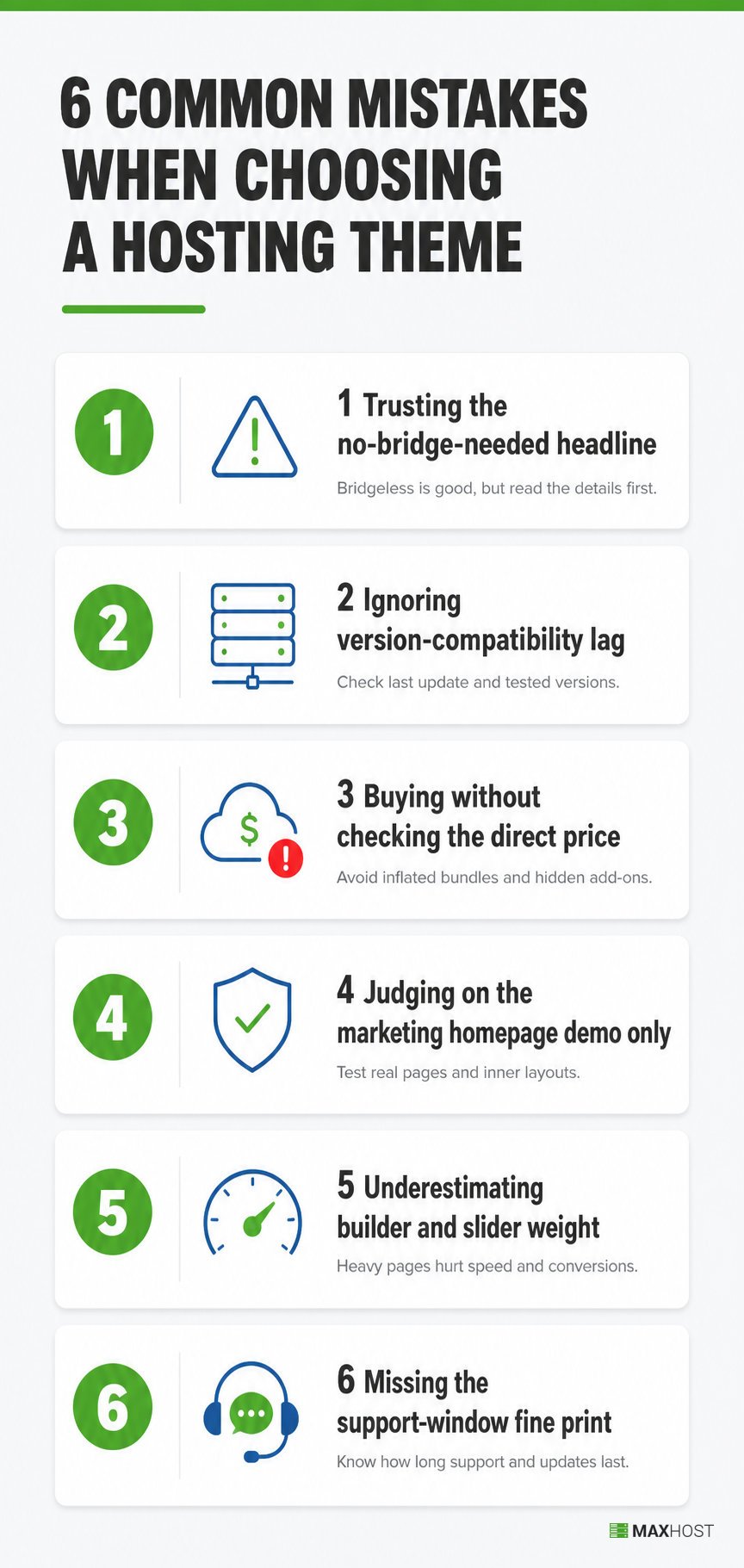
- Trusting the "no bridge needed" headline. A bridge-free base template can still route specific features through an optional bridge plugin. Three named Phox buyers had to ask before they learned which features carried a dependency. Confirm the scope in writing before you buy.
- Ignoring version-compatibility lag. Buyers assume the compatibility list is current and skip the changelog. Six named Phox buyers were stranded waiting for WHMCS and PHP support they thought had shipped. Read the last twelve months of the changelog first.
- Buying on the marketplace without checking the direct price. Hostiko sells the same theme for $49 on ThemeForest and $39 on its own store. Check the vendor's site before you check out.
- Judging on the marketing homepage demo only. The client area is where billing breaks. One Hostiko buyer hit a cart that would not fill, a failure invisible on the homepage demo. Always open the WHMCS demo and test the cart.
- Underestimating builder and slider weight. This category ships heavy, and buyers who skip a PageSpeed check inherit a slow site. Run the demo URL through PageSpeed before committing.
- Missing the support-window fine print. Marketplace support is time-boxed, and the portal can lock you out when it lapses. Two named Phox buyers were surprised by exactly that. Know the window and the renewal cost up front.
How to Evaluate a WordPress Hosting Theme: A Step-by-Step Process
Evaluating a hosting theme takes a few focused hours, not weeks. The process below reflects this category's real risk points: the WHMCS connection, version currency, and the client-area experience. Work through it in order.
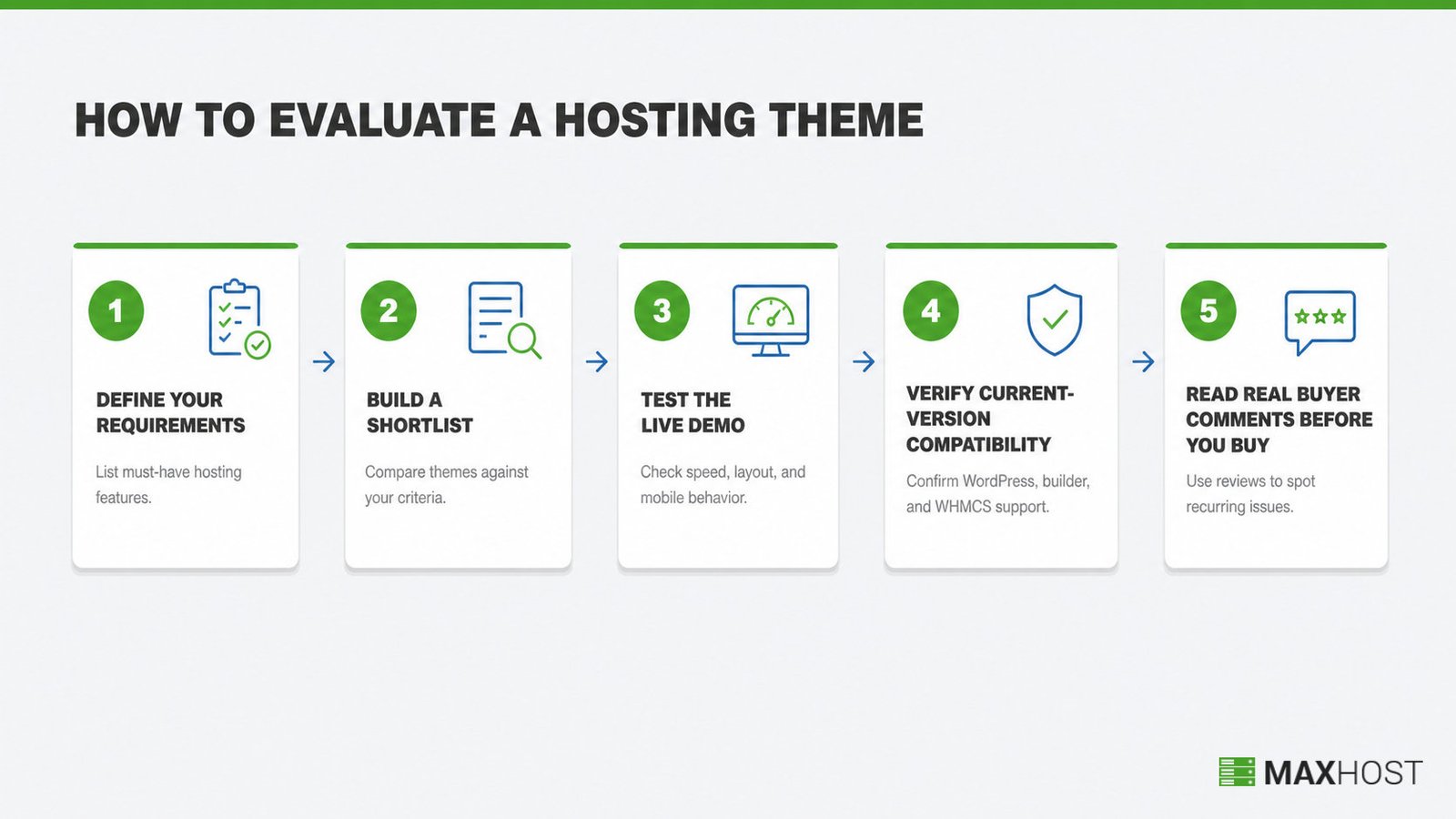
Step 1: Define Your Requirements
List your hosting types: shared, VPS, dedicated, cloud, or reseller. Then note your current WHMCS version, preferred builder, budget, and resale plans. This defines your shortlist filters and takes about thirty minutes.
Step 2: Build a Shortlist
Start from a ranked comparison, then filter by WHMCS integration method and current-version compatibility. Drop any theme whose compatibility list trails the current WHMCS major. Aim for three to five candidates.
Step 3: Test the Live Demo
Open both the marketing demo and the WHMCS client-area demo. Run the demo URL through PageSpeed Insights on mobile, and test the cart, domain search, and a pricing table. This is where thin hosting themes reveal themselves.
Step 4: Verify Current-Version Compatibility
Read the last twelve months of the changelog. Confirm the theme supports your WHMCS, WordPress, WooCommerce, and PHP majors today, not in a promised future update. This step alone screens out the category's most common regret.
Step 5: Read Real Buyer Comments Before You Buy
Scan the most recent marketplace comments for three patterns: version-lag complaints, bridge-dependency confusion, and support-window lockouts. Recent, repeated complaints of the same kind are the clearest warning a demo will never show.
Use this decision checklist before you check out:
- The entire WHMCS client area is bundled-template based, with any bridge dependency disclosed in writing.
- The compatibility list names your current WHMCS and PHP majors, confirmed against the changelog.
- The live demo scores acceptably on mobile PageSpeed, and the cart works in the client-area demo.
- Your team's builder is genuinely supported, and pricing tables are editable without code.
- The last update is recent and the release history is long and unbroken.
- You have compared the marketplace price against the vendor's direct store.
- You know the support window length and its renewal cost.
How MaxHost Maps to This Framework (a Worked Example)
MaxHost is our own theme, so treat this as a transparent worked example, not a neutral verdict. We score every theme, including this one, on the same seven dimensions above, and we say where it loses. See How We Review WordPress Hosting Themes for the full method. Against the criteria here, MaxHost is strong on WHMCS integration and maintenance, mid on raw performance, and priced for a bootstrapped buyer.
WHMCS Integration
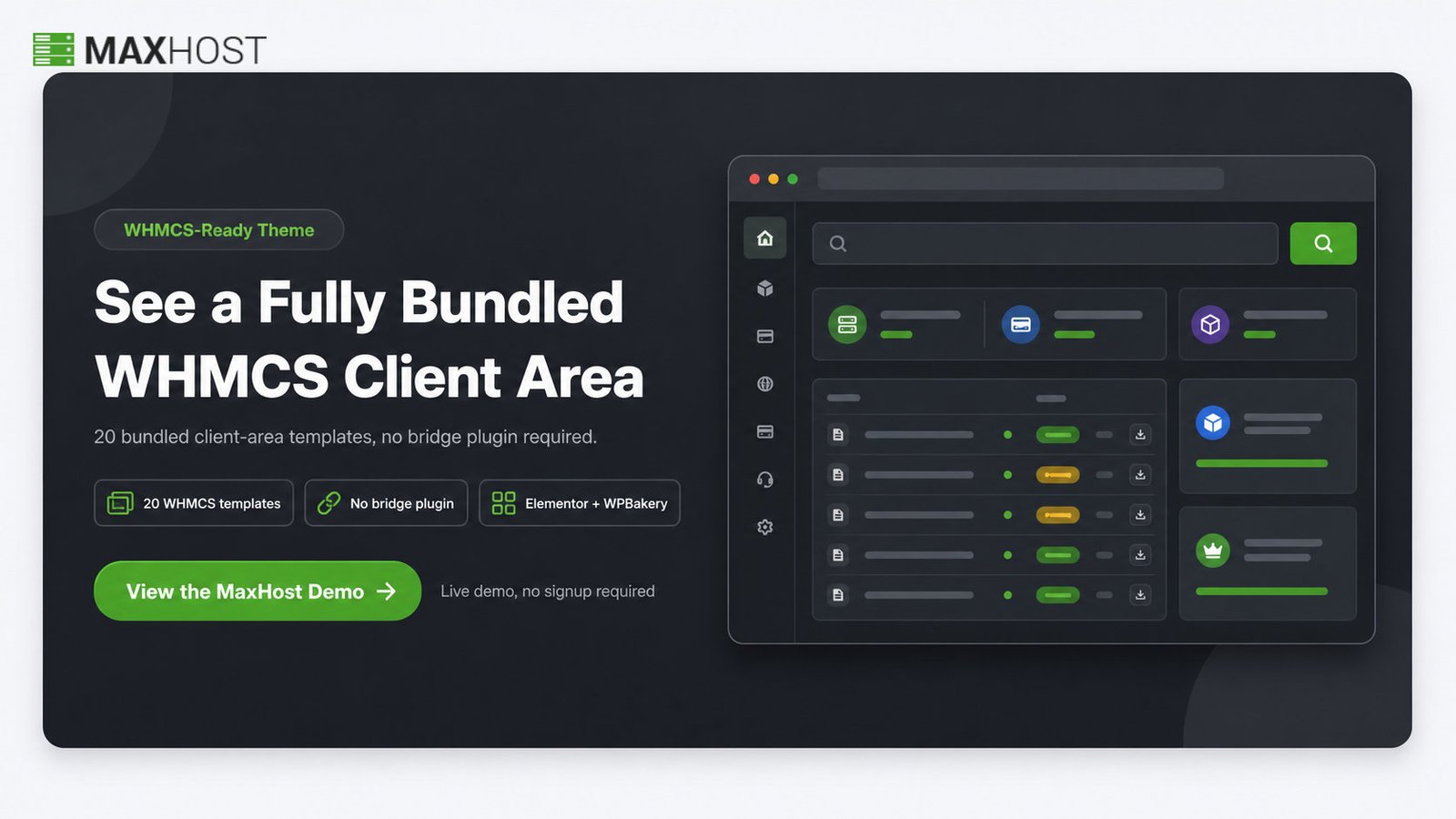
MaxHost ships 20 bundled WHMCS client-area layouts with no bridge plugin required, and supports WHMCS 8.0.x through 9.0.x. The WHMCS criterion above told you to look for a fully bundled client area with no partial bridge dependency. MaxHost's approach fits that signal. The mechanics are detailed on the MaxHost WHMCS integration page.
Maintenance and Compatibility
MaxHost was released in 2016 and last updated in April 2026, tracking WordPress 6.9.x, WooCommerce 10.7.x, and WHMCS 9.0.x. That answers the changelog-currency signal from the maintenance criterion. A near-decade unbroken history is a real longevity signal in a category littered with abandoned themes.
Page Building
MaxHost supports Elementor and WPBakery with one-click demo import, so a non-developer can edit plans in either builder. That satisfies the dual-builder signal from the page-building criterion, rather than locking you into one editor.
Performance and Pricing
Here MaxHost concedes the framework honestly. It is builder-heavy and slider-heavy by default, and its own documentation coaches trimming sliders, caching, and compressing images for speed. On the out-of-the-box performance criterion, it is not the lightest option and needs that discipline to run fast. It is the theme's weakest dimension. Pricing is $49 for the regular one-time license, $2,950 for the extended, with six months of support included. MaxHost is not the automatic answer, and it is worth weighing against MaxHost alternatives using the same seven criteria.
View the MaxHost demo and run it through the evaluation process above, especially the client-area and PageSpeed checks.
FAQs
What's the most important thing to look for in a WordPress hosting theme?
WHMCS integration method. A theme with fully bundled WHMCS client-area templates and no bridge-plugin dependency gives you a unified billing experience that survives updates. It is the highest-weight criterion, because a broken billing connection costs signups, not just polish.
What's the difference between a WHMCS bridge plugin and a bundled WHMCS template?
A bundled template installs directly into WHMCS and skins the client area to match your site, with no extra moving parts. A bridge plugin mirrors WHMCS pages inside WordPress, adding a component that can break on updates. Bundled is more reliable. For WHMCS-first picks, see the best WHMCS WordPress themes.
How much does a WordPress hosting theme cost?
Most cost $29 to $99 as a one-time regular license on ThemeForest, with lifetime updates and no subscription. The premium WHMCS-ready options cluster around $49 to $59. Extended licenses, for reselling the theme inside a charged product, range from roughly $1,600 to $2,950. Support is usually a time-boxed six-month window with paid renewal.
Is a hosting theme better than a custom build?
For most bootstrapped resellers, yes. A theme launches a WHMCS-ready site in hours for under $60, while a custom build costs far more and still needs maintenance. Custom work only pays off with deep, non-standard WHMCS logic. See WordPress hosting theme vs custom website for the full trade-off.
How long does it take to evaluate and set up a hosting theme?
Evaluation takes a few focused hours: define requirements, shortlist, test both demos, check the changelog, and read recent comments. Setup is faster than most buyers expect, often a few hours with one-click demo import, plus time to install and match the WHMCS templates.
Should I choose a lightweight theme or a feature-rich one?
Lean lightweight when you can. A minimal, fast theme protects Core Web Vitals and keeps you portable, so switching later is painless. Feature-rich, builder-heavy themes are fine if you commit to caching and trimming heavy effects to stay fast.
Elementor, WPBakery, or Gutenberg: which page builder should I use?
Use whichever your team already knows, since you will maintain the site in it for years. A theme that supports two builders keeps that choice open. If you have no preference, Elementor has the largest ecosystem, while Gutenberg is the lightest.
Do I need WooCommerce if I'm already using WHMCS for billing?
No, not for hosting billing. WHMCS handles hosting plans, domains, invoicing, and the client area. WooCommerce is optional, and only worth adding if you also sell add-ons, merchandise, or one-off services alongside your hosting plans.
Is MaxHost a good WordPress hosting theme?
MaxHost is a strong general fit for bootstrapped resellers by the criteria here. It offers bundled WHMCS templates with no bridge, a decade of current maintenance, and dual-builder editing. Its honest weak point is out-of-the-box performance, since a builder-heavy stack needs discipline to run fast.