A ready WordPress hosting theme and a custom-built hosting website both get you a public site with a matching billing area. But they suit very different budgets and timelines. A theme is buy-and-configure. A custom build is commission-and-wait. For most bootstrapped resellers, a $49 theme launches in days; a custom build starts around $1,500 and climbs from there.
This guide covers what a custom build genuinely does well and where it starts to break down. It also compares the two approaches on cost, speed, WHMCS effort, maintenance, and uniqueness. Finally, it covers exactly when each one is the right call.
Disclosure: This comparison was written by the MaxHost team. We make a WordPress hosting theme and appear in the verdict as the recommended option for most hosting businesses. We wrote this page to help you decide honestly. It notes when a custom build is the better call.
What's the Difference Between a Ready Hosting Theme and a Custom-Built Site?
The difference is not quality, it is intent and ownership. A ready hosting theme is a pre-designed WordPress site plus billing templates that you install, import, and adjust yourself. A custom build is a site a developer designs and codes from scratch to your exact spec. One is a product you configure; the other is a project you commission.
A ready theme suits a hosting reseller or agency that needs a professional site and a WHMCS-matched client area fast, without hiring anyone. A custom build suits a business with unusual requirements, a real budget, and time to wait for bespoke work. Neither is universally better. The right choice depends on your budget, timeline, and how unusual your billing workflow is.
What Is a Custom-Built Hosting Website, and When Does It Work Well?
A custom-built hosting website is a site a freelance developer or agency designs and builds specifically for your hosting brand. It usually pairs a hand-coded WordPress front end with hand-styled WHMCS billing. It works well when your requirements are genuinely unusual and when your budget comfortably clears five figures. It also works well when you already have or can retain a developer to maintain it.
Most people who need any hosting-company site at all are resellers, domain sellers, or corporate IT firms. If that describes you, a custom build is one valid route, and so is a dedicated WordPress theme for a web hosting company. The custom route earns its cost only under specific conditions, which the sections below name precisely.
Genuine Strengths of a Custom Build
A custom build has real advantages that no template can fully match. Here is what it does genuinely well.
- Complete design uniqueness. Your site looks like nothing else in the market, which matters when brand differentiation is a competitive lever.
- Bespoke workflow support. A developer can code a non-standard provisioning flow, an unusual upgrade path, or a custom reseller onboarding sequence that no theme anticipates.
- Full source-code ownership. You own the codebase outright, typically transferred on final payment, with no dependency on a marketplace author staying active.
- A potentially leaner build. A disciplined developer can ship only the code the site needs, avoiding the plugin and slider weight that page-builder themes tend to carry.
Where a Custom Build Wins: Specific Scenarios
A custom build is the right answer in a handful of concrete situations. These are the scenarios where it genuinely pays off.
- You need deeply customized WHMCS cart or client-area logic beyond skinning, such as conditional pricing rules or a bespoke order flow.
- You run a multi-brand hosting operation and need pixel-perfect, non-templated visual separation across every brand.
- Your budget already exceeds $10,000 and you have an in-house or retained developer on staff to build and maintain it.
- Your provisioning or automation workflow is non-standard enough that no theme, MaxHost or any rival, covers it out of the box.
The Limitations of a Custom Build: Where It Starts to Break Down
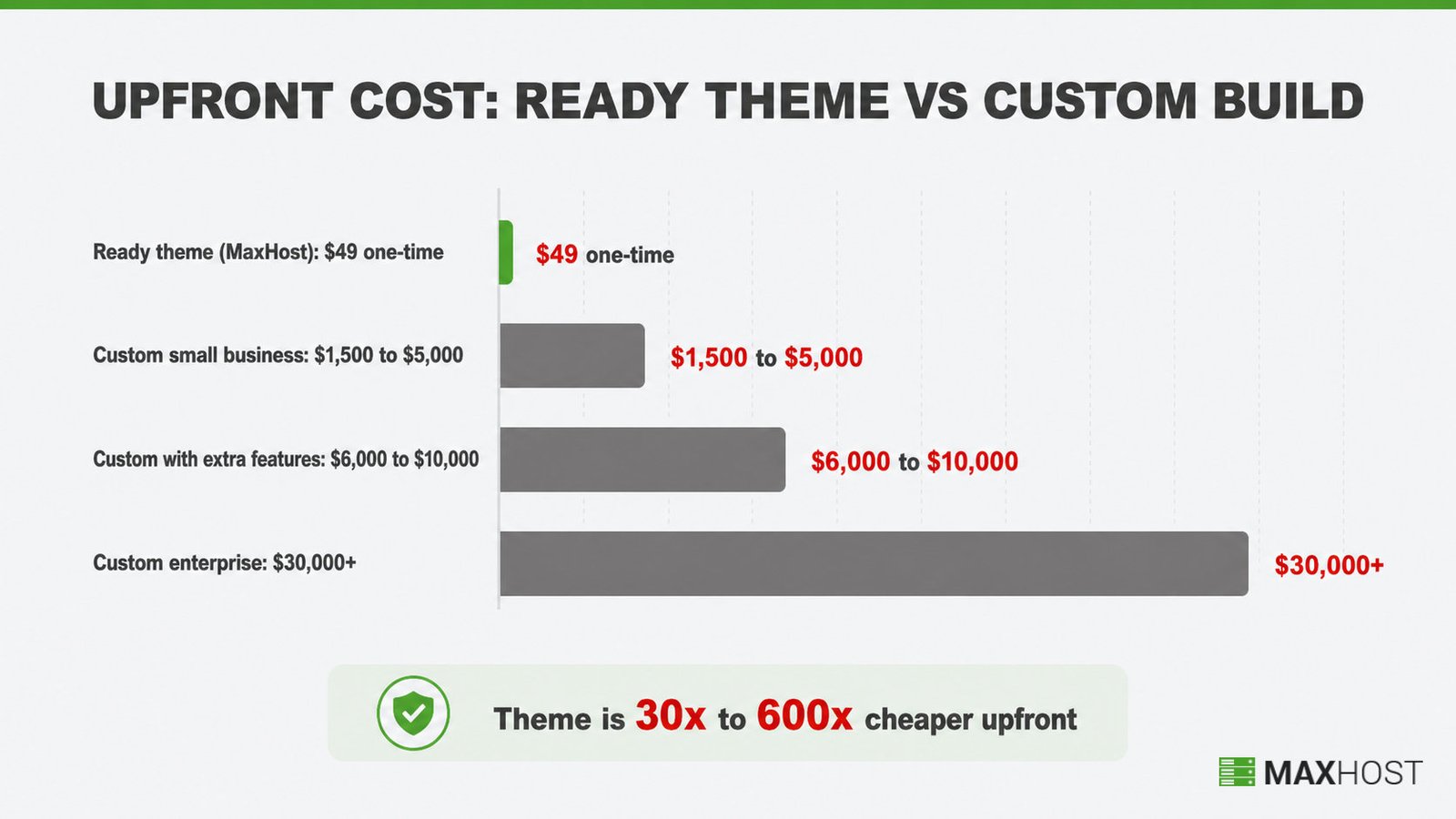
A custom build stops making sense when the numbers outrun a bootstrapped budget. A small-business custom WordPress site runs $1,500 to $5,000. It rises to $6,000 to $10,000 once companion plugins and extra features enter the scope, per SeedProd's 2026 cost breakdown. Anything complex or enterprise-level exceeds $30,000.
Timelines break down too. A developer build takes 4 to 8 weeks for a small site and 3 to 6 months for a complex one. For a reseller who just bought a VPS package and needs a public site this week, that wait is the real cost. It is not just the invoice.
How a Ready Hosting Theme and a Custom Build Compare
Here is the head-to-head across the six dimensions that actually decide this, with MaxHost standing in as the ready-theme example. Each row shows a specific figure, not a vague label, so you can weigh your own situation against real numbers.
| Dimension | Ready Hosting Theme (MaxHost) | Custom-Built Site | Winner / Notes |
|---|---|---|---|
| Upfront cost | $49 one-time (regular license) | $1,500 to $30,000+ | Theme, by 30x to 600x |
| Time to launch | Hours to a few days | 4 to 8 weeks (small) to 3 to 6 months (complex) | Theme, decisively |
| WHMCS integration | Bundled no-bridge templates, 20 layouts | Hand-styled per project | Theme for standard billing; custom for bespoke logic |
| Design uniqueness | Configurable within the theme framework | Fully bespoke, one of a kind | Custom |
| Maintenance and updates | Vendor ships updates (2016 to 2026) | You or your developer owns every update | Theme for cadence; custom for control |
| Ownership | Licensed asset, shared design | Full source-code ownership | Custom for pure IP |
Pricing verified July 2026. Check the current theme license on the MaxHost pricing page and current developer rates before you commit.
Cost: Which Is Cheaper, a Theme or a Custom Build?
A ready theme is cheaper by a wide margin for nearly every hosting business. A regular theme license is $49 one-time. A custom developer build starts at $1,500 and reaches $30,000+ for complex work. Custom only makes financial sense when its bespoke output is worth thousands more to you than a configured template.
Custom Build Cost
A custom build carries both a large upfront cost and a recurring one. The developer fee runs $1,500 to $5,000 for a small business site, $6,000 to $10,000 with extra features, and $30,000+ for enterprise scope. Freelancers charge $50 to $100 per hour, boutique agencies $100 to $200, and enterprise agencies $150 to $300+.
The hidden cost is ongoing. A custom build does not include maintenance, so outsourced upkeep runs $50 to $200 per month. Every future change also routes back through a paid developer.
Ready Theme Cost
A ready theme is a single low payment with no recurring fee. MaxHost's regular license is $49 one-time and bundles roughly $200 of premium plugins, including Slider Revolution and WPBakery. Support runs six months, extendable to twelve for $13.88, and version updates are free for life. Full details sit on the MaxHost pricing page.
There is one exception. If you resell the site itself as a product or SaaS, the extended license is $2,950, which still undercuts most custom builds.
Cost Verdict
The theme wins on cost for the vast majority of bootstrapped resellers. The gap is 30x to 600x upfront, before counting the custom build's ongoing maintenance retainer. Custom wins on cost only when your budget already exceeds $10,000 and the bespoke logic you need has genuine revenue value.
Time to Launch: How Long Does Each Approach Take?
A ready theme launches in hours to a few days; a custom build takes weeks to months. That gap is the single biggest practical difference for a reseller who needs to be live now. Speed is where the theme's advantage is least arguable.
Custom Build Timeline
A developer build runs 4 to 8 weeks for a small hosting site and 3 to 6 months for anything complex. Scope changes mid-project stretch that further. During those weeks you have no public site, which delays every signup the business could have taken.
Ready Theme Timeline
MaxHost's marketing claims you can launch within an hour, and the honest realistic range is a few hours to a few days. You buy the theme, install it, one-click import a hosting demo, import a WHMCS template, then customize your copy. Our own guide to making a web hosting website walks the full path.
Verdict
The theme wins decisively on speed. A custom build is only competitive on time when the business can genuinely wait months to launch, which few bootstrapped resellers can.
Flexibility and Control: Who Wins?
This is the closest to a real tie. A custom build gives you total design and functional control with no template constraints. A ready theme gives you strong flexibility inside a builder framework. It also offers something custom builds lack: a non-technical owner can self-manage day-to-day edits without calling a developer.
Custom Build
A custom build has no ceiling on design or function, since nothing is templated. The tradeoff is dependency. Every future change, however small, routes back through the developer who built it, or a new one who first has to learn the old code.
Ready Theme
A ready theme is flexible within its builder. MaxHost ships both Elementor and WPBakery, so you are not locked to one builder like most single-builder rivals. As one developer put it in a community thread, WordPress lets clients manage their own sites, which a custom build rarely allows.
Verdict
Custom wins for truly bespoke needs that a builder cannot express. The theme wins for a business that wants to self-manage without ongoing developer dependency, which covers most hosting resellers.
SEO: Does a Custom Build Really Rank Better?
A custom build offers a marginally higher SEO ceiling, but it rarely decides rankings for a hosting site. Custom code allows deeper technical control over schema and markup. In practice, content and links move rankings far more than template-versus-custom markup does.
Custom Build
A custom build genuinely offers more technical-SEO headroom. One developer in an r/Wordpress thread argued that custom code gives 100% control over SEO tweaks that ready themes do not. That control is real, though most hosting sites never reach the point where it is the binding constraint.
Ready Theme
A ready theme ships SEO-optimized markup out of the box. MaxHost's markup is clean and standards-based, and its template ceiling is lower than fully custom code. For a hosting marketing site, template SEO is rarely the limiting factor versus the content and backlinks you build.
Verdict
The custom build's SEO edge is real but marginal for most hosting sites. It only matters at a scale where technical SEO is genuinely the bottleneck, which is rare before a hosting business has real revenue.
Maintenance and Updates: Who's Responsible Long-Term?
A ready theme moves update responsibility to the vendor; a custom build leaves it entirely with you. This is a quiet but expensive difference over the years you own the site. Neither model is risk-free, but the risks are different.
Custom Build
With a custom build, the original developer or whoever inherits the code owns every update. There is no external update stream, so nothing forces the site to stay current with new WordPress, WooCommerce, or WHMCS releases. A disciplined build can be leaner, but it can also quietly fall behind once the developer moves on.
Ready Theme
A ready theme carries a vendor update stream. MaxHost has shipped updates from 2016 through 2026, tracking current WHMCS 9.0.x, WordPress 6.9.x, and WooCommerce 10.7.x releases. The honest caveat is that support is time-boxed to six months, so long-term update dependence rests on the vendor staying active, not a guaranteed SLA.
That stream carries a tradeoff worth naming. Themes need frequent core, plugin, and theme updates, and a widely used theme is a larger target for automated attacks. The upside is that those fixes ship to you, instead of waiting on a developer you have to call.
Verdict
The theme wins on update cadence across most of your ownership window, given the decade-long track record. The custom build's risk is concentrated in developer availability rather than code going stale.
Ownership: What Do You Actually Own?
A custom build gives you outright ownership of unique code; a ready theme gives you a license to a shared design. If owning the design as a unique asset matters to your business, that is the custom build's clearest win. For most resellers, it is not the deciding factor.
Custom Build
A custom build transfers full intellectual-property ownership of the codebase, typically on final payment. The result is a genuinely unique asset that no competitor holds. That ownership is worth most when the design itself is part of your competitive edge.
Ready Theme
A ready theme is a licensed asset, not unique IP. The $49 regular license covers a single non-charged end product, and the $2,950 extended license covers resale or SaaS use. Every other buyer of the same tier uses the same underlying design, adjusted to their brand.
Verdict
Custom wins on pure ownership and uniqueness. The theme wins on total value per dollar for any business that does not need to resell the design itself as intellectual property.
When to Choose a Custom Build
Choose a custom build when your requirements genuinely exceed what a template can express and your budget can absorb the cost. These are the specific conditions where custom is the right call, not a vague "if you are a big company".
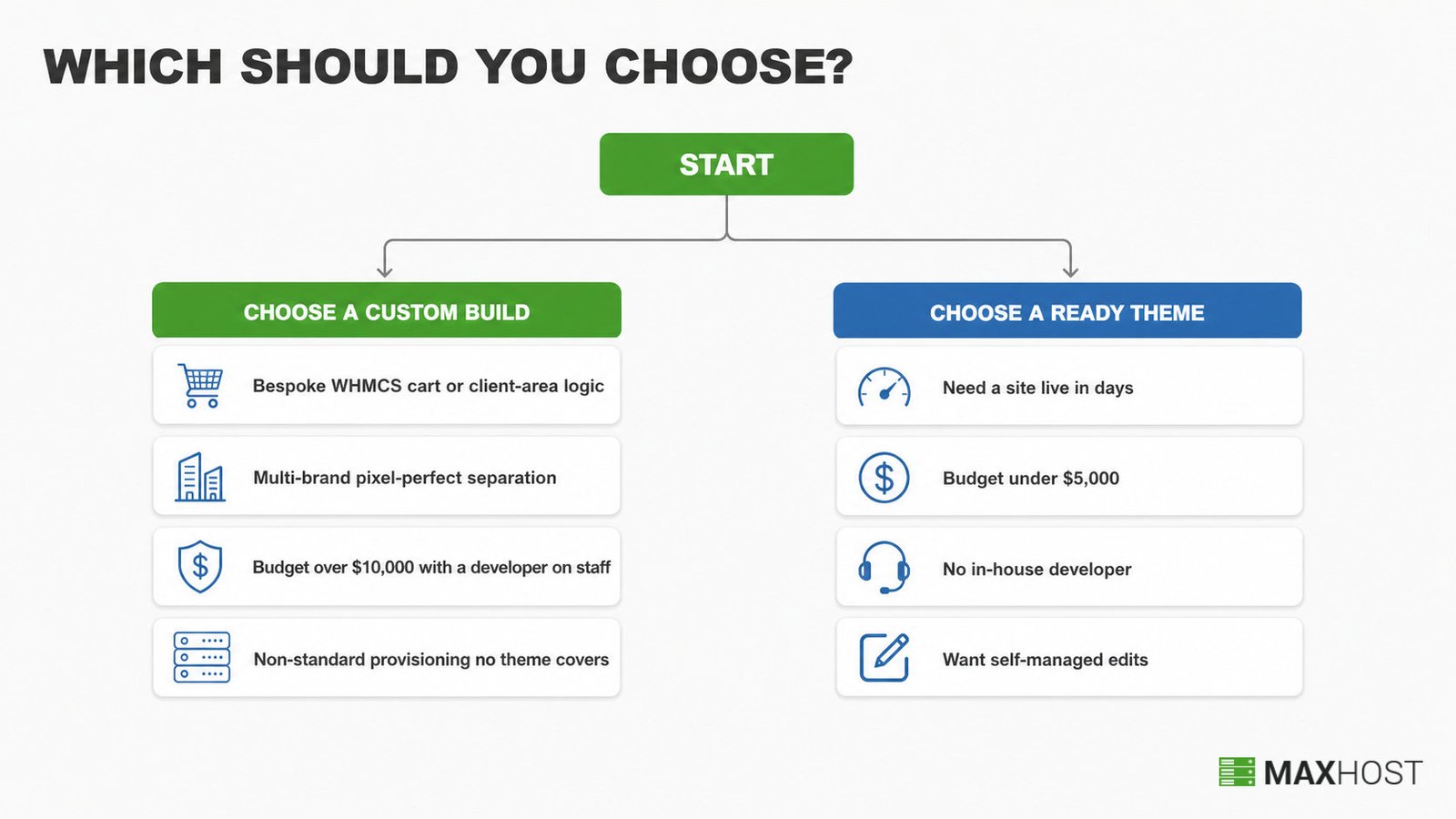
- You need deeply customized WHMCS cart or client-area logic beyond visual skinning, such as conditional pricing or a bespoke order flow.
- You run a multi-brand hosting operation and need pixel-perfect, non-templated differentiation across every brand.
- Your budget genuinely exceeds $10,000 and an in-house or retained developer is already on staff.
- Your provisioning or automation workflow is non-standard enough that no theme covers it out of the box.
If none of these describe your business, the next section covers the signals that a ready theme is the smarter call.
Signs a Ready Theme Like MaxHost Is the Right Call
A ready theme is the right call when you need to launch a professional, billing-matched hosting site fast and cannot justify a five-figure custom project. Most bootstrapped resellers and agencies fit this profile exactly. Here are the clearest signals.
- You just bought a VPS or reseller package and need a public site within days, not months.
- Your budget is under roughly $5,000, which a custom build's low end already exceeds.
- You have no in-house developer and no wish to manage one.
- You need a WHMCS client area that visually matches your site without custom billing work, which MaxHost's WHMCS integration delivers through bundled no-bridge templates.
- You want to self-manage day-to-day edits through a builder rather than pay for every change.
If those signals fit, our checklist on how to choose a WordPress hosting theme helps you compare options before you buy.
Switching Directions: Moving Between a Custom Build and a Theme
Moving from a custom build to a ready theme is straightforward for content and painful for bespoke functionality. Your words and domain come with you; your custom code does not. Moving the other way, from theme to custom, is a fresh project, not a migration. Here is what each direction actually involves.
What Transfers When You Move to a Theme
Your copy, images, and domain transfer cleanly when you move to a theme. Your custom design and any bespoke functionality do not; those were built for the old codebase and have to be rebuilt inside the theme. Plan to recreate anything unusual rather than port it over.
How Long Setup Actually Takes
Setup takes hours to a few days in practice. You buy MaxHost on ThemeForest, install the theme, one-click import a hosting demo, import a WHMCS template into WHMCS, then customize in Elementor or WPBakery. The "within an hour" claim is achievable for a bare demo, but a realistic, content-complete launch spans a few hours to a few days.
When to Bring In a Developer Instead
Bring in a developer when you hit the conditions in the "When to Choose a Custom Build" section above. A theme is a starting point, not a ceiling. A common middle path is to start on the theme and hire a developer later to extend it. That beats building fully custom from zero.
Verdict: Is a WordPress Hosting Theme or a Custom Build Right for Your Business?
Choose a custom build if you need bespoke WHMCS logic, multi-brand visual separation, or unusual provisioning. You also need a five-figure budget with a developer on staff. In that narrow case, the uniqueness and control are worth the cost and the wait.
Choose a ready theme if you are a bootstrapped reseller or agency that needs a professional, billing-matched site fast and affordably. That describes most hosting businesses, and it is where MaxHost fits. Its one clearest differentiator is bundled no-bridge WHMCS templating. It skins your billing to match your marketing site with no bridge plugin and no custom WHMCS work. It's backed by a 2016 to 2026 update record, a 4.69 out of 5 rating across 48 reviews, and roughly 1,250 sales. It launches in days for a one-time $49.
If you have decided on a theme, compare your options first. See our roundups of the best WordPress hosting themes and the best WHMCS WordPress theme picks. Also check the best reseller hosting WordPress themes and the best free WordPress hosting theme options before you commit.
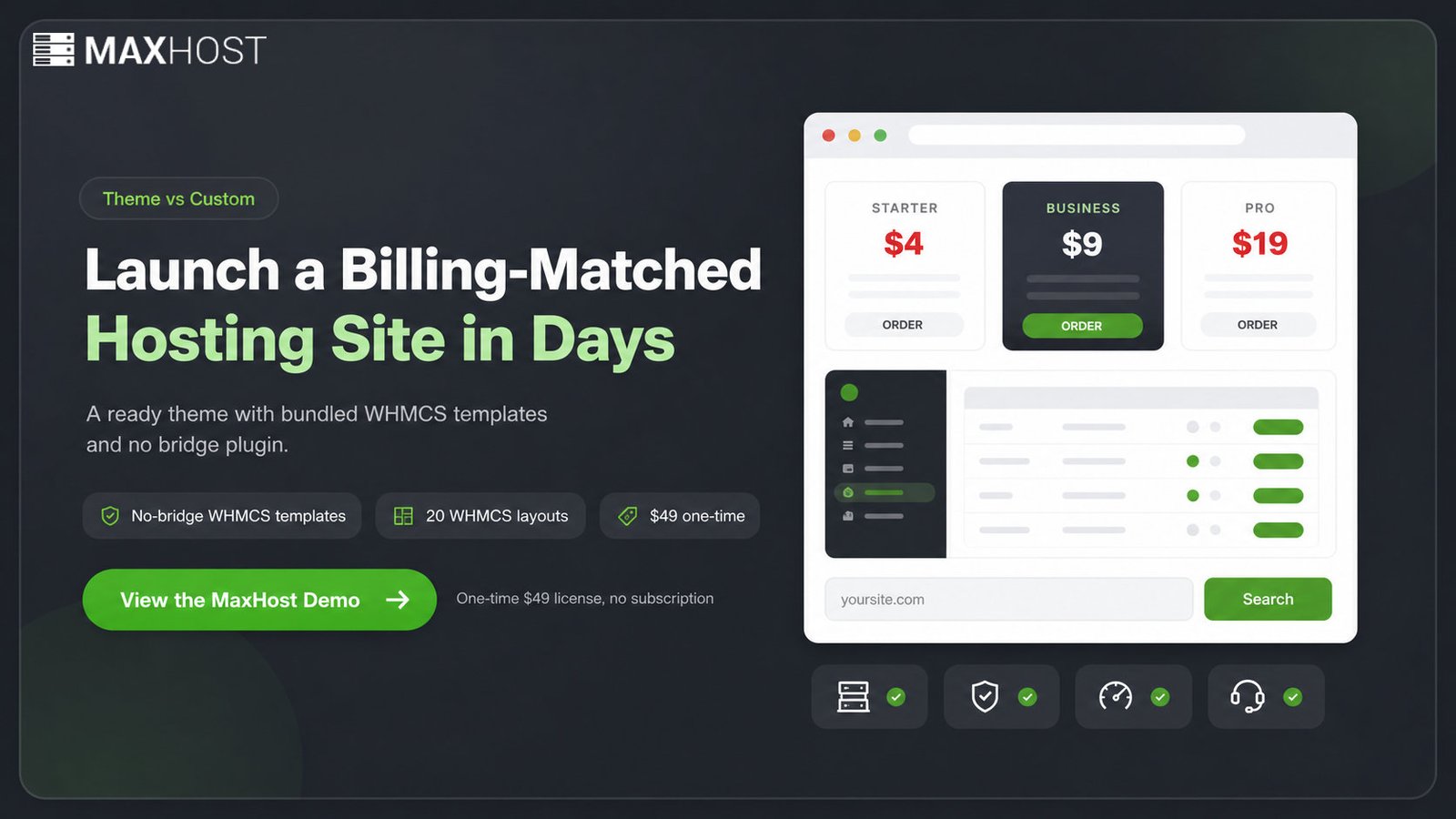
Ready to see it in action? View the MaxHost demo and judge the hosting layouts and WHMCS client area for yourself.
FAQs
Can I use a WordPress theme instead of hiring a developer for my hosting site?
Yes, for the vast majority of bootstrapped resellers. A theme like MaxHost gives you a professional site and a matching WHMCS client area without a developer. The exception is deep custom WHMCS cart or client-area logic beyond skinning, which still needs custom development.
Is a custom-built website really better for SEO than a theme?
Only marginally, and rarely enough to decide anything. A custom build offers more technical-SEO control over schema and markup. For a hosting marketing site, content and backlinks drive rankings far more than whether the markup is templated or hand-coded.
How much does a custom WordPress hosting website cost compared to a theme?
A custom build runs $1,500 to $5,000 for a small site and $6,000 to $10,000 with extra features. Complex work runs $30,000+, per SeedProd's 2026 data. A ready theme like MaxHost is $49 one-time, roughly 30x to 600x cheaper upfront.
How long does a custom hosting website take to build versus using a theme?
A custom build takes 4 to 8 weeks for a small site and 3 to 6 months for a complex one. A ready theme launches in hours to a few days once you import a demo, import a WHMCS template, and customize your content.
Can I switch from a custom-built site to a theme like MaxHost later?
Yes, but only partly. Your content, images, and domain transfer cleanly. Your custom design and any bespoke functionality do not, since they were coded for the old build and have to be rebuilt inside the theme.
Does MaxHost support adding custom development on top of it?
Yes. A theme is a starting point, not a ceiling. A developer can extend MaxHost with custom work later, which is faster and cheaper than building fully custom from zero. Many businesses start on the theme and add bespoke development only when they outgrow the templates.