Note: When you want to make a page like Homepage, you need to know how to use the ‘Post Block’ elements..

There are many options available, which will help you to make an interactive website using Pantograph WordPress theme. You can see the option fields for each post block when you edit/add a post block in your page..
Helpline : You can see the post block layout beside each post block name. The common option fields for each blocks are explained here:
- Heading : Heading means a post block Headline. You can use or not. If you don’t need Headline keet it blank and save the post blcok.
- Select Category : You can choose a category for showing posts in this post block.
- Do you want Image Animate? : We can see this effect when mouse hover on the image. If you want click on Yes or don’t need to make change.
- Do you want Border? : Border can help you to make box style post block. If you want to make box style then click on Yes checkbox.
- Block Border Color : After clicking on Yes checkbox to make border. Will available border color feature. So if you need to change border color for this post block you can do.
- Block Background Color : After clicking on Yes checkbox to make border. Will available Block Background color feature. So if you need to change Block Background color for this post block you can do. By default it contains white color.
- Do you want Next – Prev button? : This feature only for Block 1 and Block 6 which is use to make pagination. If you want you can choose Yes to make Next-Previous pagination
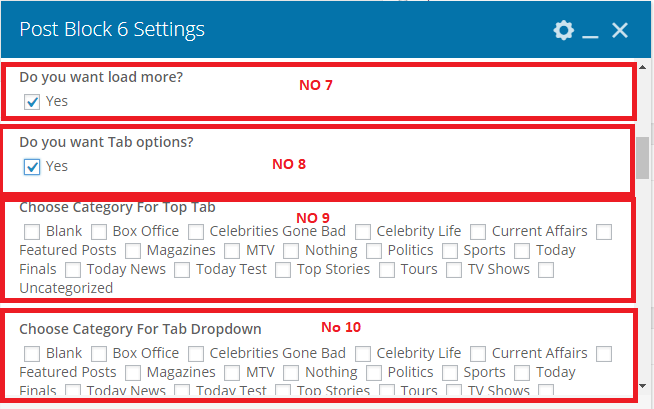
- Do you want Tab options? : This feature only for Block 1 and Block 6 which is use to make tab item post category.
- Choose Category For Top Tab : After clicking on Yes checkbox for Tab options, will available this feature to select Top Tab item for this block post.
- Choose Category For Top Tab Dropdown : After clicking on Yes checkbox for Tab options, will available this feature to select Top Tab Dropdown item for this block post.
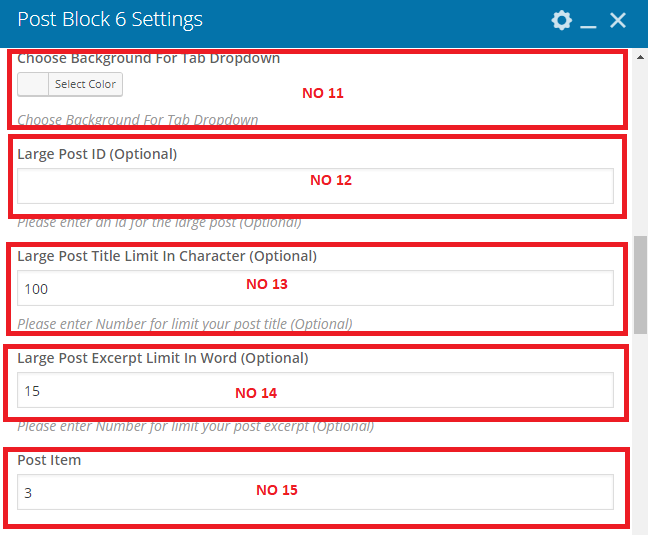
- Choose Background For Tab Dropdown : After clicking on Yes checkbox for Tab options, will available this feature to select Top Tab Dropdown background color. If text color and background color will same then users can see the text. That’s why we can change the background color for dropdown items.
- Large Post ID (Optional) : Most of the post blocks have 1 post as Large. So if you can show a post permanently for this post block you can use a post ID.
- Large Post Title Limit In Character (Optional) : Just Character limit for this large post title
- Large Post Excerpt Limit In Word (Optional) : Description word limit for the large post.
- Post Item : How many post want to show for this post block, You can limit with this.
- Another Posts Title Limit In Character (Optional) : Just Character limit for this post block another post title excerpt large post.
- Another Posts Excerpt Limit In Word : Description word limit for this post block another post title excerpt large post.
- Block color : This option use to change block posts hover color, meta, author link. But you can use individually options for hover, meta and post title. Apply this feature and you can see some of difference on the post block.
- Block Heading Color : Block Heading Color can change by this feature
- Block Heading Background Color : To change Heading Background Color. By deafult Heading Background Color is white. When heading color will use white then it will make a conflict. So if you need to use white heading color you can change heading background color. After that you can see the text. Not only for this reason, you can choose heading background color for your necessity.
- Block Post Title color : Just to change the post title color, By default this color is black.
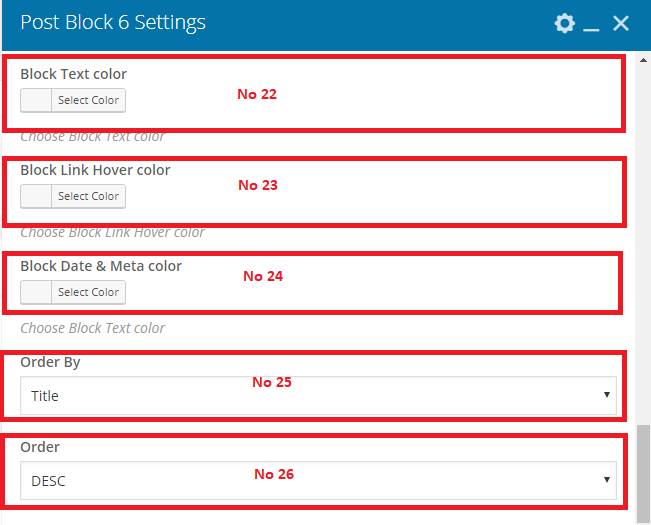
- Block Text color : You can change the block text color if you need.
- Block Link Hover color : You can set Hover Color for all links in this block posts.
- Block Date & Meta color : Available option to change Date and Time color
- Order By : You can set order by options to show the post according this options
- Order : You can set Ascending or Descending order to show the posts